
pdlbgfbmijdmejbmjababcdblgpipgdn
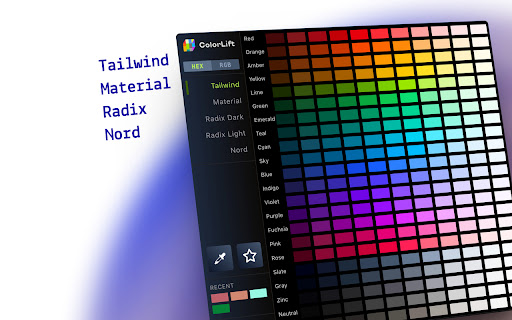


🏆 Color palettes from Tailwind, Material, Radix, Nord and more — in HEX and RGB formats. Access popular design system colours like Material UI, Tailwind, Radix and Nord directly in your browser. Perfect for developers and designers working with Figma, VS Code, or any design tool. **Why You'll Love it** 🔹 Preloaded Presets Access curated palettes from popular systems like Tailwind, Material UI, Radix, and more. 🔹 ColourPicker Tool Pick any colour from your screen, whether it's inside your browser or anywhere on your desktop, with pixel-perfect precision. 🔹 Favourites & Custom Palettes Save colours you love and build your own palettes for future projects. 🔹 Copy in One Click Instantly copy colour values in HEX or RGB formats to your clipboard. 🔹 Drag and Drop Hold + and drag the colour to your VS Code, Figma or anywhere you like. No need to copy to your clipboard. Free, lightweight, and privacy-focused – no account required.

Content Compass AI
Are you a YouTube creator struggling to understand what your audience really thinks and feels? Generic comments and basic analytics don't tell the whole story. Content Compass AI is your essential Chrome Extension to effortlessly decode audience feedback and supercharge your content strategy. Transform Your Feedback Loop with AI: Content Compass AI uses the power of Artificial Intelligence to go beyond surface-level metrics. Understand viewer sentiment, uncover key discussion topics, identify burning questions, and generate targeted feedback surveys – all within your browser. 🧠 AI Comment Analysis: Dive deep into your comment section! Automatically analyze viewer comments for overall sentiment (Positive, Negative, Neutral), identify key themes and topics being discussed, extract viewer questions, and even get AI-generated content ideas inspired directly by your audience. 🤖 AI-Powered Survey Generation: Need specific feedback? Get unique survey questions tailored to your video content with a single click. Save hours compared to manual survey creation! 📝 Seamless Google Forms Integration: Automatically create professional-looking surveys directly in your Google Forms account. No complex setup required. ✂️ Customizable Questions: Easily edit, add, or remove AI-generated survey questions. Choose from various types like multiple-choice, checkboxes, and paragraph answers. 🔗 Easy Sharing Guidance: Copy your survey link instantly and get tips on sharing it effectively in your YouTube video description, cards, end screens, and community posts. 📊 Simple History Tracking: Keep a record of all generated surveys and analyses for your videos right within the extension. Uncover True Sentiment: Understand the feeling behind the comments, not just the words. Identify Key Topics: Instantly know what resonates most with your viewers. Answer Viewer Questions: Easily find and address questions hidden in the comments. Spark Content Ideas: Let your audience's feedback inspire your next hit video. Save Valuable Time: Automate comment analysis and survey creation. Gain Deeper Insights: Combine qualitative comment analysis with targeted survey feedback. Improve Your Videos: Use specific feedback to enhance content quality, clarity, and engagement. Grow Your Channel: Make data-driven decisions for your content strategy. Get Started for Free! 🎁 Start Your FREE 7-Day Trial Today! Install now and get 10 FREE credits to experience the full power of Content Compass AI. Analyze comments or generate a survey for your next video!

Talently - find software developer in a tap
Find trusted remote software engineers and App developers in a click Talently for Chrome transforms job pages and project griefs into instant hiring and sourcing solutions. Open a job description page or copy project info, and get matched with software engineers and app developers. ✔ Minimal effort - Just open any job page or project brief, and the best candidates appear automatically. - No registration and verification hassle. - No time-consuming JDs and project submissions ✔ Precise Matching and Trusted profiles - Proven precision-grade matching algorithm finds the best candidates based on job criteria. - Diligently vetted and curated vetted, high-quality developer profiles you can trust from around Europe and LatAm. ✔ One-Tap Actions - Check developer profile, download a PDF resume, and book a call — all from the same page: - View detailed profiles without leaving the page. - Download PDF resumes and book calls in seconds. - Contact and book a call with an engineer ✔ Privacy-First - No tracking, no injected scripts, and completely ad-free. 1) Open job descriptions on popular platforms or any Google Doc files (TBD) Extract tech skills & key details. 2) Find the best-matching engineers Instant database query based on job criteria. 3) Check profiles & take action Book a call, download resumes, or view profiles online. 1. Immediate Developer Search from Any Webpage. You can start looking for developers and hire developers without having to sign up, verify your ID, or wait around for approvals like you do on a lot of job sites—stuff like passport checks or days-long waits. Say you’re on Indeed, reading a job description, and you highlight the text. Talently pops up in your browser and starts finding matches on the spot, skipping all the hassle of forms and red tape you’d hit on places like Upwork or LinkedIn. 2. Automated Technical Analysis via Algorithms The extension uses algorithms to extract technical details from any text input on a webpage, such as programming languages, frameworks, and tools (e.g., JavaScript, React, Angular). It relies on tech term dictionaries, technology trend data, and keyword recognition to identify project or job requirements for developers. An example: a user inputs a Google Docs project outline mentioning “React and Node.js expertise” while viewing it in their browser, and Talently identifies relevant skills and technologies without manual specification, aiding those looking to hire app developers or other specialists. 3. Candidate Matching from a Vetted Profile Database Talently taps into a list of about 3,000 developer profiles from upstaff.com—profiles with solid project histories, work records, and reviews people have verified. It digs into those profiles and shows you good matches right in a sidebar on the same page you’re on, all in your browser. I heard about a recruiter who was on X Jobs looking to hire developers for an Angular gig, and Talently showed them solid candidates with clear work backgrounds almost instantly, cutting down the time it’d take to search manually. 4. Relevance Scoring and Profile Details When it shows you developer profiles, Talently gives each one a fit rating—like how well they match what you’re after—plus notes on what might be missing, like if they don’t know a certain tech. You can check out full profiles or grab PDF resumes, all from your browser on any page. I know a startup founder who used it to find someone for a React role, saw a 92% match for a candidate, but noticed they were light on Node.js experience, which helped them decide fast. 5. One-Click Connection Option Reach out to developers with just one click—either set up a call or send a message (though the messaging part’s still being worked on). Depending on if they’re free, you might talk to them right away, or someone from upstaff.com might jump in to help set up a chat later. A user told me they were on Wellfound, browsing for a JavaScript developer, and used Talently to schedule a call in minutes, making it simpler to hire developers. 5. Option for Expanded Candidate Search If the first matches aren’t quite right, you can ask Talently to look harder through its network, and it’ll send more options later, all still in your browser. I talked to a tech lead on Reddit Jobs hunting for senior Python developers who used this to get more vetted candidates within a day after their initial list was short, without ever leaving the page they were on. 2.1.25 Updated vocabulary (AI skills) 2.1.2 Updated vocabulary, minor fixes. 2.1.0. Added project brief scan functionality. 2.0.7. Minor configuration and content fixes. 2.0.5. Stabilisation updates 1.9.0. Added Skills X-Ray (Highlight) and Settings page. 1.8.1. Embedded "Book a Call" functionality 1.7.5. Interactive Assistant style and minor bug fixes 1.7.0. "+ Show More" matching talents and New user interaction. 1.6.1. Added support for Reddit and X Jobs. 1.6.0. Contextual "..." menu for job. Scan Text Selection is now available on any page. 1.5.0. Added support for Google Drive files, including PDFs. 1.4.0. Added Google Docs support (job descriptions and project drafts). Added role detection and matching. 1.3.0. Reset job settings function, minor fixes 1.2.0. Revised candidate matching and display algorithm 1.1.0. Preview found skills (required and nice to have) 1.0.1. Initial build. * Added side panel component * Job description parser: text summarise, tech skills finder. * Matching Experts: relevancy, missing skills * Engineer profiles: Preview, Complete profile, resume in PDF) ☆ How Talently changes the recruitment and hiring landscape ☆ Alternative to traditional freelance, remote hiring platforms. Talently was designed as an alternative to legacy project-based or dedicated (full-time) hiring and matching platforms like Toptal, Upwork, and Fiverr, with a few important ideas in mind. - Save time and budget on the job posting - Automate talent matching process - Eliminate service and transactional fees - Provide support at every step from project discovery to onboarding, supervision and managed delivery. ☆ Upwork Alternative Consider Talently as Upwork Alternative: No registration hassle, no AI bids, only trusted and vetted engineers, managed delivery and talent supervision at zero cost. - Website: https://upstaff.com/hire/ - Twitter / X: https://x.com/UpstaffTeam - LinkedIn: https://www.linkedin.com/company/upstaff/ - Free Online Tools: https://upstaff.com/tools/ - Custom Software Development Services: https://upstaff.com/development/ - Hire Chrome Extension Developer: https://upstaff.com/hire/chrome-extension/

SuperMute
Silence the Chaos, Master your Meet 🌌 Introducing SuperMute 🚀 – Your reliable Google Meet companion that ensures your audio and video controls are always within reach, no matter which tab you're on. SuperMute empowers you to mute, unmute, and even end calls with a simple click, without disrupting your workflow. Designed for professionals who value efficiency and peace of mind. Elevate your meeting experience with SuperMute 🔇✨

PromptBar - ChatGPT Prompt Library
Unlock thousands of high-quality prompts with a single click Instantly supercharge ChatGPT with a powerful prompt library — right inside the interface. Save time, unlock new capabilities, and get more value from every ChatGPT session. This extension adds a native-style button directly to ChatGPT, giving you one-click access to a curated collection of high-quality prompts designed for productivity, creativity, learning, and more. 💡 Whether you’re coding, writing, researching, or exploring ideas — the right prompt is just a click away. Why users love this extension: ✨ Seamlessly integrates with the ChatGPT interface — no clutter, no distractions 📚 Unlock a growing library of expertly crafted prompts for dozens of use cases ⚡ Boost productivity, save time, and get inspired with ready-to-use ideas 🔐 No login, no setup, no fluff — just install and use 🧠 New prompts added regularly to keep your workflow fresh and efficient Whether you're a developer, writer, student, or just someone who uses ChatGPT daily, this tool helps you get better answers, faster. Designed to look and feel like a native feature, it keeps your workspace clean while giving you powerful creative leverage. Built to be simple, fast, and beautifully integrated. Forget clunky dashboards or external tools — this extension is designed specifically to blend into ChatGPT’s UI, so it feels like a natural part of the platform. Just click and go. No data collection. No tracking. No ads. This extension is designed for privacy-focused users. We don’t collect personal data, track your conversations, or inject any third-party scripts. It’s just you and your prompts — as it should be. For more detailed info read our ToS and Privacy Policy at https://telegra.ph/Terms-of-Service--Privacy-Policy-05-18
