
pdebmboeclmkhcbldifomfpekphdmlgb
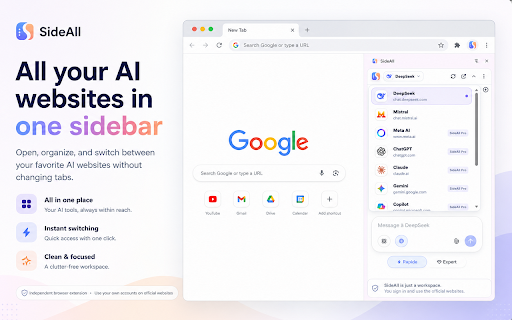


Access your favorite AI chat websites in one sidebar — side-by-side with your work. No tab switching needed. Stop juggling tabs. SideAll puts your favorite AI chat websites right in Chrome's side panel, so you can chat, research, and code — all without leaving your current page. We're in the middle of an AI revolution, but managing dozens of tabs just to chat with different AI models is exhausting. Our answer? Bring the official AI websites you already use directly into your browser's side panel. One click, instant access, right alongside your work. Think of SideAll as the ultimate wingman to your existing AI accounts. It doesn't replace anything — it enhances your workflow: 1️⃣ Side by Side: Pull up any supported AI website on any webpage without toggling between tabs. Multitasking made incredibly easy. 2️⃣ Use Your Own Accounts: No API wrappers or proxy services. Just log into your existing accounts directly through the sidebar and keep your full chat history. 3️⃣ Always Up to Date: Whenever an AI provider releases a new feature (like Canvas, Artifacts, or Voice), you get it instantly because you are on their official website. 4️⃣ Zero Learning Curve: Because SideAll loads the official websites, there's nothing new to learn. ✅ Multi-Provider Support: Access multiple popular AI chat services from one unified sidebar. ✅ Persistent Sessions: Your chat histories, custom instructions, and logged-in sessions remain active — just like they do in a normal browser tab. ✅ Instant Access: Highlight text on any page, right-click, and open SideAll instantly. ✅ Keyboard Shortcuts: Jump between different AI providers using intuitive keyboard shortcuts. ✅ No Middlemen: You interact directly with each AI provider through their official website. ✅ No Logging: SideAll does NOT log your prompts, read your web page content automatically, or collect your browsing history. ✅ Local Storage: Your extension preferences are stored securely on your local device. Why juggle multiple tabs when you can have a Swiss Army knife? SideAll integrates the power of generative AI right into your existing workflow, making your browser a true AI productivity engine. 🚀🚀 Click 'Add to Chrome' and transform how you work today! 🚀🚀 Disclaimer: SideAll is an independent browser productivity utility and is not affiliated with, endorsed by, or sponsored by any AI provider. All product names, logos, and brands are property of their respective owners.

Deepseek AI助手|R1|V3 | 联网
DeepSeek utilizes advanced AI technology to provide users with an intuitive and efficient web content analysis and response tool. Users only need to select text on a webpage, and DeepSeek can invoke powerful AI models to provide in-depth analysis and answers. Usage: 1. Use by selecting web text: Select any text on the webpage, click the DeepSeek icon next to it, and a dialog window will pop up for intelligent responses. 2. Use via shortcut keys: Whether or not you have selected text, you can directly use the shortcut to bring up the dialog window. (Note: Shortcut keys are customizable; users can modify them in the browser's extension management page.) Features: 1. Contextual Text Selection: Highlight any text on a webpage, and a popup window will appear for quick AI-driven responses. 2. API Key Integration: Supports users entering their own API Key to access DeepSeek models. 3. Draggable & Resizable Window: The reply window is draggable and resizable so that users can place it anywhere on their screen as needed. 4. AI Streaming Response: Supports streaming responses from AI models allowing real-time interaction while generating replies. 5. Markdown Rendering: Renders AI replies in Markdown format for easy viewing of formatted content like lists, code blocks, etc. 6. Math Formula Rendering Support using LaTeX syntax for rendering mathematical formulas conveniently viewable as expressions. 7. One-Click Copying: Easily copy AI replies with one click onto your clipboard for quick usage. 8. Re-answer Option: If unsatisfied with an AI reply, easily re-ask questions for new answers. 9. Code Copy Functionality Enhances copying of code snippets functionality 10.Language Switching Feature Allows switching answer language types based on user preference 11.Multi-turn Conversation Supports multi-turn conversation enabling continuous deep interaction without being limited by single queries 12.Shortcut Keys Quickly summon session windows through custom shortcuts Installation Instructions: 1.Visit Chrome Store search DeepSeek extension 2.Click "Add To Chrome" button install 3.After installation Click top-right corner extension icon enter your API key activate custom ai service 4.Select text on webpages then click Deep Seek icon get smart answers

DeepSeek AI
DeepSeek AI Assistant is a free and open-source browser extension tool (unrelated to DeepSeek official). DeepSeek leverages advanced AI technology to provide users with an intuitive and efficient tool for web content analysis and responses. By simply selecting text on a webpage, DeepSeek activates powerful AI models to deliver in-depth analysis and answers. How to Use: 1.Install the DeepSeek AI extension in your browser 2.Click the extension icon in the toolbar 3.Enter your API key 4.Select your preferred response language (force the model to respond in the set language) 5.Enable the Quick Button feature (to decide whether the toolbar appears when selecting text on a webpage) 6.Set your preferred shortcut keys (for quickly opening/closing the AI conversation window) 7.Select text on the webpage to start a conversation with AI! Key Features: 1. Contextual Text Selection:** Highlight any text to trigger a pop-up window for AI-powered responses. 2. API Key Integration:** Input your own API Key to access DeepSeek models. 3. Draggable and Resizable Window: Position and adjust the response window anywhere on your screen. 4. AI Streaming Responses: Receive real-time, incremental replies for seamless interaction. 5. Markdown Rendering: View formatted content (lists, code blocks, etc.) with Markdown support. 6. LaTeX Math Formulas: Render mathematical expressions using LaTeX syntax. 7. One-Click Copy: Instantly copy AI responses to your clipboard. 8. **Regenerate Responses:** Request new answers if unsatisfied with the initial reply. 9. Enhanced Code Copy: Effortlessly copy code snippets. 10. Language Switching:Toggle response languages based on preference. 11. Multi-Turn Conversations:Engage in continuous, in-depth dialogues with AI. 12. Custom Shortcuts: Quickly open the dialogue window via personalized shortcuts. Use Cases: - Obtain deep insights into webpage content. - Enhance academic research and data analysis. - Instantly understand complex information during casual browsing. Installation Guide: 1. Visit the Chrome Web Store and search for the DeepSeek extension. 2. Click "Add to Chrome" to install. 3. After installation, click the extension icon in the top-right corner and enter your API Key to activate personalized AI services. 4. Select text on any webpage and click the DeepSeek icon to start using intelligent responses.

deepseek™ AI Assistant
Enhance your browsing experience with AI capabilities. Transform your browser into a productivity powerhouse with our groundbreaking AI sidebar! The game-changing feature: Add entire website content (as markdown) or screenshots to your workspace with just one click using the Page or Screenshot buttons. Collect content from unlimited tabs or websites, and then chat with all the gathered data—seamlessly and intuitively. ✨ Pro Tip: Hold the ALT key to load not just the page’s Markdown, but also the full HTML or a complete screenshot into DeepSeek for even deeper analysis! Key features: • Collect and chat with content from multiple tabs and websites effortlessly. • One-click buttons to add page content or screenshots instantly. • Advanced AI tools to summarize, analyze, and interact with gathered data. • Intuitive sidebar that works across all tabs without disruption. Experience unparalleled convenience and let the AI do the heavy lifting—your browser has never been this smart!

Qwen
Use Qwen in Chrome. Enjoy Qwen AI for Qwen chat and seamless access to Qwen VL. 🟢 Qwen: Your AI-Powered Chrome Sidebar for Seamless Productivity The Qwen extension revolutionizes the way you interact with by integrating a powerful neural assistant directly into your Chrome browser. Whether you need text generation, translations, coding assistance, or advanced reasoning, this sidebar offers instant access to state-of-the-art AI capabilities without disrupting your workflow. 🚀 Instant Access to AI ➤ This extension ensures that AI tools are just one click away. ➤ Seamless integration allows for uninterrupted browsing and productivity. ➤ Floating Qwen online sidebar adapts to your screen for an optimized experience. With Qwen ai model, users can generate high-quality text, answer complex questions, and even enhance coding efficiency. No need to switch tabs—everything happens inside your browser. From casual discussions to technical problem-solving, the extension provides a reliable driven experience. Whether you're writing emails, drafting reports, or conducting research, Qwen llm guarantees coherent and accurate text outputs. 🧠 Smart Text Generation & Chat 💬 Qwen chat delivers intelligent responses for real-time communication. 💬 Qwen ai chat understands context and adapts to different conversation styles. 💬 Qwen reasoning model ensures structured and logical answers. 🔢 Advanced AI for Math & Coding 🟠 Qwen math assists with solving equations and understanding mathematical concepts. 🟠 Qwen coder is a powerful tool for developers, generating clean and optimized code. 🟠 Qwen 2.5 coder offers AI-enhanced programming support, making coding faster and easier. By integrating AI into your coding workflow, you can debug, optimize, and refactor code effortlessly. With Qwen max, the extension pushes the limits of AI-driven creativity and content generation. These different versions of Qwen model allow users to choose the best fit for their needs. 🌍 Multimodal AI & Vision Capabilities 🖼️ Qwen vl supports image-based analysis and text generation. 🖼️ Qwen vl max enhances multimodal AI performance for superior image processing. 🖼️ Qwen multimodal merges text, vision, and reasoning for more advanced AI interactions. 🏆 Performance & Scalability 1️⃣ Qwen 7b handles complex AI tasks with efficiency and precision. 2️⃣ Qwen 3b delivers mid-range performance for lightweight AI tasks. 3️⃣ Qwen 1.5b and Qwen 1.5 optimize resource usage while ensuring high response quality. 4️⃣ The Qwen 7b qwen model processes large datasets with zero lag. 5️⃣ The Qwen 3b variant integrates seamlessly into daily workflows. 6️⃣ The Qwen 1.5b and Qwen 1.5 versions operate efficiently even on low-resource devices. 🔒 Secure & Reliable Assistance 🔹 Qwen alibaba guarantees enterprise-level security and innovation. 🔹 Qwen assistant helps users automate daily tasks with AI-driven intelligence. 🔹 Qwen plus unlocks premium features for power users and businesses. 🔹 Enterprise-grade encryption ensures that all user interactions remain private and protected. 🔹 Advanced authentication protocols prevent unauthorized access to sensitive data. 🔹 Regular security updates keep the system safeguarded against emerging threats. 🔹 Seamless cloud integration allows for secure data processing without compromising performance. 📥 How to Get Started? 1️⃣ Install Qwen llm chrome from the Web Store. 2️⃣ Click the Qwen online sidebar for instant AI-powered assistance. 3️⃣ Start chatting, coding, and generating text effortlessly! 🎯 Experience the future of powered browsing with this Qwen chrome extension today! With Qwen download, users can instantly access the extension and explore its full potential. The Qwen reasoning model ensures every response is accurate, relevant, and logically structured.
