
pcokpfcijndejcfpekdegpbhieafchab
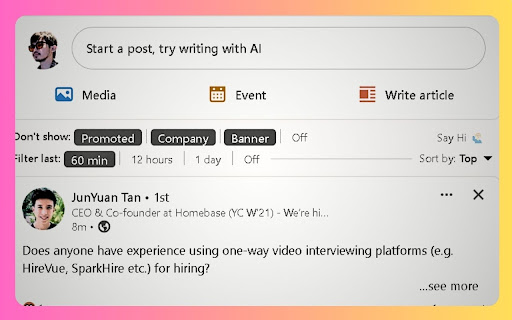
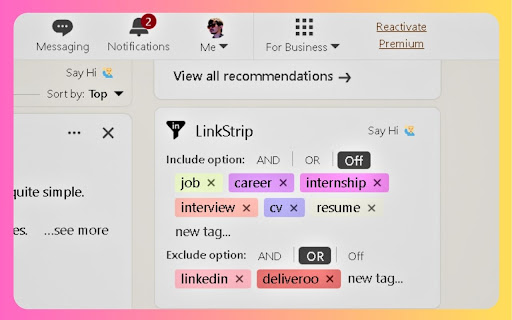
Strip the 💩 from your LinkedIn newsfeed like a pro user with the LinkStrip Chrome Extension. This LinkedIn ad blocker and content optimizer helps you focus on relevant posts and engage with meaningful content. 😎 Intuitive LinkedIn Filter for Streamlined Engagement - Eliminate unwanted LinkedIn ads, promotional posts, LinkedIn banners, and company updates - Customize your LinkedIn feed to display posts from the last 60 minutes, 12 hours, or 1 day 🤩 Advanced LinkedIn Keyword Filter for Targeted Content Discovery - Include or exclude LinkedIn posts containing specific keywords - Use Boolean search operators (OR/AND) for precise LinkedIn content filtering - Organize your LinkedIn feed with a Notion-inspired tag system LinkStrip Chrome extension automatically saves and applies your filters for a seamless browsing experience. Unless you clear the cache - then all tags will be lost.

Feedra
Stop scrolling on LinkedIn and proceed directly to the relevant posts. Feedra is a Chrome extension designed to enhance your LinkedIn experience by filtering posts based on keywords or usernames. It helps you avoid endless scrolling by directing you to the most relevant posts and provides AI-generated summaries for quick insights. ↳ Keyword Filtering: Quickly find relevant posts by filtering your LinkedIn feed using specific keywords. ↳ AI Summaries: Navigate through filtered posts with AI-generated summaries that highlight key takeaways for concise information. ↳ Comment Suggestions: Get suggestions for thoughtful comments, enhancing your engagement. Feedra simplifies your LinkedIn feed, keeping you informed and engaged with essential content.

Cringe Guard: filter out cringe content on your LinkedIn feed using AI
AI-powered Chrome extension that filters cringe, clickbait & low-value posts from your LinkedIn feed in real-time. Tired of scrolling through engagement bait, self-promotional fluff, and off-topic rants on LinkedIn? Cringe Guard is a Chrome extension that puts you in control of your feed by filtering out low-value content using AI, in realtime. Cringe Guard uses AI (LLM of your choice) to analyze LinkedIn posts in real time. It evaluates each post based on predefined indicators of "cringe"—such as excessive self-promotion, clickbait engagement tactics, or irrelevant personal stories—and automatically hides posts that don’t meet your quality standards. Cringe Guard comes with a dedicated settings page where you can customize filtering rules and choose your preferred AI model. It also includes a stats dashboard that tracks the number of posts filtered and the estimated time saved, giving you insights into how much cleaner your feed has become. The extension provides a simple toggle to turn filtering on or off at any time, ensuring that you remain in control of your experience. Privacy is a top priority—your API key never leaves your browser, and all processing happens locally. As an open-source project, Cringe Guard is fully transparent, and its code is available on GitHub. You can verify its implementation, modify it to suit your needs, or even contribute to its development. With seamless LinkedIn integration and real-time filtering, Cringe Guard helps you reclaim your feed and spend your time engaging with high-quality content. Install it today and experience LinkedIn without the noise.

Toby: Linkedin Company Information
See company information without exiting the profile page. On any user profile you can see the summary and details for each company they worked at Save yourself needless clicks and your precious time :)

LinkedIn Feed Hider
Selectively hide LinkedIn feeds (main feed, company pages, profile activity) with customizable settings. Take control of your LinkedIn experience today—stay focused with LinkedIn Feed Hider! LinkedIn Feed Hider is the perfect solution for professionals who want to stay focused and avoid unnecessary distractions while using LinkedIn. With this extension, you can selectively hide LinkedIn feeds based on your preferences, allowing you to maintain productivity by eliminating the clutter of posts and updates. ✨ **Customizable Feed Hiding** - Hide main LinkedIn feed (default: ON) - Optionally hide company feeds (perfect for sales professionals) - Optionally hide profile activity feeds - Individual posts are never hidden ⚙️ **Interactive Controls** - "Open Settings" button for quick customization - "Show Feed (This Session)" button for temporary override - Settings sync across all your devices 🎯 **Selective Hiding** - Only hides feed posts, not the entire page - Navigation bar remains visible - Profile and company sidebars stay accessible - "Start a post" functionality preserved - All LinkedIn features remain fully functional 🔒 **Privacy First** - No data collection - No tracking - Works entirely locally in your browser - Open source approach When you visit LinkedIn, the extension automatically hides the feeds you've chosen to hide (main feed by default), replacing them with a clean message and two helpful buttons: 1. **⚙️ Open Settings** - Quickly customize which feeds to hide 2. **👁️ Show Feed (This Session)** - Need a quick peek? Click this to temporarily show the feed until you close the tab You can still navigate to all parts of LinkedIn, view individual profiles, write posts, search for jobs, send messages, and use every LinkedIn feature—just without the distracting feed! ### Perfect For: - **Professionals** who want to use LinkedIn for networking without getting distracted by the feed - **Sales Professionals** who need to view company pages but want to hide the main feed - **Job Seekers** who want to focus on applications without feed distractions - **Recruiters** who need to view profiles without getting sidetracked - **Anyone** who wants more control over their LinkedIn experience **Scenario 1: Focus Mode** Hide the main feed to stay productive while still accessing profiles, messaging, and job search. **Scenario 2: Sales Professional** Hide the main feed but keep company feeds visible to research prospects and companies. **Scenario 3: Quick Check** Need to check the feed briefly? Click "Show Feed (This Session)" and it stays visible until you close the tab. **Scenario 4: Profile Research** Hide profile activity feeds to focus on the person's experience and skills without distraction. - Uses multiple selector strategies for future-proofing - CSS-based hiding preserves page structure - Background service worker for button handling - Real-time settings sync via Chrome Storage API - Optimized with smart debouncing - ✨ Settings page with toggle switches for each feed type - ✨ Interactive buttons on the hidden feed message - ✨ Session-based temporary show feature - ✨ Selective hiding that preserves all page functionality - 🐛 Fixed: Company admin dashboards never hidden - 🐛 Fixed: Better URL detection for company posts - 🐛 Fixed: Message appears in correct location - ⚡ Improved performance and reliability Having issues? Check the settings page to customize which feeds are hidden. The extension is designed to be flexible and work with your workflow. **Take control of your LinkedIn experience—install LinkedIn Feed Hider today!**
