
pcogcfinllbgfmhmcpnighcpepnfpfca
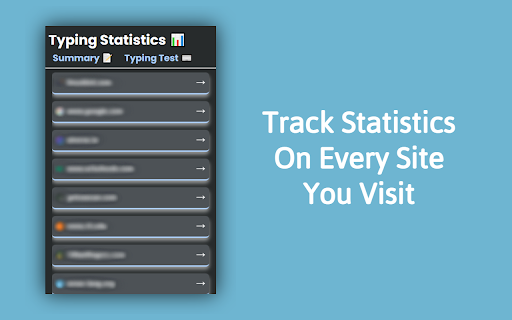

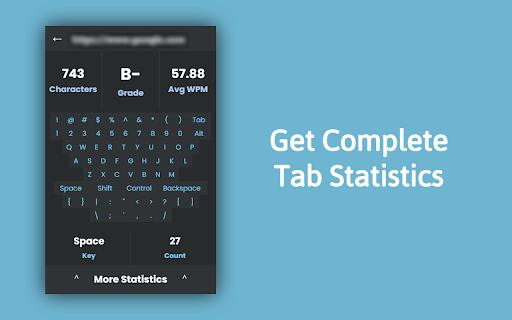
Typing Statistics: Tracks WPM and other statistics | Bundled with auto typers The Typing-Statistics Chrome extension is a tool that tracks and provides insights into your typing habits while using the Chrome browser. It offers valuable statistics such as the number of letters, words, and your typing speed in words per minute (WPM). Features: - Letter and Word Count: Get an accurate count of the letters and words you type while using Chrome. - Words Per Minute (WPM): Track your typing speed in real-time and measure your words per minute. This feature helps you monitor your typing progress and efficiency. - Individual Site Tracking: The extension can track typing statistics on a per-site basis, allowing you to analyze your typing performance on different websites separately. - Auto Typers: Have the extension assist you in achieving high WPM on sites like Type Racer and 10FastFingers. Usage: 1. Once the Typing Statistics extension is installed, it will automatically track your typing statistics while you use Chrome. You can access the extension's features and view your typing data by following these steps: 2. Click on the Typing Statistics extension icon in the Chrome toolbar. 3. A dropdown menu will appear, showing you a list of visited sites. Click into any arrow and you will be shown current typing statistics and options to access more details. 4. Explore the available options, such as viewing overall typing statistics, and site-specific statistics. 5. The extension will continuously update the statistics in real-time as you type, providing you with up-to-date information about your typing performance.

KahootGPT (NEW: Start Free!)
Not affiliated with Kahoot! or ChatGPT: Use KahootGPT to win all your Kahoot! games 🚫 Not affiliated with Kahoot! or ChatGPT: Use KahootGPT to win your Kahoot games. ⚠️ IMPORTANT ❗️❗️❗️ KahootGPT is not associated with or affiliated with Kahoot! services in any way. Kahoot! and the K! logo are trademarks of Kahoot! AS. ❗️❗️❗️ 📖 READ THE TUTORIAL ❗️❗️❗️ https://itsmarsss.github.io/kahootgpt/#/tutorial ❗️❗️❗️ ✨ NEW in v4 - Free Tier: Start free with 5 queries per week (resets every Monday) - Bring Your Own API Key: OpenAI / Claude / Gemini supported - Premium Plans: Light (100/week), Monthly, and Yearly - Rating Bonus: Leave a 5-star rating and get +10 bonus queries - Improved Subscriptions: Better plan management and smoother upgrades ❓ WHAT IS KAHOOTGPT? KahootGPT is a powerful Chrome extension that uses advanced AI models to help you ace Kahoot games. No API key required to get started. 🚀 KEY FEATURES - Smart Answers: AI-powered suggestions for every question - Auto-Highlight: Highlights the best answer instantly - Auto-Tap (Premium): Hands-free answer tapping powered by AI - File Upload: Add extra context from your own study material - Multi-Select Support: Works with multi-answer questions - Universal Compatibility: Works with any Kahoot game (when host enables “Show questions & answers”) ⚠️ DISCLAIMER - Host Requirement: The host must enable “Show questions & answers” because KahootGPT relies on visible player-screen question data. - No API Key Needed: KahootGPT now runs through our backend by default. ⚙️ HOW IT WORKS KahootGPT reads the live Kahoot question, analyzes it with AI, and returns the best possible answer(s). Use it to generate answer options, highlight likely answers, or enable Auto-Tap (Premium) for hands-free gameplay. 🎯 PERFECT FOR - Students improving quiz performance - Teachers testing question quality - Anyone who wants to dominate Kahoot sessions KahootGPT combines fast AI answers, flexible pricing, and a simple UI to help you perform at your best.

WPM - Typing Everywhere
A cool extension for calculating wpm everywhere Detect every typing in the browser and provide WPM calculate number, Choose every text in the browser and type it!

Auto Typer
Auto Typer types text automatically. Works on websites and Google Docs via AutoHotkey. Auto Typer is a productivity extension that allows you to paste text into the extension and automatically type it into any editable field, including documents, text areas, and input fields. The extension types character by character when you press the assigned hotkey (default: Ctrl + Shift + T), and you can set a delay between characters to control typing speed. This saves time and effort when writing long text, and it types as if you are manually typing, preserving formatting in most web editors.

AutoTyper
This extension automatically types on nitrotype.com. NitroType AutoTyper Extension A powerful Chrome extension designed to automate and enhance your racing experience on nitrotype.com with advanced features including real-time race visualization, tier-based WPM management, and intelligent auto-racing capabilities. Key Features ------------ Live Race Visualization - Real-time race tracking with dynamic progress bars - Racer positions with car emojis and color-coded lanes - Live stats display: WPM, accuracy, typed characters - Auto-show/hide functionality with persistent state - Race text preview with typing progress indicator Smart Auto-Racing - Customizable WPM range: Select multiple speeds for randomization - Accuracy control: Set target accuracy (90-100%) - Auto-mode: Continuous racing with auto-join - Session persistence: Resumes after page refresh - Race counter: Track completed races in real-time - Progress indicator: Live typing progress percentage Configure Racing Settings 1. Select WPM Speeds: Choose one or more WPM multipliers (e.g., 8x, 9x) Locked speeds (🔒) require tier upgrade Extension randomly picks from selected speeds 2. Set Accuracy: Select target accuracy range (90-100%) Extension randomizes within selected values 1. Click "Start Auto Mode" 2. Extension automatically: Joins races Types with selected WPM/accuracy Completes races Re-joins next race 3. Monitor Progress: Header shows: Tier, WPM, Race count, Progress Race visualization popup displays live race data Race Visualization Popup Auto-opens when racers join the race Shows live data: All racers with progress bars WPM and accuracy for each racer Your position highlighted in gold Race text with typing cursor Final ranking with medals when race ends Toggle button (🏁) to show/hide popup 1. Click "Stop" 2. Extension stops auto-joining races 3. Current race completes normally After approximately 45-50 races, NitroType requires captcha verification Extension automatically reloads at 45 races to prevent errors Manually solve captcha when prompted to continue racing Settings are saved automatically to localStorage Race state persists across page reloads Panel visibility remembered between sessions Start with lower WPM speeds (6x-8x) for Tier 2 Use varied accuracy (96-99%) for natural appearance Monitor the race counter to anticipate captcha Check race visualization to track performance Tier upgrade system (currently locked) Race statistics and analytics Advanced accuracy patterns More customization options
