
pcjcbllhkkfmhjkkcdheljobkigdmnkd
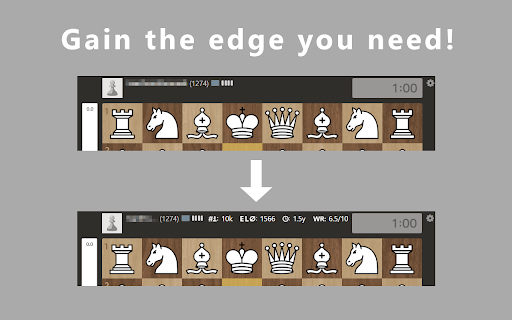

Adds additional info about your chess.com opponent – you can choose which to display. As this uses the public chess.com API the opponent info is always up to date. This can give you some additional leverage about your opponent’s playstyle, current performance and experience without having to look at their profile. Saving you time to focus on the game instead and therefore maybe just giving you the edge over the opponent. User preferences: Your choices of info that should be displayed is saved in your browser, so you don’t have to worry about losing your settings. Customization options: Tailor the information about your opponent to your specific liking to minimize the amount of cluttering information while still gaining some inside information into your opponent. Change Theme: Choose between a dark or light theme for the addon popup using the slider in the bottom right. Changelogs: [June 2024] Initial base-functions: average rating, account age, win rate over last n games and total games played.

Chess Pro
A Chrome chess extension Suggesting the best move (on Lichess) and automatically moving the pieces How to run the extension: - Open the Extensions by clicking on the puzzle icon next to your profile avatar - Click on the pushpin icon next to ChessPro to pin the extension, a knight icon will show up on the taskbar - Click on the knight icon - Turn on the extension Features: - Customize analysis depth: Higher depths take longer to analyze but will result in better moves. We recommend using depth 9 or above. Note: Using depth too high risks your account getting closed. - Max wait time: Only applies to “Automove” mode. This allows you to set how long it takes for the extension to make the next move. - Winning chance: Get realtime evaluation of the match. Note: this is based on the assumption that the opponent makes perfect moves, so it's fine even if the evaluation fluctuates. - Automove: The extension automatically plays for you. - Voice suggestion: The extension will tell you which move to play using voice suggestion (Recommended on Lichess). - Auto play new game: The extension will automatically find a new game once the current one finishes. - Bongcloud: Joke opening. Notes: 1. The extension doesn’t highlight the positions when playing on lichess.org, is this an error? No, this is intentional. lichess.org can detect cheating if the extension draws on the screen, so we disabled this feature entirely. However, you can use the extension by turning on either the autoplay mode or voice suggestion mode. 2. If you have any suggestions or found any issues, please email us at speedrunlegend123@gmail.com.

Chess.com Opponent Risk Score
Calculate risk scores for Chess.com opponents This extension helps you avoid playing cheaters (or those who seem suspicious). Right when the game starts, the extension pops up and shows you a risk score - the probability of your opponent being a cheater from 0 to 100, where 100 means that they're (almost) certainly a cheater. If the score is high or critical, you might want to abort the game before you start playing. The calculation is based on a primitive scoring model which considers 4 factors: - Overall win rate for each format - Recent win rate for each format (15-45 days) - % of High Accuracy games played recently* - Account age** These factors are combined, checked and weighted against each other, which results in the final risk score. On the options page, you can choose: - If you the risk score calculated based on all or only rated games - If you want to disable auto-pop-up behaviour. Note that this is recommended if you're running Chrome Version 126 or older. Please note that chess.com is not the fastest website out there. So sometimes the extension needs 5-10 seconds to load all the info. Just be patient! The extension source code, as well as the risk model description is available here: https://github.com/tim-sha256/chess.com-anti-cheat * High accuracy is considered 80%+ for rating in [0; 1500], and 90%+ for 1500+. ** Accounts younger than 60 days are considered more risky, and the overall score for them is multiplied by 1,5.

Chess Tier
Replaces your chess.com rating with a Chess Tier Ever wish chess.com had a tiered ranking system instead of displaying your rating number? This extension replaces your rating with a tier, so you can focus on your long-term skill level trends instead of watching your rating fluctuate after every game. There are currently 7 tiers, each with 4 to 5 sub-tiers. You can also turn on the "use USCF ratings?" setting to get a tier that is based on the Elo rating distribution of US Chess Federation players instead of the rating distribution of chess.com players.

Chess Stats
Shows Win/Lose/Draw and average accuracy for players on chess.com - First three numbers are the wins/loses/draws of the player - Percentage in brackets is the average accuracy of the player - Accuracy is only available on reviewed games - Hover over the stats to see information how many games the average is based on Use the icon in the top right corner to adjust the settings. This extension is an independent project and is not affiliated with, endorsed by, or associated with Chess.com in any way.
