
pchajbiagkbddgblddhjmkaiendcdggp


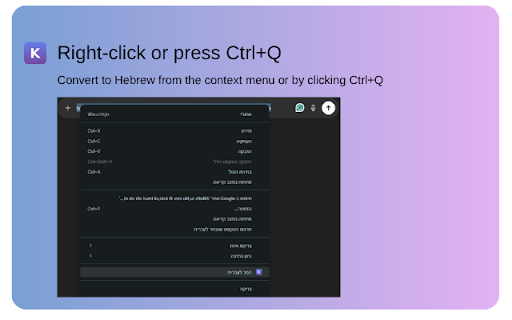

Convert English text typed in wrong keyboard layout to Hebrew instantly. Fix typing mistakes with Ctrl+Q or right-click menu. Convert text typed in the wrong keyboard layout from English to Hebrew with one click. No more retyping! KeyFix is a simple and powerful Chrome extension that fixes text typed in the wrong keyboard layout. THE PROBLEM Ever typed in English when your keyboard was set to Hebrew? You get gibberish like "ahlom" instead of "שלום". Frustrating, right? THE SOLUTION KeyFix instantly converts your mistakenly typed text to the correct Hebrew characters with just one click! HOW TO USE 1. Type text in the wrong layout (e.g., "ahlom" instead of "שלום") 2. Select the text 3. Right-click and choose "Convert to Hebrew (KeyFix)" 4. The text is instantly replaced with the correct Hebrew text! PERFECT FOR - Bilingual users who frequently switch between Hebrew and English - Anyone who accidentally types in the wrong keyboard layout - Students, professionals, and anyone who writes in Hebrew PRIVACY KeyFix does NOT collect, store, or transmit any of your data. All text conversion happens locally in your browser.

צבע אדום | התרעות בזמן אמת
An extension that shows red alerts and other threats in realtime on a map. תוסף המציג התרעות צבע אדום ואיומים שונים בזמן אמת על מפה.

Hebrew-English Keyboard Converter
Converts selected text in text input boxes between Hebrew and English keyboard layouts. Users of bilingual keyboards often have accidentally set the wrong shift mode and type multiple letter or even words before realizing. Normallym this requires erasing and retyping the full incorrect text. This extension lets you select the text, click right, and choose "Convert Selected Text" to automatically swap the text's language (based on the corresponding keyboard mapping). The current version supports only Hebrew and English, but I can add more languages easily, if requested.

Keyboard Language Corrector
Manually convert mistyped text between Hebrew and English based on keyboard layout. To use this feature, simply mark the text you want to convert, right-click, and select "Convert to English/Hebrew." This tool will convert mistyped text between Hebrew and English based on your keyboard layout. This means that if you accidentally type a Hebrew letter when you meant to type an English letter, or vice versa, the tool will correct it for you.

JSON Data Sender
Send JSON data to a Multi webhooks easy extantion to send JSON data to Multiple webhooks
