
pbpooidoegfggpfjjkahkabpbejpnihd
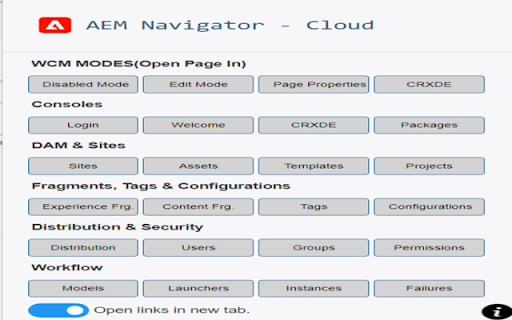
Useful for AEM developers for easy navigation.Useful for Touch UI. Enhance your Adobe Experience Manager (AEM) Cloud experience with the AEM Navigator Chrome Extension. Streamline your workflow and boost productivity by accessing essential AEM functions from a single, user-friendly popup window. Simplified Workflow: Seamlessly switch between AEM modes, access consoles, and manage DAM & Sites effortlessly. Faster Navigation: Open links in new tabs for improved organization. Workflow Efficiency: Handle fragments, tags, configurations, distribution, security, and workflow tasks with ease. Download now and say goodbye to tab overload. Simplify your AEM journey with AEM Navigator.

AEM Smart Extension
An AEM Extension to help AEM shortcuts. Short cut keys for AEM Authors, developers and Admins 1. Author Shortcut to sites, crxde, packages, dam, XFs, Tree activation 2. Admin Shortcut to Bundles, logs, Query builder, bundles, log analyser 3. Switching to edit, preview, disabled modes 4. Advanced links for admins - replication, bulkedit, jmx

AEM Helper
AEM Helper Streamline your Adobe Experience Manager workflow with the ultimate browser extension for developers. AEM Helper is designed to make your daily development tasks faster and smoother. From smart page detection to one-click debugging, everything you need is right at your fingertips. 🚀 Quick Actions Mode Toggle: Switch between Disabled Mode and Edit Mode in a single click. Page Properties: Access page settings instantly. Smart Detection: Automatically identifies the current page path. 🔧 Debugging Tools CRXDE Integration: Open the current page node directly in CRXDE Lite. Layout View: Toggle the Layout Debug view on the fly. Direct Jump: Click to view the specific JCR node in CRXDE immediately. 🔗 Navigation Shortcuts Core: Welcome Screen, CRXDE, Package Manager ⚙️ Personalize Your Experience 🌙 Dark Mode: Easy on the eyes for late-night coding. 🎛️ Custom Toolbar: Enable or disable the CRX button as needed.

GA4 annotations Test
GA4 Annotations+ is a web app that allows users to annotate their Google Analytics 4 (GA4) data more intuitively and powerfully within the GA4 UI dashboards. With GA4 Annotations Plus, users can easily add notes, comments, and tags to their GA4 data while collaborating with cross-teams, making it easier to understand and track traffic performance.

Add to Benevolist.org Button
Benevolist.org extension simplifies the donation process to help increase the number donations for all your item collection drives. Add items from top-brand retailers to create the perfect drive for all of your charitable collection drives when you use Benevolist.org. With our “Add to Benevolist.org Button" extension, you can quickly and easily add items from any of our merchant partners (Walmart, The Home Depot and Target) to your drives on Benevolist.org. Streamline your charitable food, toy, clothing drives and more, while easily tracking the progress as your donors purchase much-needed items. You’ll be amazed at how Benevolist.org helps make your work so much easier and more efficient. And your donors will love contributing to the success of all your charitable donation drives.
