
pbndhpnajpcnaijjacmknamlpjmfgpkh
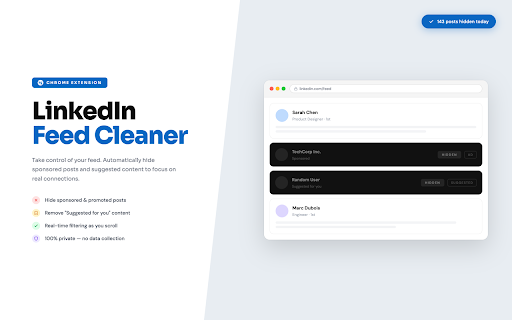


A minimalist Chrome extension to control suggested and sponsored posts in your feed. 🚀 LinkedIn Feed Cleaner – Take control of your LinkedIn feed! 🔹 A lightweight & minimalist Chrome extension 🖥️ 🔹 Filter out unwanted content – hide suggested &/or promoted posts 🚫 🔹 Enjoy a cleaner, distraction-free browsing experience ✅

No LinkedIn News
Hide LinkedIn News on the home page and in individual news articles. This browser extension disables the LinkedIn News section on the home page and within individual news stories. It eliminates distractions and makes it easier for users to focus while browsing LinkedIn. You can view the code for this project on GitHub via this link: https://www.github.com/garnetred/no-linkedin-news. Privacy Policy No LinkedIn News accesses Google's tabs and scripting permissions for browser extensions to update the styling if you're on the LinkedIn home page or visiting a specific news page. Note: This extension does not block the LinkedIn News profile page (https://www.linkedin.com/showcase/linkedin-news/) or posts from that profile.

MyFeedIn : LinkedIn Analytics & Feeds
The all-in-one toolkit for LinkedIn creators — analytics, focused feeds, and smart engagement tools to grow your audience. MyFeedIn is the all-in-one LinkedIn analytics extension and LinkedIn engagement tool for creators. Track your LinkedIn post performance, analyze your comments, and engage with a distraction-free LinkedIn feed reader — everything you need for LinkedIn growth in one productivity tool. 🎯 TAKE BACK CONTROL OF YOUR LINKEDIN FEED LinkedIn's algorithm decides what you see. With MyFeedIn's Focus Feed, YOU decide. Create custom feeds with the people you want to engage with, browse their posts one at a time, and react or comment directly — no distractions, no noise. 🔹 WHAT YOU CAN DO WITH MYFEEDIN 📊 LinkedIn Post Analytics & Performance Tracker — Track views, likes, comments, impressions, and engagement rate for every post. Spot trends with heatmaps, performance charts, and content breakdowns by type (text, image, video, carousel). Build your LinkedIn content strategy with data. 💬 LinkedIn Comment Tracker & Analytics — See your commenting activity at a glance. Track which comments get the most likes and replies, discover your top engaged authors, and find your most active days and times. 🎯 Distraction-Free LinkedIn Feed Reader — Build custom feeds with your key connections. Browse their latest posts one by one, react and comment without leaving the dashboard, and track your engagement history for each post. 🎙️ AI Voice Comments for LinkedIn — Dictate comments with your voice on any LinkedIn post. AI-powered text polishing turns your speech into natural, well-written comments in your preferred style. 👥 LinkedIn CRM & Contact Management — Organize your LinkedIn network into engagement lists. Add notes, tags, and custom fields. Visualize your connections with an interactive mind map. 1. Install MyFeedIn and sign up — it takes 30 seconds 2. Sync your LinkedIn posts and comments with one click 3. Explore your analytics dashboard — heatmaps, trends, and insights 4. Create engagement feeds with the people you want to follow closely 5. React, comment, and engage directly from your Focus Feed 6. Watch your LinkedIn growth accelerate ✅ Know exactly which posts perform best and why ✅ Engage consistently with the people who matter ✅ Comment faster with voice-to-text and AI polishing ✅ Stop wasting time scrolling — focus on what drives LinkedIn growth ✅ All your LinkedIn analytics and engagement tools in one place 🙌 PERFECT FOR → LinkedIn creators who want to understand what content resonates → Solopreneurs and founders building their personal brand → Sales professionals engaging with prospects consistently → Community managers tracking engagement across their network → Anyone serious about growing on LinkedIn without wasting time ──────────────────────── Built by a creator, for creators. Have feedback or feature requests? We'd love to hear from you! MyFeedIn — Grow smarter on LinkedIn. MyFeedIn is not affiliated with, endorsed by, or sponsored by LinkedIn Corporation. LinkedIn is a registered trademark of LinkedIn Corporation.

LinkedIn Feed Blocker
Stop wasting time on LinkedIn's endless feed. Reclaim your focus. This extension blocks LinkedIn's main feed (only /feed/ page) and replaces it with a clean, peaceful message. No more cringe posts. No more mindless scrolling. Just check your messages, view profiles, and get back to work. • Blocks the main feed on linkedin.com/feed/ only • Shows a clean message instead of the feed • Toggle on/off anytime from the popup • Available in English and Polish • Syncs settings across your devices • Works automatically with LinkedIn's navigation • Is completely free to use! • Doesn't block messages, profiles, job offers, or other LinkedIn features • Doesn't collect any data or logs • Doesn't track your activity • Doesn't send information anywhere ✅ Zero data collection ✅ Zero tracking or analytics ✅ All settings stored locally on your device ✅ Minimal permissions (only activeTab + storage) ✅ No external server communication ✅ Manifest V3 compliant Switch language instantly from the popup. 1. Install extension 2. Go to linkedin.com/feed/ 3. Feed is blocked - see peaceful message instead 4. Click extension icon to toggle on/off or change language Size: ~140KB | Languages: 2 | Permissions: Minimal LinkedIn Feed Blocker is independent and not affiliated with LinkedIn Corporation.

LinkedIn Feed Blocker
Hide the LinkedIn feed with a single toggle. LinkedIn Feed Blocker helps you stay focused by hiding the LinkedIn home feed with a single click. The extension adds a simple toggle to your browser toolbar that lets you hide or show the LinkedIn feed whenever you want. No accounts, no tracking, no complicated settings. Features: • One-click toggle to hide or show the LinkedIn feed • Works only on linkedin.com • Runs locally in your browser • No data collection Note: If the LinkedIn feed does not update immediately, refresh the page once after toggling. If you find the tool useful, you can optionally support development via the link in the extension.
