
pbcljcpjmdhgpffgalkifignmbnedikk

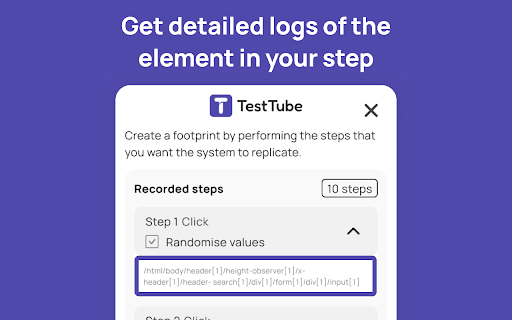
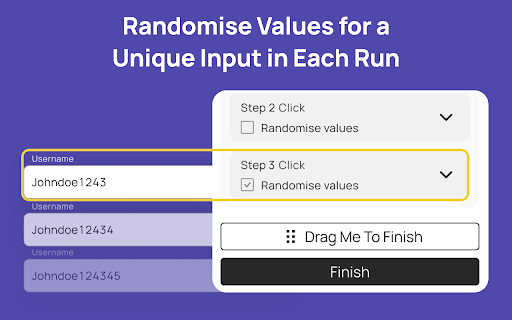

With Testtube.io, setting up automated tests is as simple as point, click, and configure—no coding skills required. Designed with… With Testtube.io, setting up automated tests is as simple as point, click, and configure—no coding skills required. Designed with ease of use in mind, our intuitive interface allows anyone on your team, from QA specialists to business owners, to create complex testing scenarios with just a few clicks.

Testim Editor
The simplest and most advanced testing automation tool, using Adaptive Learning and Computer Vision image validation. Testim is the leading AI-based functional and end-to-end UI testing automation solution. Testim Automate uses AI to give you the speed and stability of codeless end-to-end tests, with the flexibility of code. Customers like Microsoft, Salesforce, Wix, and JFrog run millions of tests on Testim each month. Learn more at www.testim.io Quickly record, configure, and customize functional UI tests. Record user journeys that are added to the Testim visual editor as discrete, configurable steps. Create reusable groups, configure validations, add loops, or insert custom JavaScript. Reduce maintenance with AI-based Smart Locators Each element is uniquely identified by analyzing the entire DOM and assigning a score. When element attributes change, the AI-based Smart Locators learn and continue to identify the element and test its functionality. Run parallel, cross-browser tests on our test cloud or Selenium-compatible grids. Integrate with your CI or dev tools to trigger test runs on pull requests or other dev milestones. Quickly identify the root cause of failures with screenshots, console logs, and network info. Capture video or annotate screenshots to send meaningful bug reports. The Testim Chrome extension only used for the purpose of creating and playing-back web application UI tests in Testim. No additional information is captured when not actively using the Testim application.

GenQE - AI Assisted Quality Engineering
Use this extension to record video and capture screenshot for your test cases. Unlock the potential of automated quality analysis with GenQE, your AI-powered assistant designed to revolutionize software testing and quality assurance processes. Seamlessly integrated into your workflow, this Chrome extension empowers teams to generate test cases with unparalleled precision and efficiency. Overview GenQE harnesses cutting-edge artificial intelligence to simplify complex QA tasks. From analyzing requirement documents to generating detailed test cases, GenQE makes it effortless for developers, testers, and project managers to streamline their testing processes. By embedding this powerful tool in your Chrome browser, you gain access to: Automated test case generation Business flow modeling Interface design recommendations Comprehensive quality scoring Integration with popular tools like Jira, Figma, and Postman With GenQE, you can shift your focus from manual and repetitive tasks to strategic decision-making, ensuring your software meets the highest standards of quality and performance. Key Features Requirement Analysis and Test Case Generation Analyze requirement documents, videos, and screen recordings to generate accurate test cases. Identify key fields, flows, and variables for comprehensive coverage. Support for various document types, including Word, PDF, Excel, and Figma designs. Business Flow and Interface Modeling Visualize end-to-end business flows and interdependencies. Generate reusable interface components and map variables to test scenarios. Create modular flows for child and parent applications to build scalable systems. Seamless Integrations Jira Integration: Automatically sync generated test cases with Jira tickets. Figma Integration: Extract test scenarios directly from Figma designs. Postman Integration: Import Postman collections to generate API test cases in seconds. AI-Driven Quality Scoring Evaluate the quality of test cases and flows with AI-driven scoring metrics. Gain insights into potential gaps and areas for improvement. Optimize test case coverage using orthogonal combinatorial testing techniques. Customizable Workflows Define workflows tailored to your project’s unique requirements. Enable batch processing to allot test cases dynamically across teams. Generate reports on user engagement, test case execution, and performance trends. End-to-End Test Management Build an end-to-end journey by integrating flows from different modules or applications. Create dependency mappings between variables and test scenarios for complex systems. Support for hierarchical test case organization for better traceability. Data Security and Scalability Leverage Docker secrets for sensitive information in multi-service environments. Ensure compliance with industry standards for secure data handling. Scale seamlessly with cloud providers like AWS, Google Vertex AI, and others. How It Works Install the Extension Add GenQE to your Chrome browser with a single click from the Chrome Web Store. Once installed, the extension appears as an intuitive sidebar in your browser. Upload Your Inputs Upload requirement documents, design files, screen recordings, or API collections. GenQE analyzes these inputs to identify critical elements like interfaces, variables, and test scenarios. Review auto-generated test cases, business flows, and interface designs. Modify and refine outputs using the extension’s user-friendly editor. Save and export outputs to your preferred tools or formats. Integrate and Collaborate Sync outputs with Jira, GitHub, and other tools for seamless team collaboration. Use built-in reporting tools to track progress and share insights. Why Choose GenQE? Efficiency Boost Automating repetitive QA tasks saves countless hours, allowing your team to focus on strategic activities like planning and innovation. Enhanced Accuracy AI-driven analysis ensures comprehensive test coverage and reduces human error in identifying test scenarios. Scalable Solutions Whether you’re a startup or an enterprise, GenQE scales with your needs. Its modular design accommodates projects of any size and complexity. User-Friendly Interface Designed with simplicity in mind, the extension offers a clean and intuitive interface that even non-technical users can navigate with ease. Continuous Improvement Regular updates and new features keep GenQE ahead of the curve, ensuring you always have access to the latest in QA automation technology. Use Cases Software Development Teams Accelerate development cycles by generating test cases and business flows directly from design and requirement documents. Quality Assurance Professionals Streamline the QA process with automated test case generation and detailed quality scoring. Project Managers Gain visibility into project quality metrics and optimize resource allocation with insightful reports. Designers and Developers Use Figma integration to bridge the gap between design and testing, ensuring seamless handoffs. Getting Started Download the Extension Install GenQE from the Chrome Web Store and add it to your browser. Sign In Log in with your GenQE account or create a new one to access all features. Upload Inputs Start by uploading your documents, designs, or recordings for analysis. Generate Export the outputs to align with your project requirements. Support and Feedback Have questions or need assistance? Our support team is here to help. Contact us at genqe@genqe.ai or visit our website https://genqe.ai for more information. We’d love to hear your feedback! Leave a review on the Chrome Web Store and let us know how GenQE is making a difference for you. Install GenQE Today – Redefine Your QA Workflow!

TestCraft
Introducing TestCraft, a free and open-source browser extension with the power OpenAI LLMs, designed to be a companion to your software testing. AI-Powered Test Idea Generation: Leverage the power of OpenAI to generate comprehensive test ideas based on webpage elements. Automated Test Creation: Generate ready-to-run test scripts for popular automation frameworks, Playwright, Selenium, and Cypress, in your preferred programming language: JavaScript, TypeScript, Python, C#, and Java. TestCraft eases your test creation process and saves time. Accessibility Checks: Empower your web applications to be inclusive for all users. TestCraft identifies accessibility issues and provides actionable insights to improve. Test Idea to Automated Tests: Seamlessly convert your AI-generated test ideas into automated test scripts. Additionally, you can edit the test ideas to improve them before generating automation tests. Unlock the full potential of your testing process with TestCraft. Download it now and experience the future of software testing!

QA Test Case Helper
A professional tool for QA engineers that highlights testable elements and suggests comprehensive test cases QA Test Case Helper is a professional tool for testers and QA engineers that automatically analyzes web pages and assists in creating comprehensive test cases. Complete UI Redesign: A modern, sleek interface with improved layout and Inter typography. Dark Mode Support: Added a native dark theme for comfortable late-night testing (toggles automatically or manually). New Filtering System: Easily filter discovered elements by type (Buttons, Inputs, Links, Forms, Selects) to focus on what matters. Expanded Test Case Library: Added comprehensive test suites for: Checkboxes & Radio buttons Textareas (multi-line input) Type-specific inputs (Email, Password, Number) Advanced QA Checks: New test suggestions for boundary values, XSS safety, and ARIA accessibility roles. Markdown Export: One-click button to copy all results in formatted Markdown for your Jira/Bug reports. Performance Stats: Real-time counter of interactive elements found on the page. Improvements & Fixes: Page Analysis: Updated the detection engine to better find custom interactive elements and ARIA components. Bug Fix: Resolved an issue where the extension would sometimes stop responding on complex dynamic pages. Bug Fix: Fixed a disappearing icon issue during the generation process. Security: Switched to modern navigator.clipboard API for secure data copying. Optimization: Significant reduction in background script memory usage. Key Features: • Interactive highlighting of testable elements on hover • Automatic test case recommendations for each element type • Support for various elements: buttons, forms, input fields, links • Convenient tooltips with detailed testing suggestions Perfect for: ✓ QA Engineers ✓ Software Testers ✓ Developers writing tests ✓ Teams practicing TDD/BDD The extension helps ensure important test scenarios aren't missed and improves the quality of test documentation. Common Test Scenarios Covered: • Form validation and submission • Button states and interactions • Input field constraints • Link functionality • Select/dropdown behavior • Error handling Developed by a professional QA engineer for the QA community. For support or feature requests: Website: https://serhii-tkachenko.com Email: me@serhii-tkachenko.com
