
pbbaoiomplacehgkfnlejmibhmbebaal
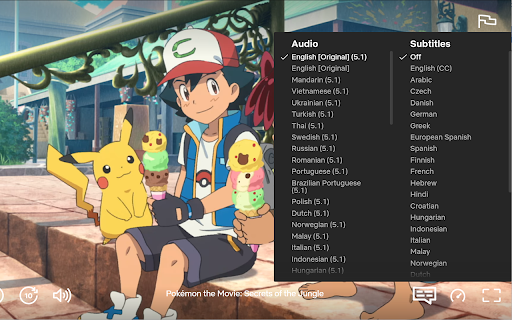
Displays all available Netflix audio and subtitle tracks. This extension allows users to listen to audio tracks on Netflix that are not normally displayed.

Netflix Hidden Categories
EN: This Google Chrome extension will allow you to discover hidden categories on Netflix. You can explore new movies, documentaries, or series of your interest, within your favorite theme, using an intuitive search feature. Enjoy!

Better Netflix
Adds various features to Netflix like support for ultrawide displays (21:9 aspect ratio). "Better Netflix" adds the following features to Netflix: - Ultrawide display support (21:9 aspect ratio) [To 21:9: '.', to 16:9: ','] - Zoom in and out of the video [Zoom in: '+', zoom out: '-'] - Show the elapsed time of the video - Disable mouse movement [Disable: 'd', enable: 'e' or 'Esc'] - Statistics [Toggle: 'q'] - Use the mouse wheel to change the volume - Button to pick a random video of the Netflix list - Buttons to search for movies or series on IMDb - Toggle english subtitles [Toggle: 'v'] (Currently only for english or german Netflix. The language for your Netflix profile can be configured at the "Manage Profiles"-page) - Button to enable picture in picture mode - Automatically skip intros and recaps - Set tab title to title of currently playing video "Better Netflix" provides the keyboard shortcuts specified in [ ]-brackets of the list above. Use the h button on a video page to show a help message with available keyboard shortcuts. "Better Netflix" does not collect your data and is completely free and open source. Source code: https://gitlab.com/konstantin-mueller/better-netflix If you would like to support the development of this extension: https://paypal.me/betternetflix

NflxMultiSubs 2021 (Netflix Multi. Subtitles)
Bilingual Subtitles for Netflix (fixed) Best ever Chrome/Firefox extension to unleash bilingual subtitles on Netflix! This is a fixed and updated re-release of the original NflxMultiSubs. This version contains a fix for the 2021 Netflix redesign that broke the original, and has various other bugfixes and improvements. Click on the extension button to access the extension settings. Note: this extension will only show the subtitle languages that are available in your country. Features: - Enable secondary subtitles in the available languages (incl. image-based subtitles like Japanese, Chinese, Russian, …) - Smart selection on secondary subtitles. Choose between 3 subtitle activation modes: disabled; automatically match subtitle language to audio language; or remember the last selected language. - Seamless integration with native Netflix player UI -- switch languages in place - Adjust playback speed with a hotkey ( [ and ] ) - Free and open source! Report bugs by creating an issue on Github (https://github.com/gmertes/NflxMultiSubs) or send me an email (click "contact the publisher" on the right of this page). v3.0.0: - Fix Chrome version with experimental manifest v3 support v2.3.5: - NEW: improved font size settings. This should make font size better adaptable to various monitor sizes and resolutions. - Fix a crash in the candidate subtitle server selection. v2.3.4: - NEW: Extra out of region languages can now be used as secondary subtitles. To do so, activate the wanted language as a primary subtitle first. The language will then show up in the secondary subtitle list ready to be used. After selecting the wanted language as secondary sub, the primary language can be switched back. For now you have to do this for every new playback. - Fix the subtitle color picker on Firefox - Fix key binds for the playback rate controller (now [ and ] for all keyboard layouts) v2.3.0: - Fix critical bug in subtitle builder - NEW: You can now change the color of text-based subs from the settings page. v2.2.10: - Fix primary sub scaling - Improve secondary sub scaling for 4K displays - Show vertical scrollbar when subtitle list overflows v2.2.3: - NEW: Add secondary language options (disabled, audio, last used) - Fix subtitles overlapping in certain cases - Fix image-based subtitle scaling - Fix image-based subs sometimes falling outside of top screen edge v2.2.2: - Improve subtitles activating on the first try without requiring a refresh v2.2.0 (first release): - Fix for the September 2021 Netflix redesign that broke the original extension

Netflix Navigator
Browse unlimited Netflix TV Shows and Movies easily with your Keyboard Arrow Keys. Netflix Navigator is a chrome extension for Netflix to make browsing experience easy with keyboard. ★ Navigate with Arrow keys ★ Get more information with Enter key ★ Autoplays Preview after 1 second ★ Search Netflix with S key
