
papnkgoggccbbpadcjndgfjgaaekgekm
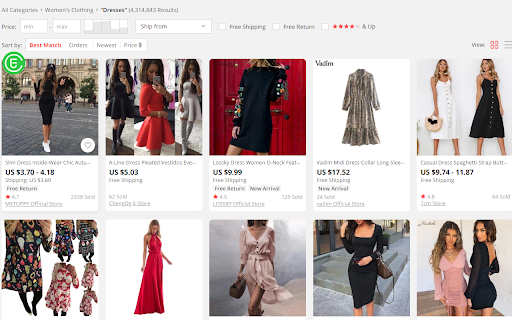


One click import and sync Aliexpress products to your Shopify and Woocommerce store. 1. After installing the Chrome Extension, register and log in your EPROLO account. 2. You can click “EPROLO” icon on AliExpress to import AliExpress products to your EPROLO account. Also, you can go to “Dashboard” – “Import Ali Product”, copy and paste AliExpress Product URL, and click ”Import”. 3. Go to “Dashboard” – “Import List”, you can import products to your Shopify or WooCommerce store with one click. 4. When your store receives orders, they will be automatically synchronized to your account. Go to “Dashboard” – ”Ali Orders”, click “Order Products” to place orders on AliExpress. Besides, you can click “Get For Quote”, We will source products for you and quote within 48 hours. Then, you can click “Fullfill at EPROLO” and place orders. 5. After the package is shipped by AliExpress suppliers or EPROLO, the tracking number will be automatically synchronized to your store. 1.We will do product sourcing, warehousing, supply management, packing and shipping for you. Fulfill orders in bulk instead of one by one. 2.Our Express can deliver the package to your UK and US customer in 5-8 days.AU 7-9 days,CA 7-9 days. Europe Express will take around 8-12 days. 3.Your brand / logo will be printed on the shipping label,scotch tape. Each package will be shipped under your brand.

UpSeller - Product Importer
Import products from popular suppliers to your online stores [FREE of Charge] Import products from the most popular platforms of LATAM (Amazon, Mercado Libre, etc.) to your online stores in a simple and fast way. With the UpSeller's extension for Chrome, sellers will be able to import information such as description, title and images from the different e-commerce platforms to UpSeller and publish dozens of products in a matter of minutes. Features: - Add products to your stores from 10+ popular suppliers by one click - Import and copy products in bulk (up to 100 products) - Image editor, auto-fill GTIN/EAN - Manage orders, Inventory and more - Manage all your online stores from one place The uses of the application are described as follows: 1- Log in to UpSeller. 2- Enter any of the supported platforms. 3- Find the product or products you want to import. 4- Click on the button that appears above each publication or on the button "Import all products" of UpSeller if you want to import in bulk. 5- Enter UpSeller and fill in the missing data for each product. 6- Publish them in all your stores linked to UpSeller. Try it for free: https://www.upseller.com If you have any questions email us at support@upseller.com *** UpSeller - Free Multi-channel ERP for e-commerce businesses ***

AliHunter - AliExpress Dropship (Promer)
Effortlessly track and analyze AliExpress products and Shopify stores to gain decisive insights. AliHunter - AliExpress Dropship Spy (Promer) helps dropshippers find winning products, track competitors, and streamline their dropshipping business on AliExpress. Save time and boost your profits with our powerful and easy-to-use extension. ⚡️Key Features: ◾️ Efficient Product Research ▫️ Instantly find the best-selling products on AliExpress. ▫️ Use advanced filters to narrow down your search. ◾️ Competitor Analysis ▫️ Track your competitors’ stores and product strategies. ▫️ Gain insights into their top-performing products. ◾️ Sales Data Insights ▫️ Access comprehensive sales data and trends. ▫️ Make informed decisions based on real-time data. ◾️ Price History Tracking ▫️ Monitor price changes to maximize your profit margins. ▫️ Receive alerts on significant price drops. ◾️ Fast & Easy Import ▫️ Seamlessly import products to your Shopify store with one click. ▫️ Integrate with other popular e-commerce platforms. ◾️ Inventory Management ▫️ Keep track of stock levels to avoid overselling. ▫️ Automate restock alerts to stay updated. ◾️ Customizable Alerts ▫️ Set up notifications for new trends and hot products. ▫️ Stay ahead in the competitive dropshipping market. ⚡️Why Choose AliHunter? ◾️ Save Time: Our tools streamline your product research and competitor analysis. ◾️ Increase Profits: Discover high-demand products and optimize pricing strategies. ◾️ Stay Informed: Access real-time data and trends to make smarter business decisions. ⚡️How to Use AliHunter (Promer) on AliExpress: 1. Install the AliHunter (Promer) extension on your Chrome browser. 2. Navigate to AliExpress and browse for products. 3. Activate AliHunter (Promer) to start tracking and analyzing any product with a single click. 4. Utilize the data gathered by Ali Hunter to select winning products for your dropshipping store. Support and Feedback: Got questions or suggestions? We're here to help! Contact us at support@promer.ai for any assistance or to share your valuable feedback.

Shopify Scraper & Parser - Shopify Spy
Shopify Spy extract product listing from Shopify stores to CSV and Excel Shopify Spy scrapes products from Shopify powered stores and saves as an Excel document or CSV file. 2024 Q2 changes: - Highly requested feature: Downloading images. - Slow mode: Extract more fields but slower: Variant Barcode, Image Alt Text, Variant Tax Code, Variant Weight Unit - Old "Excel" format has been renamed to "Excel (Legacy)" and will be removed in further releases - Option to manually specify a collection handle if the list of collections is too large. - Enhanced error handling with clearer explanations 2024 Q1 changes: - Resolved "Out of memory" error for large stores; now, CSV/Excel files are automatically split for efficient data handling. - Improved status messages for enhanced clarity and precision. 2023 Q3-Q4 changes: - Undock popup: you can use browser while the scraping is in progress and even scrape several store simultaneously - Renewed login flow Shopify Spy features: ✓ Can extract thousands of products within minutes ✓ Filter by a specific collection ✓ All fields from Shopify product listing are included (see below) ✓ All product images are added to the CSV ✓ Download images along with CSV ✓ Export to CSV format compatible with Shopify import format (https://help.shopify.com/en/manual/products/import-export/import-products) ✓ Save as XLSX (Excel document) with proper data types - dates, prices ✓ Does not require excessive permissions For e-commerce store owners, Shopify Spy allows you to keep track of your competitors' products, pricing, and promotions. With this tool, you can quickly and easily extract thousands of products from Shopify-powered stores and filter them by specific collections. For digital marketers, Shopify Spy provides accurate and reliable product data to help you analyze market trends and identify potential opportunities for your clients. For product researchers, Shopify Spy makes it easy to gather data on a large number of products quickly and efficiently. This means you can identify trends and insights in your field of research with ease. For dropshippers, Shopify Spy is an essential tool for finding new products to add to your store, and monitor pricing and product availability for your existing products. For data analysts, Shopify Spy's ability to extract product data from Shopify stores and save it in a CSV or Excel format makes it an attractive tool for processing large amounts of data quickly and efficiently. So, whether you're an e-commerce store owner, digital marketer, product researcher, dropshipper, or data analyst, Shopify Spy has everything you need to stay on top of the latest product trends and insights. Try it out today and take your business to the next level! Supported Fields: - Handle: The unique identifier for the product. - Title: The name of the product. - Body (HTML): The HTML description of the product. - Vendor: The name of the product's vendor. - Product Type: The category or type of the product. - Tags: Keywords associated with the product. - Published: Indicates whether the product is published or unpublished. Variants: - Variant SKU: The stock keeping unit for the variant. - Variant Grams: The weight of the variant in grams. - Variant Price: The price of the variant. - Variant Compare At Price: The original price of the variant, used for comparison. - Variant Inventory Qty: Inventory quantity, where 0 indicates out of stock and 1 indicates in stock. Slow Mode Additional Fields for Variants: - Variant Barcode: The barcode for the variant. - Variant Tax Code: The tax code associated with the variant. - Variant Weight Unit: The unit of weight measurement for the variant. Images: - Image Src: The source URL of the image. Slow Mode Additional Fields for Images: - Image Alt Text: The alternative text for the image.

ShopifyHunt - Shopify™ Spy Tool & AliExpress™ Product Research
ShopifyHunt is an all-in-one Shopify store analyzer for sales tracking, competitor research, and product discovery. 👋 Shopify Store Analyzer Features (Free Trial Available) ● Store Overview Analyze any Shopify store’s country, theme, product catalog, pricing strategy, traffic trends, and newly launched products. ● Product Research Track competitors’ best-selling and newly added products to uncover winning product opportunities before others. ● Shopify Sales Tracker Monitor Shopify store sales in real time or review historical sales reports to understand competitor performance and store growth. ● Ad Spy Tool Spy on competitors’ ads across Facebook, Instagram, TikTok, and YouTube to discover profitable advertising strategies. ● Traffic Source Analysis Analyze competitor traffic channels and optimize your own marketing and conversion strategies. ● Review Analysis Use AI-powered review analysis to understand customer pain points, buying motivations, and product expectations. ● Shopify Theme Detector Instantly detect which Shopify theme a store is using. ● Shopify App Detector See which Shopify apps competitors use for marketing, upsells, reviews, and store optimization. 👉 ShopifyHunt helps Shopify sellers and dropshippers uncover competitor secrets, discover winning products, and grow their stores faster.🎁 Shopify features are available with a free trial. 👋 AliExpress Product Research Features (100% Free) ● Batch Product Analysis Analyze multiple AliExpress products at once to identify winning niches and high-potential products faster. ● Product Insights View orders, wishlist data, pricing, profit margins, publishing time, and product trends in one place. ● Competitor Tracking Find Shopify stores selling the same products and evaluate market competition instantly. ● AI Product Recommendations Get daily AI-powered recommendations based on recent sales trends and product performance. ● Product Sourcing Find identical suppliers across AliExpress, Shopify, and 1688 to reduce sourcing costs and improve profit margins. ● AliExpress Image Downloader Download product images, videos, descriptions, and variant images with one click for faster product importing. ● Review Analysis & Download Analyze real buyer reviews and seller images with unlimited review downloads. 🎁 All AliExpress features are completely free to use. 👋 How to Use ShopifyHunt on Shopify 1. Install the ShopifyHunt Chrome extension 3. Open the ShopifyHunt panel to view products, sales, ads, traffic, reviews, themes, and apps 👋 How to Use ShopifyHunt on AliExpress 1. Install the extension and visit AliExpress.com 2. Browse category or search pages to view trending products and best-seller charts 4. Click the ShopifyHunt floating icon on any product page to access detailed product and competitor reports 👋 Summary ShopifyHunt combines a powerful Shopify store analyzer, Shopify sales tracker, ad spy tool, and AliExpress product research tool into one Chrome extension.Spy on Shopify stores, track competitor ads and sales, discover winning dropshipping products, find suppliers faster, and scale your eCommerce business more efficiently.
