
pabdhaakclnechgfhmnhkcbmjobeoope
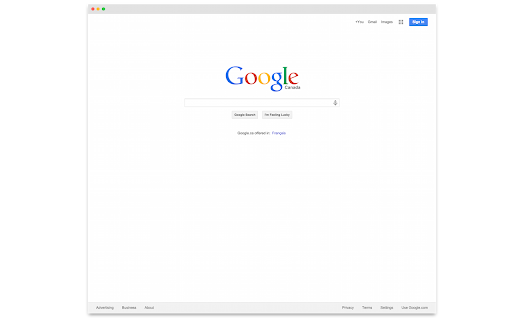
A very opinionated screen capture extension for Chrome. It will: - Capture the current tab. - Add a macOS-ish title bar. - Add drop shadow to it. - Display the result in a popup frame for both light and dark mode. The source is available on Github: https://github.com/j-martin/screenshot-chrome Forked from: https://github.com/mrcoles/full-page-screen-capture-chrome-extension

Enhanced GitHub
Display repo size, size of each file, download link and option to copy file contents Extension that provides useful features on top of GitHub Website. 1. Displays repo size. 2. Displays each file size in every active branch (not applicable for folder / symlink) 3. Show download link for each individual file (not applicable for folder / symlink) 4. Copy file's contents directly to Clipboard (just won't work for markdown files) 5. Download file 7. Coming soon...please suggest by opening an issue on https://github.com/softvar/enhanced-github/issues Enhanced GitHub Chrome Extension doesn't collect/share/care about your data at all. Asks for GitHub Access Token only for private repos and if Rate Limiting is your concern. 1. "*://*.github.com/*" - for running on github.com domain. 2. storage - for storing GitHub access token on your local system. GitHub Access token is required for private repos and for handling API rate-limiting issues. 3. webRequest - to support GitHub being a single-page-application now. 4. webNavigation - to support GitHub being a single-page-application now. Read the detailed blog to support SPA and for requesting permissions #3 and #4 - https://medium.com/@softvar/making-chrome-extension-smart-by-supporting-spa-websites-1f76593637e8 * Note: From v1.0.0 onwards - Click on download icon/button while pressing Alt / Cmd(for Mac)/ Ctrl(for Windows) because GitHub has stopped downloading of files directly. * From v3.0.0 onwards, this extension wants webRequest permission so that it can properly handle SPA behavior of GitHub website. * From v4.0.0 onwards, it support GitHub New Design. Please check the detailed CHANGELOG - https://github.com/softvar/enhanced-github/blob/master/CHANGELOG.md OPEN-SOURCED and LICENSE: For more updates, please stay tuned! For any queries/issues - open an issue on https://github.com/softvar/enhanced-github/issues For any query, drop me an email at varun2902@gmail.com

HTML Elements Screenshot
Easily remove desired HTML5 elements with just one click! HTML Elements Screenshot enables you to capture a full or partial screenshot from any webpage. It uses an open-source JavaScript library called - html2canvas. To work with this add-on, simply click on the toolbar icon to activate the add-on. Then, select any desired element with mouse left-click. Please note that, as you move your mouse, elements are highlighted with pink color. Once you select an element, a popup window will appear that contains a loader image. Once the operation is done, the loader will be replaced with the screenshot. Now you can download the image to your machine by clicking on the download button. If you want to close the screenshot's popup window, please click on the close button on the top left corner. Please note that, by default, the extension does not include cross-domain images in the screenshot, if you want to enable this feature, please visit the options page and click on the - allow cors - checkmark. You can also adjust the screenshot resolution. By default, it is set to 2, meaning the screenshot image is two times bigger than the original element. If you have a feature request in mind or found a bug to report, please fill the bug report form in the add-on's homepage (https://mybrowseraddon.com/html-elements-screenshot.html).

Page Screenshot
Take a screenshot from the entire website with just one click! Page Screenshot is an addon that enables you to capture a full-page screenshot from any desired website. Please click on the toolbar button (or press Alt+Shift+D combination) to capture the screenshot. You can adjust the screenshot image format from the options page. Moreover, image quality and the time delay between multiple screenshots are also customizable. The screenshot will be saved to the default download location in your browser. Please note, to change the download location, visit the settings page in your browser. Note 1: you need to "reload" all opened tabs before using the addon. Note 2: for long-page websites, Page Screenshot automatically scrolls the page from top to bottom (vertical scroll) to capture the screenshot. But, it does not have a horizontal scroll in case the page is too wide. To report bugs, please fill out the bug report form on the addon's homepage (https://mybrowseraddon.com/page-screenshot.html).

Handy Screenshot - Full Page Screen Capture
Take screenshots of web pages with ease. Capture, edit, annotate and save them as PNG / JPG / WEBP formats. An easy, free and full-featured screenshot tool that lets you screen capture, annotate and edit screenshot. Full page screen capture supported, as well as capturing entire display. We try to make it super easy for you to capture viewport, capture entire page, crop, annotate, save as PNG / JPG / WEBP / PDF, copy to clipboard. 🤩 You will love: ◉ Easy and user-friendly interface ◉ Custom keyboard Shortcuts: separate shortcuts for 1. capture full page 2. capture visible area 3. select area ◉ Capture screenshot for selected area / visible area / whole page ◉ Annotate your screenshot with our powerful yet the most easy-to-use built-in image editor ◉ Name your screenshot before saving as best quality, high-resolution screenshots, PDF, PNG, JPG, and WEBP formats ◉ Upload your screenshots to Google Drive, and it remembers the folders you've used ✨ Features of our built-in screenshot editor: ◉ Cropping ◉ Texts ◉ Shapes: arrows, rectangles, circles ◉ Free draw: pencil or highligher ◉ Blur: to hide sensitive info on screen ◉ Counters: for steps / order ◉ Magnifier: highlight details with zoomed-in callouts ◉ Beautiful gradient background: to take your screenshots to next level 🚀 PRO Features (New) PRO license is a one-time purchase - no subscription. It unlocks more control and a faster editing workflow: ◉ Annotation presets: save and reuse your favorite styles (colors, shapes, crop, background) ◉ Layer manager: easily organize, reorder, and manage elements on your screenshot ◉ History (undo & redo): go back and forth through your edits with confidence ◉ Fixed-size capture: capture screenshots with precise, consistent dimensions One more thing: * The other products made by ohhandy.com are also listed in a dropdown in screenshot editor page (editor.html)
