
opomflbocnfigfddnpbebnjhlldpgmhc
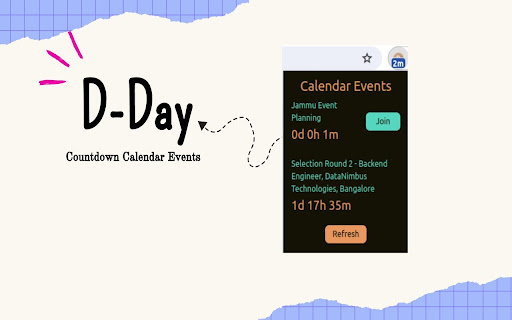
A countdown to your calendar events This chrome extension lets you track days/hours/minutes of your calendar events. The nearest event time would always be visible in your chrome toolbar. Helps you track date-time until your important calendar event even when you are mindlessly browsing This also syncs between browsers. Like if you login to same chrome account on two different PCs, it'll show the same results!

CountDown Timer
Use to count the number of days,hours,sec remaining Introducing our Chrome extension – a powerful countdown timer at your fingertips! Stay organized and boost productivity with our user-friendly timer. Set customizable countdowns for any task or event, whether it's a work deadline, study session, or a quick break. Enhance your time management skills and stay on track with this intuitive tool. Download now for a seamless countdown experience right in your browser! We have updated the design of extension and added few features.

Days Between Calculator
Use days between calculator to get the time between two dates. A simple day counter that works as a duration calculator. Introducing our Days Between Calculator – a powerful, easy-to-use Google Chrome extension designed to streamline your time calculations and keep you organized. ❓ Why Choose the Days Between Calculator? This extension lets you calculate days between two dates instantly with precision and ease. With its clean, user-friendly design, it’s ideal for anyone needing to count days between dates. Perfect for managing deadlines, project timelines, or even personal milestones, it’s a must-have tool for efficient planning. 🌟 Key Features of the Calculator Between Two Dates Extension 1️⃣ Quick Calculations – Calculate days between dates instantly, without any waiting. 2️⃣ Flexible Date Formats – Easily switch between different formats to match your needs. 3️⃣ Count Time Intervals – Use the date and time calculator to calculate any time intervals, including minutes, hours, weeks, months, years. 4️⃣ Countdown and Day Counter – Track the time range for any event. 1. Input the start and end dates. 2. View Results: The date difference calculator provides your result instantly. Whether you're a student planning exam schedules, a freelancer tracking projects, or someone counting down to a big event, our tool makes it easy to stay organized. ⏳ Perfect for Personal and Professional Planning Our extension is designed for both personal and business use: ➤ Event Planning – Know exactly how many time remain until birthdays, anniversaries, or vacations. ➤ Project Deadlines – Use the days calculator between dates to stay on top of project timelines. ➤ Personal Milestones – Track the time since you started a habit, a new routine, or any personal milestone. ➤ Work Schedule Management – Calculate days between two dates to manage work timelines. ➤ Historical Tracking – Curious about how long ago the historic event happened? Quickly calculate it here. 📈 Use it with Precision One of the standout features of our days in between calculator is its precise time tracking. You can break down calculations by even by weeks or hours. Whether you’re planning a project, counting down to an event, or just need to calculate dates between days, this tool is perfect for everyone from professionals to students: 📌 Accuracy: No more manual errors. Let the tool do the work and get reliable results. 📌 Time-Saving: Quickly calculate days in between dates with just a few clicks. 📌 Versatile: Whether you need a simple days between calculator or a detailed breakdown of time, it’s all here. 📌 Customizable: Choose the specific time range, units, and formats that best suit your needs. 💹 Get more from your calculations with advanced options: ▸ Time Between Dates – Also find the amount of months, weeks, hours or even minutes between. ▸ Calculate between two dates – Answer questions like what is 30 days from today. ▸ Calendar Days Counter – Access a calendar days calculator to measure time across various intervals. 🔍 Use Cases for the Days Between Calculator 🔸 Freelancers and Project Managers – Track project timelines easily 🔸 Event Coordinators – Count down to important event or anniversaries. 🔸 Students – Use it to schedule study timelines for assignment's deadlines. 🔸 Everyday Users – Use it as a days since calculator to track personal goals or life events. 💡 Advantages of the Calendar Days Calculator Using our time duration calculator is not only quick and efficient, but it also ensures you have full control over your time management. No matter the complexity of your scheduling needs, any time between two times will be calculated. ♦️ Simplicity and Speed – Calculations are instant and reliable. ♦️ Flexible Formats – The tool adapts to your format preferences. ♦️ Versatile Functionality – Duration calculator for any projects, it covers it all. 🔥 Get Started with the Days Between Calculator Today! Download our extension now and experience the convenience of accurate and quick calculations. Whether you need a date calculator for work, personal use, or planning, this extension is here to make it easy and effective.

Day Countdown
Adds a new button to your toolbar to allow you to easily access a full calendar and see the number of days left to each date. Click on a date to add events, and see the number of days remaining until that date in your browser toolbar. Hovering over the button shows the event name. Includes settings to ignore weekends, US holidays and custom dates when counting days.

Timer Countdown
An easy-to-use interface for the Countdown clock Timer—to manage time! After all, you'll be redirected to the last active tab. Online Timer Countdown Clock—This is a Chrome extension timer that simplifies time management and boosts productivity. Our online timer is designed to be easy to use, eliminating the need for a keyboard and providing an intuitive interface that anyone can navigate. Its versatile features make this timer good for personal use, whether managing work projects, timing meetings, or tracking other essential tasks. Why Choose Our Extension? ✅ Efficiency growth ✅ Popular sounds collection. If you need more - write in the comments ✅ Nice to view ✅ Simplicity ✓ Ease of Use: Set up your countdown in just a few clicks. ✓ No Keyboard Needed: Navigate with your mouse, making it perfect for quick setups. ✓ Anchors: 10s, 30s, 5m, 10m, 15m, 30m, 45m, and 1h to set an alarm clock in a single click. ✓ Visual Clarity: The countdown is prominently displayed, ensuring you always know how much time is left. ✓ Productivity Boost: Helps maintain focus and manage time effectively during work or study sessions. Because the clock is ticking! The countdown clock is prominently displayed on your screen, clearly indicating the time left. This is particularly useful during meetings or timed work sessions, where keeping an eye on the clock is crucial. The alarm timer feature allows you to select predefined alarm sounds, ensuring you never miss a deadline or forget an important task. The countdown app is designed with versatility in mind. You can use it for various activities, from tracking the time spent on work projects to setting timers for breaks and personal tasks. The online countdown function means you can access your timer from any device with a Chrome browser, giving you flexibility and convenience no matter where you are. Use Cases and Benefits: ☑️ For Professionals: Manage project deadlines, time meetings, and improve productivity by completing tasks within the set time. ☑️ For Students: Perfect for timing study sessions, exams, and breaks, helping to create an effective study routine. ☑️ For Fitness Enthusiasts: Track workout sessions and rest intervals, and ensure you follow your fitness regimen accurately. ☑️ For Home Use: Set timers for cooking, household chores, and other daily activities to stay organized. 🔸 Increased Productivity: Users report a 30% increase in productivity when using our timer for managing work tasks. 🔸 Enhanced Focus: 75% of users feel more focused and less distracted when they use the timer to segment their work into manageable intervals. 🔸 Better Time Management: Over 80% of users find it easier to manage their time effectively and meet deadlines consistently. - Style: Set and manage multiple timers simultaneously for different tasks. - Predefined Alarms: Choose from various alarm sounds and customize them to your liking. - Timer Presets: Save frequently used countdowns for quick and easy setup. - Tab safe: The alarm sound opens in a new tab. When it closes, you will automatically go to the tab where you worked. 👉🏻 "The online timer has completely changed how I manage my workday. It's incredibly easy to use, and the countdown clock keeps me on track during meetings and projects." – Sarah T., Marketing Manager. 👉🏻 "I use the countdown app for all my study sessions. It helps me stay focused and ensures I take regular breaks. Highly recommend it!" – John D., University Student. 👉🏻 "As a coach, the digital timer is perfect for timing brainstorms and rest periods. The customizable alarms are a great feature." – Emily R., The Personal Productivity Coach. Our Chrome extension timer is more than just a simple countdown tool: it's a comprehensive time management solution designed to enhance productivity and organization. With features like the timer countdown, digits display, and sound countdown clock alarm, it offers everything you need to stay on top of your tasks. Whether working on a critical project, studying for exams, or managing daily activities, this timer is the perfect tool to help you achieve your goals. Don't wait to take control of your time. Set up our Chrome extension timer today and experience the benefits of efficient time management. Join thousands of users who have transformed their productivity with our easy-to-use and versatile timer. With our feature-rich Chrome extension timer, enhance your workflow, stay organized, and never miss a deadline again.
