
opnbpeohppnogaifdgcoellimejkdama
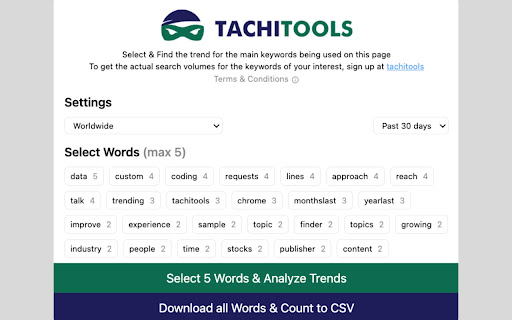


Find Trending Root Keywords on Any Web Page The average user mostly searches for the head terms and common keywords on search engines. As a leading edge content creator, you need to be focused on the rising and top keywords related to niches that make up your area of interest. The Trending Keywords Hunter analyses the on-page text and shrinks the keywords to their roots and shows you the frequency with which they are used on any web page that you are on. You can select up to 5 such keywords at a time and analyze their search trend and that of any associated top or rising keywords to uncover insights related to your market with Google Trends. Once you have identified your target keywords you can find their actual search volume in your target geography with www.tachitools.com (paid membership required). We also provide you with the ability to download all the root words being used on a text page to a CSV format with the count of the number of times such a keyword is being used. In order to bring you back the keywords of relevance we eliminate some "stop" words that are commonly used in the English language but do not actually relate to the main concept of the page.

Trending Google Searches
Trending Google searches, delivered right to your browser. Trending Google Searches is the easiest way to keep up with what's trending on the internet. - Hottest search phrases of the past 24 hours - Total number of searches - Top related news articles - Trends update hourly! Add to Chrome now and never miss a thing!

Google Keyword Getter
Optimise Google Ads and Keyword Research with Google Keyword Getter! Effortlessly copy match-type keywords or full table data. Simplify Your Google Ads Workflow in Seconds! ✨ Unlock unparalleled efficiency in your Google Ads campaigns with Google Keyword Getter v3.2.1, the cutting-edge solution from Fatduck Marketing. This powerful Chrome extension revolutionises the way you manage and extract keywords, saving you time and effort while improving accuracy and productivity. Managing keywords in Google Ads can be a tedious process, especially when working with the Keyword Planner, Search Terms, or Keywords interfaces. Google Keyword Getter (GKG) makes this process effortless by allowing you to instantly copy keywords, tables, and metrics with a single click—no manual copying or tedious workflows required. Whether you’re a digital marketer, PPC specialist, or SEO professional, GKG is the ultimate companion for optimising your keyword research and campaign management. 🔑 Instant Keyword Copying Effortlessly copy keywords directly from Google Ads’ Keyword Planner, Search Terms, and Keywords views. Choose from Broad, Phrase, or Exact match types to suit your campaign needs. 📋 Seamless Table Export Need more than just keywords? GKG lets you copy entire tables, including keyword data and performance metrics, for in-depth analysis or report generation. ⚙️ Flexible Match Types Customise how you copy keywords with ease—select Broad, Phrase, or Exact match formats with just one click. 🖥️ Integrated User Interface The GKG interface appears automatically when viewing keywords in Google Ads, so you can stay focused without switching tools. 🚀 Optimised Performance Built with the latest web technologies, GKG v3.2.1 operates efficiently and won’t slow down your browser, ensuring a seamless experience. ✅ Enhanced Compatibility Now fully supports Google Ads’ Keyword Planner, Search Terms, and Keywords views for maximum versatility. ✅ Sleek UI Improvements A refined interface design that’s more intuitive and streamlined for quicker keyword management. ✅ Advanced Copy Options Export with precision using new options, like custom delimiters for table exports. ⚠️ To ensure all selected keywords are copied, scroll through the entire list after selecting “Select All.” This ensures all items are visible for GKG to process, as Google Ads loads content dynamically. Perfect For: 💼 Digital Marketers & PPC Specialists Save time on keyword research and focus on scaling campaigns. 📊 SEO Professionals Quickly extract keyword data for performance analysis and reporting. ✍️ Content Creators & Online Marketers Gain fast keyword insights to power your strategies. Experience effortless keyword management with Google Keyword Getter v3.2.1 by Fatduck Marketing. Simplify your workflow, extract data instantly, and spend more time strategising and less time copying. Install now and take your Google Ads campaigns to the next level! 🎉

Tab Trends
Transform your new tab into a window to the world with the latest Google Trends! Transform your browsing experience with our exciting Chrome extension for new tabs! Each time you open a new tab, you'll be greeted with the latest trending topics in your area. Watch as these hot keywords dynamically appear on your screen, and with just one click, dive into the stories behind the trends. Stay informed, entertained, and always in the know with the pulse of the internet right at your fingertips. Install now and make every new tab an adventure!

TickerTrends - Trend Analytics & Social Insights
Reveal trending keywords, Google Trends, and social signals for any website — real-time insights to power smarter decisions. Description Instantly uncover what’s driving online attention. TickerTrends gives you real-time access to trending keywords, social signals, and market context directly in your browser. Overview TickerTrends is a browser extension that surfaces trending keywords for any website you visit. It overlays Google Trends data with stock prices, shows real-time social media posts, and provides interactive visual insights. Whether you're a marketer, content creator, investor, or researcher, TickerTrends gives you the tools to understand what people care about right now and why. The extension allows you to overlay live stock price data onto Google Trends, giving deeper market intelligence without leaving the page. As you browse, you can instantly view top trending keywords for any domain and recognize rising topics or attention shifts in real time. It includes interactive charts that display keyword popularity over time, helping you analyze historical patterns over three months, six months, one year, or more. You can easily track growth rates and identify key inflection points to understand when a trend is accelerating or fading. Social media signals are pulled in live, giving you a feed of real conversations happening around each keyword. You can observe sentiment shifts, emerging brand buzz, and broader cultural momentum directly from platforms like X (Twitter), all without switching tabs. With TickerTrends, you can spot emerging trends before they peak, align your content or investment strategies with actual audience behavior, and track keyword momentum over time — all from the convenience of your browser. The extension is fast and lightweight. It runs in the background without slowing your workflow, offering one-click access to insights. There’s no sign-up process and no cluttered interface — just clean, actionable data when and where you need it. Once installed and pinned to your browser toolbar, you simply click the TickerTrends icon while visiting any website. The extension will immediately display trending keywords, relevant social posts, and Google Trends data enhanced with stock market overlays. From there, you can dive into interactive charts with adjustable timeframes for deeper exploration. Who It’s For TickerTrends is built for content creators who want to know what’s trending now, marketers and SEO professionals who rely on data-driven campaigns, investors and analysts looking to tie consumer attention to stock behavior, and business owners or researchers exploring digital behavior and relevance in their niche. Instead of juggling multiple tools to get a complete picture, TickerTrends consolidates keyword intelligence, social insight, and market context into a single tool that lives right in your browser. This gives you a faster, smarter way to stay ahead of shifting online attention. TickerTrends is compatible with Chrome and all Chromium-based browsers. It’s regularly updated for performance, speed, and reliability. The extension is optimized for minimal memory usage and fast load times. Install the extension, start browsing, and access real-time keyword trends, social context, and market intelligence — all in one click.
