
opchjelombkjeoleoaganhaofjgjnbod
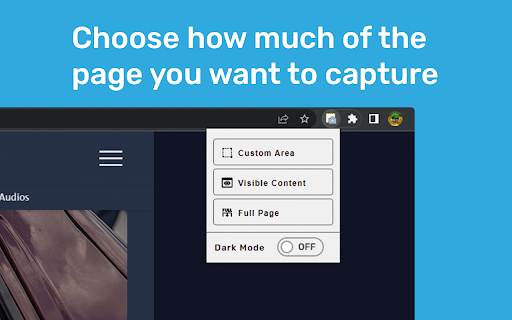


An easy to use extension for taking screenshots in the browser Easily screenshot how much of your current page as YOU want, for free! If you want to choose how much of the current page you want to screenshot, this is the right extension for you. Use the extension by clicking on the icon in the top right of Chrome. You can see a selection of options for the area you want to screenshot: - Custom Area: choose your own area to screenshot - Visible Content: screenshot only the content currently visible - Full Page: screenshot the whole website Tip: If none of the options work right after adding the extension to chrome, refresh the website you want to screenshot and it should work as expected afterwards. After the screenshot has been taken, you will be redirected to a new tab showcasing the created screenshot with an option to download the image as a PNG. The extension is minimalistic and very easy to use without bloat, ads or unnecessary permissions. The whole extension is created by an independent developer. You can view the open source project on GitHub: https://github.com/timii/Snapper

VideoMind: Quick ChatGPT for Youtube
1-Click summary, translation or qa for Youtube Videos. VideoMind is a powerful Chrome extension powered by ChatGPT. It provides a 1-CLICK video summary, translation, format for social post or anything prompt you would use directly. Access it directly from your homepage or search results for FREE. With this tool, you can easily avoid clickbait and become more productive by making informed decisions on whether a video is worth watching. Whether you’re a content creator or marketer, Quick Insights from Youtube is an essential tool that can help you save time and boost your productivity. Some key questions and possibilities you can ask: 1. What is the main topic of the video? 2. What is the purpose of the video? 3. What are the main points made in the video? 4. What are some next steps or actions that viewers can take based on the information presented in the video? 5. What are some potential counterarguments or alternative perspectives related to the video’s topic? 6. What are some common misconceptions or misunderstandings related to the video’s topic? 7. What are some potential implications or consequences of the ideas presented in the video? 8. What is the speaker’s main argument or thesis? 9. Who is the intended audience for the video? 10. What are some examples or evidence provided in the video? • Researching a topic: Quickly find videos that are relevant to your research and get a sense of what people are saying about them in the comments. • Avoiding clickbait: Get a better understanding of what a video is about before clicking on it, saving you time and frustration. • Improving productivity: Use the extension to quickly scan through search results and find the most relevant videos based on their descriptions and comments. • Learning from others: Use ChatGPT in combination with the extension to receive summarized insights from the comments, allowing you to learn from others’ experiences and opinions. VideoMind: Quick ChatGPT for Youtube is a powerful tool for anyone who wants to make the most of their time on the platform. Start now with a preset or your own prompt. Support: contact us for any questions or feedback? at videomindonline@gmail.com

Quick Tab Suspender
Handy offline tool to suspend tabs and boost your performance quickly. Every tab suspended would be activated or refresh once you click it. Install the SessionPaw to see the magic visually. It's a part of SessionPaw's FreeApps, for more info or apps, please check https://sessionpaw.com. 🐈🐾🐾🐾

screenie
A tiny extension that takes a full page screenshot in one click. It's just takes a screenshot of entire page in one click.

Thymeline
Add events to your timeline the easy way Keep track of everything important about your projects all in one place. Meet Thymeline, the free Chrome extension that will magically transform your project chaos into an organized masterpiece. Created for Project Managers. Here is how Thymeline saves you time. No APIs. No integrations. As simple as copy & paste. Easily copy relevant information from any of your existing tools or apps without any hassle. Once you download the chrome extension... Step 1: Visit any website. Step 2: Highlight any text. Step 3: Click on the Thymeline Chrome extension Step 4: Add to existing Thymelines. That’s it! Thymeline can handle as many projects as you’re juggling. Create as many Thymelines as you need! Multiple projects, multiple Thymelines, we can handle it. Keep track of it all in a simple interface. Share with others Share your Thymelines with others on your team with view or edit privileges, keeping everyone on the same page. Want to keep it private? You can do that too.
