
oomoeacogjkolheacgdkkkhbjipaomkn
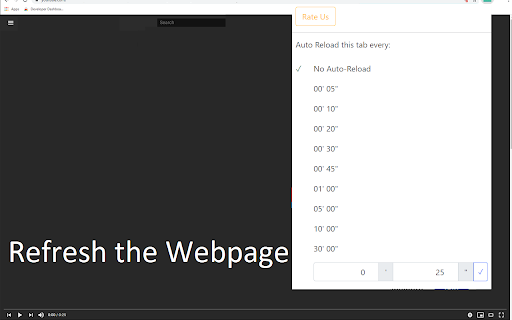
Set the time you want the application to automatically reload your Chrome Browser Tab Auto Refresh reloads the web page periodically. Set the refresh interval and it will refresh tab by timer, even for background tabs. Waiting for some important update and you need to hit the refresh button? Just set up the update time interval and let our software press the reload button for you! Click on the auto refresh icon in toolbar Specify the refresh interval and options that allow you to refresh the tab Press the start button Fixed the bug where auto refresh did not work for new Chrome Windows Fixed the display so that the refresh timer countdown is not only in seconds. Disclaimer: Please note this extension is NOT made by Google and is made by an independent development team. All copyrights belong to their respective owners. Google doesn’t endorse or sponsor this Chrome extension. Tab Auto Refresh is not owned by, is not licensed by and is not a subsidiary of Google Inc.

SuperRefresh , Auto Refresh pages
SuperRefresh, Auto Refresh the page interval. you don’t need to frantically press Ctrl-R or F5 if you are waiting for an update. Features: 1. Auto Refresh the page interval . 2. Tracks all auto refresh progress. 3. Real time display on Icon. 4. Set multiple times for multiple tabs 5. Define custom interval in minutes and seconds

Auto Page Refresh
Tab auto refresh. Refresh pages automatically. Auto refresh and page monitor with specified time intervals fixed or random . Finally a page refresh that works. Reload any page with just a few clicks. Page refresh works on any website. Auto-refresh (auto-reload) your idle pages on a selected interval. Are there times when you want a page(tab) in your browser to auto-refresh? Do want your page/tab content to be always updated. Now that is easy - Page-refresh will reload your pages and tabs for you. It is very easy and super simple - just set the time interval that you want to auto refresh your pages or tabs and the Page-refresh extension will auto reload the pages. The best thing about this page refresh extension is that there is no setup required - it is easy and simple to use, install it and let your idle pages be auto reloaded. Just choose the time you want Page-refresh will do its magic. If what you want an extension that automatically reloads and refreshes web pages in the simplest way, this is what you need.

Tab Auto Refresh
Tab Auto Refresh is a browser addon that helps you automatically reload (refresh) tabs of your choice. To operate with this addon, please open toolbar popup UI while you are visiting a website. Adjust time interval in seconds (i.e. 120 sec) and you are all set. Selected tab will be reloaded based on the interval you just set. Please note reloading occurs based on tab URL not tab ID or domain. If you want to stop the current "reload" task, please press on the "stop" button at top left corner in toolbar popup UI. Alternatively you can set the interval to 0 which is equal to stop function. If you have many tabs reloading and do not want to visit each tab to clear the reloading task, please open toolbar popup UI and press on the "reset" (top right) button to do so. This button serves as a global reset button and clears the reloading task for all tabs. Note: The toolbar popup interface supports dark mode. To switch the popup interface theme to dark, please press the moon icon on the bottom left corner. To report bugs, please visit addon's homepage (https://mybrowseraddon.com/tab-auto-refresh.html) and fill the bug report form.

Tab Reloader (page auto refresh)
An easy-to-use tab reloader with custom reloading time for individual tabs and more! You can define a custom period with a random variation for each tab. Tab reloading jobs can be disabled or enabled through the toolbar panel. Features: 1. Define variable (random) reloading times with a predefined range 2. Define whether reloading occurs when a tab is active or not 3. Restores reloading jobs after a restart (session manager) 4. Reload tabs from the context menu over tab element (see screenshot) 5. Optionally displays the remaining time of the next reloading on the badge area 6. See the list of all tabs with active reloading jobs in the browser action's popup 7. Set custom rules to start reloading a tab when URL or hostname matches. 8. Optionally move to the bottom of a tab after reloading occurs to read the new content 9. Reload all tabs in the current window or all browser windows 10. Reload local files (file://) 11. Optionally bypass form submissions 12. Define a policy that prevents reloading based on the time (date) and URL 13. Run custom JavaScript code on each reload. 14. Reload only a few times and then stop. 15. Reload discarded tabs in the current window or all windows 16. Supports setting reloading jobs of all selected tabs at once To disable an already activated tab, please make sure to switch to the tab first, then open the toolbar button and disable the job. Note that if you are closing the tab, there is no need to disable the job. The job will be disabled automatically after an active tab gets closed. As of version 0.2.7, you can now ask the extension to automatically set new reloading jobs for you based on the "Custom JSON" object. If the option is checked and the new page has a matching hostname, the extension will load the custom reloading job from the JSON and applies to the tab. Check the options and FAQs pages for more info. As of version 0.2.9, 1 you can define a policy that prevents reloading based on the time (date) and URL. Both time and URL keys accept regular expressions to prevent reloading. With the policies you can, for instance, prevent reloading on a specific page of a domain or prevent reloading at specific hours of a day.
