
oocjbppnakjplkgkcpiaobafeedefhdn
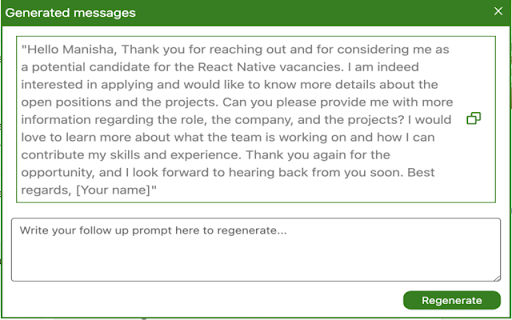

Quickly and easily set up auto-replies to messages you receive, saving you time and effort in responding to messages. Introducing our new Chrome extension, designed to make your LinkedIn messaging experience even easier and more efficient. With our extension, you no longer need to spend time thinking about how to craft the perfect response to your LinkedIn messages. Our advanced technology uses GPT-3, one of the most advanced natural language processing tools available, to generate responses for you based on your recent LinkedIn message history. Our extension reads your last couple of LinkedIn messages and then generates a response that matches the tone and content of your previous messages, saving you time and effort. Whether you're responding to a job offer, networking with a new contact, or following up on a conversation, our extension can help you quickly and easily craft a response that will impress your recipients. Our extension is perfect for busy professionals who want to save time while still maintaining a professional tone in their LinkedIn messages. Try our extension today and experience the convenience and efficiency of automated message responses powered by GPT-3!

Video To Text
Easily transcribe video to text. Convert video and audio to text effortlessly for quick access to AI transcription. 🎥 Unlock the power of your videos with the video to text Chrome extension, your ultimate tool for transforming video content into easily accessible text. Whether you’re a student, professional, or content creator, this extension simplifies the process of transcribing video to text, saving you time and effort. ⏱️ With just a few clicks, you can convert video to text and gain instant access to the information contained within your videos. No more tedious manual transcription! The video to text converter is designed to help you efficiently extract key insights from your video files. ✨ Here are some of the amazing features that make our video to text extension a must-have: 1. Effortless transcription: Transcribe video to text in seconds. 2. Multi-format support: Upload file to transcribe from various video formats. 3. AI-powered accuracy: Enjoy high-quality results with our advanced AI transcription technology. 4. User-friendly interface: Navigate easily and quickly get your transcripts. 5. Versatile applications: Perfect for students, professionals, and content creators alike. 🎤 The video to text extension also allows you to transcribe audio to text seamlessly. This means you can use our audio to text converter to handle not just videos but also audio files. Whether you need audio transcription for interviews, podcasts, or lectures, our tool has you covered! 💡 Imagine being able to translate video to text in a matter of moments. With our extension, you can easily generate YouTube subtitles or create a comprehensive YouTube transcription for your channel. This not only enhances accessibility but also boosts your SEO efforts by providing search engines with valuable text data. 🌟 Why choose video to text? Here are some compelling reasons: • High accuracy rates thanks to AI transcription. • Fast processing times that keep you productive. • Support for multiple languages, making it a global solution. • Ability to edit transcripts directly within the extension. • Shareable transcripts that facilitate collaboration. 🚀 The process is incredibly simple. Just install the video to text extension, select your video or audio file, and let our powerful technology handle the rest. You’ll receive a polished transcript video to text that you can use for various purposes, from creating engaging blog posts to enhancing your online courses. 📹 If you’re looking for a reliable YouTube video converter, look no further! The video to text extension allows you to easily convert any YouTube video into text format. This is perfect for creating content summaries or extracting quotes for your articles. 🔊 But it doesn’t stop there! You can also utilize our audio to text transcription capabilities for any audio files you have. Simply upload your file to transcribe, and in no time, you’ll have an accurate representation of your audio content in written form. 🛠️ In addition to its core features, video to text also offers: 1️⃣ Customizable settings for personalized transcription. 2️⃣ Batch processing for multiple files at once. 3️⃣ Integration with popular platforms for seamless workflow. 4️⃣ Regular updates that enhance functionality. 5️⃣ Responsive customer support ready to assist you. 👩🏫 Whether you're an educator needing lecture transcripts or a marketer looking to create engaging content from your video campaigns, the video to text extension is your go-to solution. It streamlines the process of converting video to text, allowing you to focus on what truly matters—creating and sharing valuable content. 🌈 Don’t miss out on the opportunity to enhance your productivity with the video to text extension. Start transcribing your videos and audio files today, and experience the ease of having all your content in text format at your fingertips! 🙌 Join countless satisfied users who have discovered the benefits of this incredible tool. With video to text, you can effortlessly transcribe video to text and unlock new possibilities for sharing and utilizing your content. Download now and transform the way you interact with video and audio forever! Frequently Asked Questions ❓ What types of files can I transcribe using this extension? You can transcribe various formats including YouTube videos, MP4 files, and audio formats like MP3. ❓ Is there a limit on the length of the videos I can transcribe? While there may be practical limits based on performance, most users can transcribe videos of significant length without issues. ❓ How to convert video and audio to text? Open the extension page, choose the file and click the "Transcribe" button. ❓ How accurate is the transcription? Our AI-powered technology provides high accuracy rates; however, accuracy may vary based on audio quality and accents. ❓ Is there a cost associated with using the video to text extension? The basic features are free. ❓ How do I report issues or provide feedback? You can reach out through our support page linked in the extension for any issues or feedback regarding your experience.

Twitter Reply Generator – ReplyX AI (Smart AI Auto-Replies)
Generate AI-powered Twitter/X replies instantly. Smart auto-replies to boost engagement and save time. Reply X AI – AI Replies for X (Twitter), in One Click Reply X AI is a browser extension that generates smart, contextual replies directly inside X (Twitter) — without leaving the page, without copy-pasting, and without sounding like a bot. No generic templates. No copy-paste. Only replies that actually fit the conversation. 🤖 Automatically analyzes the tweet you’re replying to ✍️ Generates natural, human-like AI replies ⚡ Saves time for creators, marketers, and founders 📈 Helps increase engagement and visibility 🎯 Works directly on X — no extra tabs, no distractions 👥 Perfect for: Content creators Social media managers & marketers Founders & entrepreneurs Web3 / Crypto / Tech communities Anyone who wants to stay active on X with less effort ReplyX AI never posts anything automatically. You always review and approve replies before posting. 🔹 Notes for Chrome Review (safe wording)

Qura AI - Instant AI Replies for Social Media
Instant AI-powered replies for all social platforms to boost engagement and save time. Qura is an intelligent Chrome extension that helps you generate personalized, AI-driven replies for posts on all social platforms (X/Twitter, LinkedIn, Reddit, Facebook, etc). With just a few clicks, Qura automates your social media interactions, saving you time while maintaining a natural, authentic tone. Whether you're a professional, content creator, or social media manager, Qura makes it easy to stay engaged with your audience without spending hours crafting responses. Key Features: ✅ AI-Powered Reply Generation: Qura automatically generates contextually appropriate replies to posts on X, LinkedIn etc based on the tone you choose. ✅ Customizable Tones: Select from a variety of pre-set tones, such as "Neutral," "Support," "Agree," and "Disagree," to ensure your replies match your intended message and voice. ✅ One-Click Replies: With just one click, generate replies that reflect your unique style and interact effortlessly with your followers or connections. ✅ Edit or Post Directly: Review and edit the AI-generated replies before posting, giving you full control over your interactions. Why Use Qura? ⏲️ Save Time: Automate the process of replying to posts, enabling you to focus on other important tasks while still engaging with your audience. 📈 Increase Engagement: By quickly responding with relevant, personalized replies, you can boost engagement and interaction on your posts, helping grow your social media presence. ⚡Easy to Use: Qura integrates seamlessly with your existing social media (X/Twitter, LinkedIn) accounts. It’s simple to install, set up, and start using right away. Qura empowers users to optimize their social media strategy, improve online interactions, and grow their presence on X, LinkedIn etc effortlessly with AI-driven tools. Whether you're managing a brand or interacting with your followers, Qura helps you stay connected without the hassle of manually writing each reply.

Snoooz - AI Email Writer
AI email assistant for Gmail and Outlook. Draft, auto-reply, and write better emails instantly with one click. Write smarter emails in Gmail and Outlook — instantly. Snoooz is an AI email assistant that instantly creates your drafts. Write your email using AI or saved templates, or highlight the text, click the "Improve" button, and watch it transform into clear, professional, confident language. No retyping, no second-guessing. 💡 What you can do with Snoooz: – Write and improve your email drafts within Gmail, Outlook, and other popular email clients. – Auto-reply to emails with personalized responses – Categorize and route emails – Set up smart out-of-office replies – Use AI to save hours managing your inbox 👌 Perfect For: – Sales reps sending outreach emails that need to land – Customer support teams responding to tickets quickly – Professionals who want to sound confident without spending 20 minutes on one email – Non-native English speakers who want their emails to sound natural – Anyone tired of overthinking every sentence they write 😎 Why Choose Snoooz Over Other Email Writers: – Unlike other AI email tools, Snoooz doesn't generate emails from scratch. It improves what you've already written. This means your emails still sound like you, just better. You stay in control of the message while Snoooz handles the polish. 🏆 Why 10,000+ professionals use Snoooz: – Rated 4.8/5 on G2 – Top Product of the Day on Product Hunt – Startup of the Year by Hackernoon – Used in 60+ countries 📥 Let Snoooz Handle Your Entire Inbox: – The Chrome extension is just the beginning. Upgrade to Snoooz's full platform and unlock powerful email automation features that save 5-10 hours every week: – AI-Powered Auto-Replies: Set up smart, context-aware auto-replies that read incoming emails and respond with personalized messages matching your tone and style. – Smart Out-of-Office Management: Go beyond basic auto-replies. Automatically block your calendar, decline meetings, reassign tasks, and assign backup coverage while you're away. – Email Triage & Routing: Let AI categorize incoming emails and route them to the right person or folder without you lifting a finger. – Custom Automation Rules: Create rules based on sender, context, sentiment, or CRM data to draft, send, or ignore emails automatically. – Team Collaboration: Copy backups on critical conversations, reassign tasks during absences, and keep your team in sync. – Integrations: Connect with Gmail or Outlook for a complete workflow solution. – Analytics Dashboard: Track email response times, template usage, and automation performance to optimize your workflow.
