
oobgojiochekabnidddglbpbikhnfidb
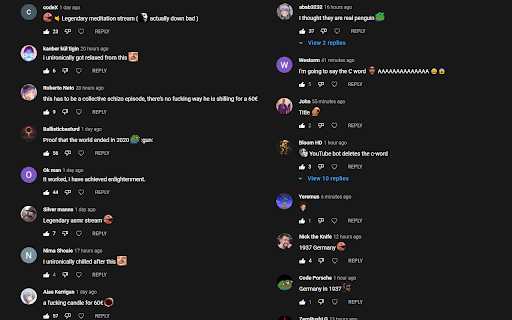


This extension currently does the following: -Enables emotes for comments (mostly forsen's Twitch, BTTV, and FFZ emotes, both static and animated). -In-video Comments - where if you post a comment with a timestamp at the beginning, it will show up on the video at that time. Emotes are also enabled for this.

NewTube (YouTube Customizer & Enhancement)
Customize your YouTube website with a lot customizable. *For simple! you just download and try new Youtube looking!!!*

Player Enhancer for YouTube
Chrome extension that enhances the YouTube player experience. - Adds skip controls to the player control bar. - Adds a reload button to the live chat menu. - Prevents the page from scrolling when clicking timestamps. - Automatically opens the live chat when it is closed. - Automatically closes polls in the live chat.

YouTube Refined: Improve's YouTube UI
Updates the Desktop YouTube UI to have rounded corners and further enhancements and tweaks. Refine and enhance the desktop experience of YouTube with more consistent UI, rounded corners and general tweaks. This extension does not change any functionality of YouTube, this is simply an UI polish and enhancement. The UI tweaks will work in both light and dark mode and will adapt accordingly. Below is a list of the UI tweaks that have been currently made: SUBSCRIPTIONS: - Increased spacing between each video - Added a hover animation to each video, making it clear which video you are clicking and to add some flare. - Video thumbnails now use rounded corners VIDEO PLAYER: - Adds rounded corners to video player - Increased the roundness of corners on action buttons - Adds rounded corners to the individual flyout cards - Adds a hover animation to the individual flyout cards - Fixes the flyout menu appearing below end slate elements - Adds a background colour to the Share, Download, Clip and Save buttons to make them more consistent with other action buttons - Increased the spacing of elements within the channel strip and top comment strip - Adds rounded corners to the channel strip and top comment sections - Adds rounded corners to the hover boxes of end slate items and video thumbnails COMMENTS - Adds clear separation of each comment by adding a faint border and increased padding - Increases the spacing between comments and the "See more replies" button. - Adds clear separation to each comment within the reply chain including a faint border RELATED VIDEOS - Adds a hover animation to each video (slight slide out) - All thumbnails have rounded corners - Made the progress indicator bar of unfinished videos slightly transparent - Adds a background colour and CONTINUE WATHCING label to videos that have been previously watched but not yet finished. This makes it super clear what is a new recommendation and what is a previously watched item. VIDEOS (Displayed anywhere) - Added a red background colour to the Live and Premiere indicators with white text. Also increased the rounded corners and padding. - Increased the roundness of corners of video length indicator - Slightly increased the padding of video length indicator SEARCH BAR - Adds rounded corners to the top search bar - Reduced the width of the search button v1.0.1 - Updated the extension to support the latest version of YouTube's UI

Video Enhancer for YouTube™
Increase playback rate up to 16x, boost the audio, adjust both the brightness and contrast and add various filters to your video. Enhance your video with various useful and helpful options and filters. Features: • Adjust the playback rate of the video from 0.1x to 16x • Boost the audio • Loop the video • Loop over specific sections of the video • Adjust the brightness • Adjust the contrast • Add and adjust up to 7 more filters • Toggle Picture-in-Picture(PiP) mode • Customize the theme and font size of the extension You can report issues and request features here: https://github.com/isgkm/VEfYT Version 2.0.0: • Refactored the majority of the codebase fixing some bugs and improving performance • Redesigned the UI • Added the ability to edit filter values directly in the text fields to allow more precise inputs • Added the option to loop the video • Added the option to loop the specific sections of a video • Added the font size option to the settings page Version 1.2.0: • Added the option to toggle Picture-in-Picture(PiP) mode Version 1.1.0: • Now you can adjust the filter values more precisely with the mouse wheel • Added the option to not reset filters on video change • Added the option to customize the colors of the extension
