
onoegffbmcddafoabbeicpdebfjonkoj

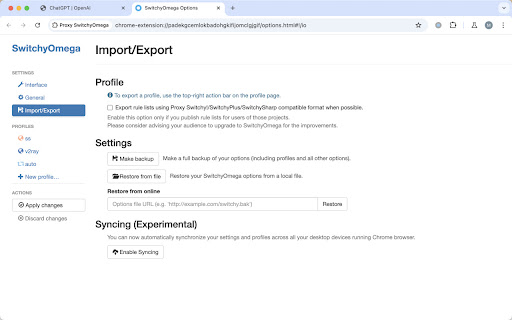
Manage and switch between multiple proxies quickly & easily. 🔥 Proxy SwitchyOmega: Powerful and Easy-to-use Browser Proxy Management Plugin Proxy SwitchyOmega is a powerful and easy-to-use browser extension plugin, mainly used for managing and switching multiple proxy settings. It is particularly suitable for mainstream chrome kernel browsers such as Google Chrome, aiming to simplify the user's proxy management process, making the switching of proxies in different network environments more efficient and convenient. Whether to protect personal privacy, or to access specific network resources, SwitchyOmega can provide effective solutions and can be called an essential tool for every network user. 🧑💻 Usage Scenarios The functionality of Proxy SwitchyOmega is extensive, applicable to a variety of network usage scenarios: 1. Users who need to frequently switch proxies. 2. Individuals or enterprises with high requirements for network privacy protection. 3. Developers who need to test different network environments. 4. Users who need to access geographically restricted content. 5. Users who want to bypass network censorship. No matter if you're an ordinary internet user, an IT professional, or a corporate user, you can fully utilize the SwitchyOmega plugin to efficiently meet all needs for proxy switching, network security protection, and specific network resource access. 1️⃣ Search and install the Proxy SwitchyOmega plugin in the Chrome web store. 2️⃣ After installation, click the SwitchyOmega icon in the browser toolbar to enter the settings interface. 3️⃣ Create a new proxy configuration file, input proxy server information (address, port, protocol type, etc.) 4️⃣ Set up automatic switching rules, you can automatically select different proxies based on URL or domain name. 5️⃣ During use, simply click the plugin icon to quickly switch different proxy settings and enjoy a convenient and efficient network experience. 💻 Main Feature Summary - 🔥 Proxy SwitchyOmega: Multi-proxy protocol support: Compatible with HTTP, HTTPS, SOCKS4, and SOCKS5 protocols. - 🔥 Proxy SwitchyOmega: Scenario Mode: Create multiple proxy configuration files to easily switch between different network environments. - 🔥 Proxy SwitchyOmega: Auto-switch: Automatically select the appropriate proxy server according to preset rules. - 🔥 Proxy SwitchyOmega: Rule Editor: Flexibly set proxy rules, support wildcard and regular expressions. - 🔥 Proxy SwitchyOmega: Quick Switch: One-click switch of proxy settings through the browser toolbar icon. - 🔥 Proxy SwitchyOmega: Import and Export: Support for importing and exporting configurations, convenient for backup and migration. - 🔥 Proxy SwitchyOmega: PAC Script: Supports the use of PAC (Proxy Auto Configuration) scripts for more advanced proxy control. 💻 Feature Highlights - 🚀 User-friendly interface: Intuitive and easy-to-use settings interface, lowering the learning curve. - 🚀 High customization: Can customize proxy rules and switching conditions according to individual needs. - 🚀 Cross-platform compatibility: Supports Chrome, Firefox and other mainstream browsers. - 🚀 Performance optimization: Efficient proxy switching mechanism that doesn't affect the browsing experience. - 🚀 Security protection: Enhancing privacy protection by hiding real IP through proxy servers. - 🚀 Rule sync: Supports synchronizing proxy rule settings across multiple devices. - 🚀 Real-time status display: Clearly displays the current proxy status being used. ❓ Frequently Asked Questions Q: Does Proxy SwitchyOmega support all types of proxy servers? A: SwitchyOmega supports most common proxy protocols including HTTP, HTTPS, SOCKS4, and SOCKS5, to meet the needs of most users. Q: How to add a new proxy server in Proxy SwitchyOmega? A: Users can click on the plugin icon, go into the settings interface, then choose New Scenario Mode, and fill in the relevant information of the proxy server to add a new proxy. Q: Does Proxy SwitchyOmega affect browser performance? A: Proxy SwitchyOmega is optimized and designed to have minimal impact on browser performance. Normal usage will not feel a noticeable slowdown. Q: How to set automatic switching rules? A: In the settings of Proxy SwitchyOmega, select Automatic Switching mode and then add rules, specifying which proxy configuration to use for specific URLs or domain names. Q: Is Proxy SwitchyOmega safe and reliable? A: Proxy SwitchyOmega itself is a safe tool, but users need to ensure that the proxy server being used is trustworthy to protect personal privacy and data security. Q: Is technical support provided? A: Proxy SwitchyOmega has an active community support. Users can submit questions or seek help on GitHub, and can also refer to official documentation for usage guides. By using Proxy SwitchyOmega, users can manage network connections more flexibly, improve online safety, and easily access various network resources. Whether for daily browsing or professional network management, Proxy SwitchyOmega is a trustworthy and powerful tool.

Proxyverse
A tool to help you manage and switch your proxy profiles Proxyverse is a modern, open-source browser extension designed as a streamlined alternative to Proxy SwitchyOmega. Built with the latest web technologies and adhering to current extension standards, Proxyverse simplifies proxy management. Key Features: 1. One-click switching between configured proxy profiles. 2. Rule-based traffic splitting for on-demand proxy usage. 3. Profile import and export capabilities. 4. Dark mode support. 5. Cross-browser compatibility: Chrome (and Chromium-based browsers), Edge, Firefox. 6. Open-source for complete transparency. Explore the project and contribute on GitHub: https://github.com/bytevet/proxyverse.

Proxy SwitchyOmega v3 (ZeroOmega)
Manage and switch between multiple proxies quickly & easily. Proxy SwitchyOmega v3 (ZeroOmega) is an advanced proxy manager extension designed for Google Chrome and other Chromium-based browsers, fully compatible with Manifest V3. It provides a seamless way to switch between multiple proxy configurations with ease, enhancing privacy, security, and accessibility. 🔹 Key Features: ✔ Manifest V3 Support – Ensures compliance with the latest Chrome extension security and performance standards. ✔ Easy Proxy Switching – Quickly switch between different proxy profiles without restarting the browser. ✔ Rule-Based Proxy Routing – Define rules to automatically route traffic through specific proxies based on domains, URLs, or protocols. ✔ Multiple Proxy Protocols – Supports HTTP, HTTPS, SOCKS4, and SOCKS5 proxies. ✔ Auto Switch Mode – Dynamically change proxy settings based on predefined conditions. ✔ No Background Service Workers – Optimized for performance with reduced resource usage. ✔ User-Friendly UI – Intuitive interface for managing and configuring proxy settings. Whether you're a developer, researcher, or just looking to enhance your browsing privacy, Proxy SwitchyOmega v3 (ZeroOmega) is the perfect tool for efficient proxy management in the modern web environment. 🚀 Get it now and take full control over your proxy settings!

Automatio Proxy Switcher
Add, edit, and switch between HTTP/HTTPS proxies quickly. Automatio Proxy Switcher is a comprehensive proxy management extension that helps you: 🔒 PROXY MANAGEMENT • Add, edit, and delete HTTP/HTTPS proxy profiles • Quick connect/disconnect with one-click switching • Support for authenticated proxies (username/password) • Global bypass list for local and trusted domains • Bulk import proxies from text (multiple formats supported) 🛡️ PRIVACY PROTECTION • WebRTC leak protection to hide your real IP • DNS leak protection via proxy routing • QUIC/UDP traffic blocking for enhanced security • Built-in leak detection testing with real-time results • Strict mode for maximum privacy protection ✨ FEATURES • Clean, modern interface with dark/light theme support • Real-time connection status and IP detection • Comprehensive leak testing to verify protection • Easy proxy profile management and organization • Chrome-optimized for best performance Perfect for developers, privacy-conscious users, and anyone who needs reliable proxy switching with advanced leak protection. PERMISSIONS EXPLAINED: • Storage: Save your proxy profiles and settings • Proxy: Manage Chrome's proxy configuration • Privacy: Enable WebRTC and DNS leak protection • Network Requests: Block STUN/TURN servers for WebRTC protection • All URLs: Apply proxy settings to all websites

Proxy Switcher
Proxy Switcher is an extension that helps you easily switch proxies from toolbar popup UI. Simply open toolbar popup and click on the desired category. There are five categories available to choose from. Moreover, badge icon color changes according to the chosen category. Once the proxy is set, a notification popup shows you the current state. This addon supports PAC proxy as well. Moreover you can white-list any domain or website through toolbar popup UI. In order to white-list a domain, please add the desired domain to the bypass area in toolbar popup. For example, to white-list - https://www.example.com - please add - *example.com - to the filed. Please note that all the entries should be comma separated. Once you filled the bypass area, please mark the related checkbox as well (the checkbox next to the Bypass category). To set PAC proxy, please add a PAC URL or SCRIPT to the designated area (PATH input area). Please note that a PAC path should have a certain format. For example if your PAC file is located in - C:// - folder (on windows machine), please write - file:///C:/pac.data - in the PATH area. If you do not know how to write a PAC file, please read this (https://en.wikipedia.org/wiki/Proxy_auto-config) Wikipedia page. Once you made a correct PAC file, please add it to the PATH field. Note: To switch the popup interface theme to dark, please press the moon icon on the bottom toolbar. To report bugs, please fill the bug report form in the addon's homepage (https://mybrowseraddon.com/proxy-switcher.html).
