
onlpmnflmhlbpejafdjmilndndmfoljb


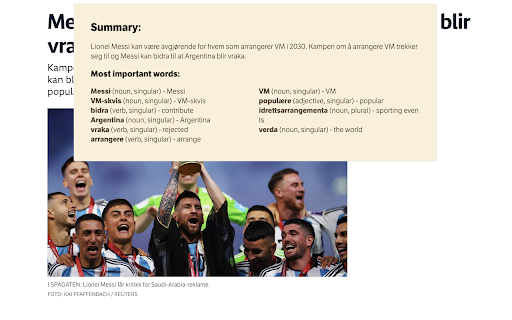
Bardo is a simple extension that allows you to summarize and get most common words in any text in several languages. Bardo AI Summarizer 🤖 is a handy Google Chrome extension that makes it easy for language learners to understand long pieces of text in foreign languages. With just a few clicks, you can get a summary of the text that highlights the most important points and translates the key words and phrases into your target language. Using Bardo is super simple: just highlight the text you want to summarize and click the extension icon. In no time, you can get a summary 📝 that helps you grasp the main points of the text, even if you're not yet fluent in the language it's written in. Whether you're a language learner trying to make sense of a lengthy text or just someone who wants a quick overview of a foreign language article or document, Bardo AI Summarizer can help. Give it a try 🤞 and see how it can make reading and understanding text in a foreign language a breeze! 😎

Muse GPT Page
Muse GPT Page Get instant summaries, highlight timestamps, user comments and automatic classification of the website you’re currently browsing including Youtube, Bilibili videos through OpenAI ChatGPT with a single click. With another click, you can save these summaries and website information to your own Notion tables! Efficiently and effectively obtain and organize valuable and interesting content from the internet! The existing features are permanently free, try it now! 🌟 I know your time and knowledge are valuable, and I want to create a more effective way to organize the valuable and interesting content you gain from the web. And with AI, we can better integrate these together. That’s why I developed this extension to help you do all of this with AI, without lifting a finger. 🎉 With the AI built into Notion, you can now benefit even more from the content you obtain from the internet. ## More features included in ❇️ Get a summary and classification of the currently open website through ChatGPT with a single click ❇️ One-click to save the current page summary and classification to Notion ❇️ Summarize video site content, including YouTube, Bilibili, etc. ❇️ Support for extracting and analyzing YouTube and Bilibili video subtitles (Bilibili does not currently support series) ❇️ AI automatically refines the highlight timestamps of YouTube and Bilibili videos ❇️ Download extracted YouTube or Bilibili subtitles as srt files (only supports default language temporarily) ❇️ Quickly extract key content from news websites ❇️ Supports translating any page language into your language ❇️ Supports Command+Shift+X shortcut to call out the panel for extraction (Ctrl+Shift+X for Windows) ❇️ Supports Markdown formatted display ❇️ Comes with prompts for YouTube, Bilibili and Github ❇️ Customizable prompts ❇️ Supports adapting prompts to domain names, to automatically enable different prompts for different websites ❇️ Editable generated webpage summaries ❇️ Google Material UI ❇️ The summary panel can be dragged anywhere on the page ❇️ Supports automatic popup summary panel on YouTube and Bilibili video pages ❇️ Supports light and dark skin ❇️ Multi-language support ## New features coming soon * Deep analysis of key content automatically connected to the internet * Embedding the highlight timestamps display function in video pages * Summary and translation of copied content * One-click save copied content to Notion * Prompt engineering guide * Connect to Prmpt engineering community * AutoGPT * Analysis and summary of Instagram content and user comments * Analysis and summary of Twitter content and user comments * Summary of Reddit community content After installing this extension, a clear and easy-to-understand usage guide will pop up immediately, just follow the guide to start using it right away. After finishing the guide, click the icon in Chrome, or the shortcut Command+Shift+X (Ctrl+Shift+X for Windows) to start using it immediately ## Please support me on my GitHub page https://github.com/feynmandj/MuseGPT-Page If you find this extension helpful, please give me a Star. Thank you.

tl;dr: GPT3 News Summarizer
Summarize and Translate News Articles in Seconds using the same AI behind ChatGPT Tired of reading the news? Let AI read it for you. tl;dr leverages OpenAI breakthrough AI, GPT3, to extract key points from news articles to save you time and effort. With tl;dr, you can get all the info you want and leave the useless filler behind. tl;dr also enables cross-language translation, and additional directions to input into your summary, such as "Explain it to me like I'm five years old" or "Give me the key statistics I can point to in the summary". Make summarization quick, simple, and effective with tl;dr.

Lindle: Save, Manage Web Links
Say goodbye to scattered links and hello to streamlined productivity. All-in-one web link saver and bookmark manager Lindle is your ultimate solution for managing and organizing your web links with ease. This versatile Chrome extension empowers you to save, categorize, and access your online resources like never before. Say goodbye to the chaos of scattered bookmarks and hello to streamlined productivity. 1. Effortless Link Saving: Save links from the web with a single click, and watch as they're neatly organized in one central hub. 2. Intelligent Auto-Sorting: automatically categorizes your saved links based on their source, whether it's from social media platforms like Facebook, Instagram, LinkedIn, or other websites. 3. Seamless Integration with URL Shorteners: Enjoy the convenience of integrated Bitly and other popular URL shorteners to keep your links clean and concise. 4. Intuitive Search Functionality: Easily find any link you've saved by using our powerful search feature. No more endless scrolling or digging through folders. 5. Folder Organization: Create custom folders to sort and manage your links. Keep everything neatly tucked away for quick access. 6. Access from Messenger Platforms: Our extension embeds directly into Facebook Messenger, Instagram, and LinkedIn. You can access your saved links right from these platforms whenever you need them. 7. Share with Ease: Share links with colleagues, friends, and family without leaving your preferred messenger platform. 8. Cross-Device Sync: Enjoy a seamless experience across multiple devices. Your links are always within reach, whether you're on your desktop or mobile. 9. Clean, User-Friendly Interface: The extension is designed for simplicity and ease of use, making link management a breeze.

SummarAI
Introducing SummarAI, the cutting-edge Chrome extension that empowers you to quickly and accurately summarize PDFs, text, and videos using advanced AI technology. With just a click, SummarAI extracts the most important information from your content, helping you save time and stay focused in the age of information overload. Swiftly summarize PDFs, text, and videos with a single click Utilize AI-powered algorithms for precise and accurate summaries Customize summary length to suit your needs Compatible with a wide range of content types and sources Ideal for students, researchers, professionals, and anyone who values brevity How it works: Install the SummarAI Chrome extension Navigate to the content you wish to summarize Click the SummarAI icon in your browser toolbar Choose your desired summary length and let the AI work its magic Read, share, or save your concise, AI-generated summary With SummarAI, you'll never again feel overwhelmed by endless streams of content. Whether you're a student trying to digest lengthy articles, a professional seeking to stay informed, or simply someone who values their time, SummarAI is the perfect tool to help you cut through the clutter and focus on what truly matters. Join the SummarAI community today and experience the future of content summarization! Note: SummarAI requires an internet connection to function, as it utilizes AI models hosted in the cloud. The extension respects user privacy and does not store any personal data or browsing history.
