
onlpmlkjcaeiajmonbeioinniidpiooa

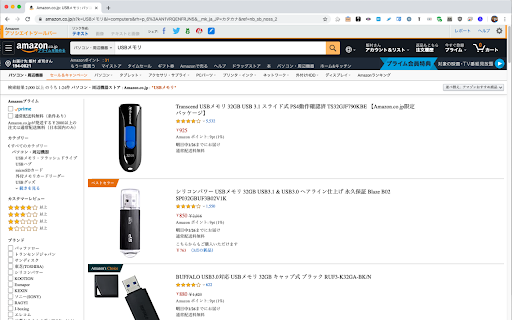
amazon.co.jp での検索結果をAmazon.co.jpの商品のみにします。 amazon.co.jp での検索結果を Amazon.co.jp が販売している商品のみにします。 逆に言うと、Amazon.co.jpが販売しているわけではないマーケットプレイスの商品を検索結果に含めない形にします。 なお、マーケットプレイスのものも検索結果に入れたい場合は、"Just Amazon" のアイコンをクリックすることで検索し直すことができます。 Just Amazon のアイコンが 青地に'a' のアイコンの場合は、Amazon.co.jp が販売している商品のみが検索されています。 Just Amazon のアイコンが 黄色地に'業者' のアイコンの場合は、マーケットプレイスも含めた商品が検索されています。 N-Stylesさんの http://n-styles.com/main/archives/2017/04/14-054444.php を参考にしています。 (Version 2.0 からはマジックワードとして使っている文字列が &rh=p_6%3AAN1VRQENFRJN5 に変わっています) source を https://github.com/limura/JustAmazonCoJP においておきました。 * 更新履歴 - Version 3.0.0: Manifest V3 に移行しました。動作原理などなど変わっています。 - Version 3.0.1: ON/OFFの動作周りを少し変更しました。(Version 2.* の頃までのタブ毎の管理が残っていたので利用しないようにしました) - Version 3.0.2: アイコンと適用されている状態が異なる場合がる問題を修正 - Version 3.0.3: タブを開いた時の初期値が OFF になっていた問題を修正 - Version 3.0.4: https://www.amazon.co.jp/stores/... のURLで誤動作に対応

Control Panel for Twitter
Gives you more control over Twitter and adds missing features and UI improvements Control Panel for Twitter is a browser extension for Twitter - its main goals are to reduce the amount of algorithmic content you see, give you more control over your timeline and make the UI less distracting. By default, your Home timeline will be the reverse-chronological "Following" timeline, which will only contain tweets and quote tweets from the people you follow. The algorithmic "For you" timeline will be hidden, and Control Panel for Twitter will keep you on "Following" if Twitter tries to automatically take you off it. Everything is configurable, so start by opening the options popup and customizing to your liking. Changes you make in the options will be applied immediately. • Use the "Following" (chronological) timeline by default • Hide the "For you" (algorithmic) timeline • Retweets • Show in separate tab / Hide • Quote Tweets • Show in separate tab / Hide • Enable muting of Quote Tweets • Hide "See new Tweets" • Hide "Who to follow", "Follow some Topics" etc. in the timeline • Hide inline prompts in the timeline • Full-width timeline content • Hide the sidebar and let timeline content go full-width • Add "Add muted word" to the "More" menu • Fast blocking (skips confirm dialog) • Hide quotes and replies to blocked and muted accounts • Hide Retweets in user profiles • Retweets in Lists • Default to "Latest" tab in Search • Hide the quoted tweet when viewing Quote Tweets • Redirect to twitter.com • Tweak new layout • Hide Toggle navigation • Replace X branding changes • Hide Views under tweets • Hide "Verified" Notifications and Followers tabs • Restore headlines under external links • Restore Quote Tweets link under Tweets • Restore other links under Tweets • Default sorting of replies • Latest / Likes • Premium blue checks • Replace with Twitter Blue logo / Hide • Hide Premium blue check replies • Hide Premium upsells • Hide Grok • Hide Jobs • Hide Subscriptions • Don't use the Chirp font • Disable bold and italic text in tweets • Use normal text font style in navigation bar • Navigation density • Comfortable / Compact • Use normal font weight in dropdown menus • Uninvert Follow / Following buttons • Monochrome / Themed • Unblur sensitive content • Hide sidebar contents • Hide Explore page contents and use it only for searching • Hide "Discover more" tweets • Hide metrics • Reduced interaction mode • Hide the action bar under tweets – replies are now the only means of interacting • Hide the Compose Tweet button • Disable the home timeline • Find yourself wasting too much time on Twitter? Try preventing use of the home timeline • Notifications • Hide badges only / Hide Hide UI items you don't use • Bookmark button under tweets • Share button under tweets • "View post engagements" under your tweets • Tweet box in timeline • Account switcher • Messages drawer • Explore • Communities • Hide "More" menu items you don't use TWITTER, TWEET and RETWEET are trademarks of Twitter Inc. or its affiliates

Gossip Site Blocker
- Blocks with arbitrary URLs (for example, on Twitter you can block by account) - Blocks by keyword - Control of hide(soft block) and erase(hard block) - Prevent blocked sites from being seen even for a moment - Card type search results, news, video can also be blocked Limitations - Because we prevented it from being seen even for a moment, the layout will collapse somewhat. Resize the window to get back to original.

uBlacklist
Blocks sites you specify from appearing in Google search results This extension prevents the sites you specify from appearing in Google search results. You can add rules on search result pages, or on sites to be blocked by clicking the toolbar icon. Rules can be specified either by match patterns (e.g. *://*.example.com/*) or by regular expressions (e.g. /example\.(net|org)/). You can use this extension in several search engines other than Google. The list of supported search engines is available at: https://github.com/iorate/ublacklist#supported-search-engines You can synchronize rulesets across devices via cloud storage. At the moment, Google Drive and Dropbox are supported. You can also subscribe to public rulesets. Some subscriptions are listed on the website: https://ublacklist.github.io/subscriptions

Clean-Spam-Link-Tweet
ツイート(返信)から悪質なリンクが記載されたツイートを可視化してナイト系スパム等のリンクを踏む事を阻止します。 FireFox版もあります!: https://addons.mozilla.org/ja/firefox/addon/clean-spam-link-tweet/ iOS/iPadOS版もあります!: https://apps.apple.com/jp/app/clean-spam-link-tweet/id6503911724 Twitter上に良く出現するbnc[.]lt等の「ナイト系」等と呼ばれる悪意のあるスパムリンクを分かりやすく可視化する事により、リンクを踏んでしまう事を未然に防ぐことや画面上から消し去る事ができる拡張機能です。 990種類以上のスパムリンク阻止が可能です。 アラビア文字が含まれた「インプレ稼ぎ(ゾンビ)」と呼ばれる悪意のある返信も設定次第である程度消し去ることができます。 搭載機能 ・スパムリンク阻止 ・スパムリンク非表示機能
