
onilpcgmnpikffebghpncnnapebndpaj
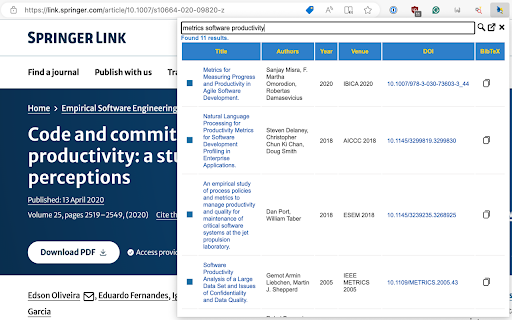
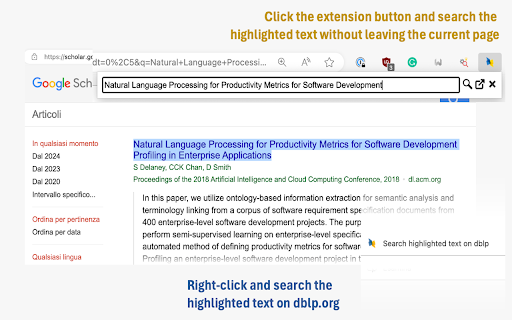
Highlight a text on any page, hit the button extension, see the matching publications, and copy the BibTeX entries to the clipboard. # Features - Search entries (either enter text in the search box or highlight text first). - Search results are displayed in a table (title, authors, venue, year, DOI). - Support for results pagination. - The same DBLP.org color pattern is used to distinguish them by type (Proceedings, Books, Journals, etc.). - The copy button copies the entry's BibTex reference to the keyboard. - Filter out useless CoRR abs entries - Ver 2+ are more efficient as they uses the official API released by dblp.org. - Resolve DOIs from context menu # Options You can configure the following options: - Limit results: You can limit the number of results returned by a query. - Customizable BibTeX Citation Keys. Overrides the default citation key generated by DBLP.org with a user define scheme (e.g., '') - Remove timestamp, biburl, bibsource, and url fields from a BibTeX entry when copying it to the clipboard

Faro
Save pages with highlighted taglines - Bookmark manager ⨯ web highlighter Chaos in your bookmarks? Can't find what you want? They end up gathering dust? Or you don't even try and end up with 100s of open tabs? Faro is made to fix that! It's the simplest way to save & keep track of pages. With it, even thousands of saves don't get overwhelming. When saving, you highlight a sentence to act as a tagline. It helps you remember what the page is about and why you saved it. If unsure - just save whatever sentence you're reading. All saves appear on your dashboard. They come most-recent-first by default, so you don't forget what you recently saved. You can pick up your reading where you left off - no need for a separate reading list. You can also pin & archive to further arrange it. Organize them with tags. Since you're reminded what you saved and why, you can do it later. It makes your saves much easier to manage than bookmarks. Faro supports nested tags (eg: recipes/vegan), so combines the best of tags and folders. Clicking a save takes you right back to your highlight - especially useful for longer articles. Also: ➣ export to bookmarks to keep them if you uninstall Faro ➣ copy links to highlights and share them or paste into Notion, Obsidian, etc. ℹ️ About your data: When installing you can read: "it can read and change all your data on all websites" The only information that ever gets uploaded (when signed in) when you use it to save: ➣ Open page address ➣ Saved highlight/quote - what's visible in the sidebar ➣ Timestamp ➣ Debug info e.g. errors The extension also keeps track the currently open tab for each window - to update the sidebar as you navigate - but doesn't save or upload that data.

Boss Hub | Signal YES
By Whatsapp & Telegram & SMS & Email send Stock & CryptoCurrency & Gold dynamic trade price Signal & Notification & Message to you. BOSS HUB: https://bosshub.up.railway.app By Whatsapp & Telegram & SMS & Email send Stock & CryptoCurrency & Gold dynamic & realtime price Signal & Notification & Message to you. Boss app is your copilot that facilitates the creation of LLM applications by employing multiple agents capable of interacting with one another to tackle tasks. 1️⃣ Features ✅ Support 100+ tasks & workflows according your prompt, command

brocrobes
Browser plugin for https://transcrob.es Brocrobes is the Chrome-compatible web extension for interacting with the open source foreign language content enrichment system of Transcrobes (https://transcrob.es). It allows you to take any webpage and enrich it with personalised, hypertext-based comprehension aids. It requires an existing account on a Transcrobes server. Free accounts are available at https://am.transcrob.es NEW! Now with personalised language learning support for watching many of your favourite movies on Netflix or Youku (in Mainland China)!

OpenText Core SCA Select Extension
Open Source Select will help developers find and use the right open source and reduce friction between organisations and developers Open Source Select helps you find and use policy compliant and great open-source for any development project. The OpenText Core SCA Select Extension is a free plugin created with developers in mind, enabling you to check the health metrics and license information of an open source project at a glance. If you need more granular data, the extension can lead you to Open Source Select for more detailed information. The three types of metrics you can examine are: Community - How healthy the community around a project is. Popularity - Is it used by many? Is the usage declining? Security - How well does the maintainers apply security best practices. The extension now supports Start Left Policies. This lets you immediately see if the open source you are browsing is compliant with your company’s open source policy, without the need to import and scan code with Software Composition Analysis tools and common source code repositories and package registries such as GitHub, pypi, npmjs, nuget and many others are supported.
