
onekmnelbichmlnmkecckkjjljifhefg

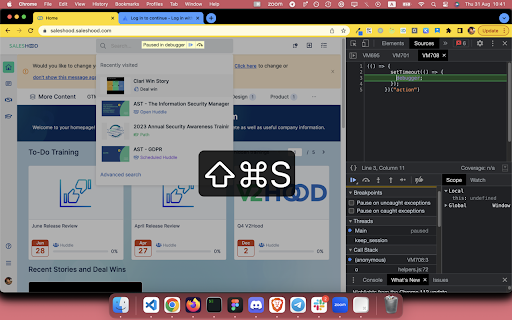
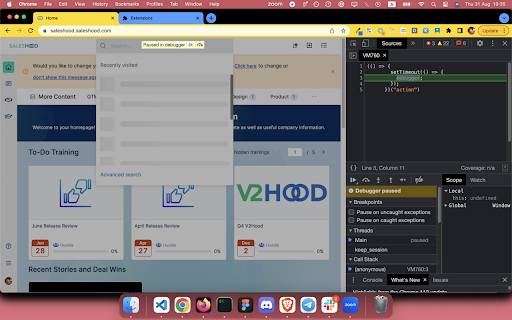
Freeze the DOM instantly Source code for those who's curious: https://github.com/coolcorexix/freedom-on-demand If you find this useful, please consider donating to support my work. It means a lot to me: https://www.buymeacoffee.com/coolcorexil Right click on tab content and choose "Freeze DOM" (while devtool panel is open) to freeze the state of website on demand. With a frozen DOM, you can: - Inspect an UI part that only available while hovered / focused (for example: keeping the auto complete dropdown of a text input visible) - Take a snapshot of an in-progress state (for example: loading state) Note: The shortcut might be overridden by built-in settings of some browsers for example Arc and Microsoft Edge. To fix it: - For Arc: go to arc://extensions/shortcuts and update the shortkeys - For Microsoft Edge: follow this instruction https://www.webnots.com/how-to-assign-keyboard-shortcut-to-extension-in-microsoft-edge/

TimeCrunch Tennis
AI-powered extension that removes non-playing time from tennis matches on Tennis TV and Tennis Channel Plus. The TimeCrunch browser extension is essential for anyone with an ATP Tennis TV or Tennis Channel Plus account. TimeCrunch uses AI to find and then skip over downtime during a tennis match. TimeCrunch is very light weight and will not increase your data usage. We also do not collect any of your browser data.

Freeze.page
Capture an HTML snapshot of the current page with one click. Easily manage history and recycle bin. Supports data import and export. Freeze.page is an efficient and practical Chrome extension that helps you conveniently download HTML snapshots of the current webpage or save them to a history list. Whether it's important articles, information, or interesting content, with just one click, you can save them permanently.

OpenText Core SCA Select Extension
Open Source Select will help developers find and use the right open source and reduce friction between organisations and developers Open Source Select helps you find and use policy compliant and great open-source for any development project. The OpenText Core SCA Select Extension is a free plugin created with developers in mind, enabling you to check the health metrics and license information of an open source project at a glance. If you need more granular data, the extension can lead you to Open Source Select for more detailed information. The three types of metrics you can examine are: Community - How healthy the community around a project is. Popularity - Is it used by many? Is the usage declining? Security - How well does the maintainers apply security best practices. The extension now supports Start Left Policies. This lets you immediately see if the open source you are browsing is compliant with your company’s open source policy, without the need to import and scan code with Software Composition Analysis tools and common source code repositories and package registries such as GitHub, pypi, npmjs, nuget and many others are supported.

Freeze Page & Hover Inspector
Freeze and inspect any web page or hover element. Have you ever tried to "freeze" a complex hover effect, a dropdown menu, or a dynamically changing interface on a webpage at the exact moment you need it most – whether for detailed analysis, a screenshot, or a presentation? The "Freeze Page & Hover Inspector" extension surpasses the capabilities of standard tools and offers you unprecedented control over webpage interactions. This is not just another page "freezing" tool. At the core of this extension lies a system of intelligent algorithms that deeply analyzes the DOM structure, CSS styles (including :hover selectors in a maximum of 5 linked stylesheets), JavaScript events (up to 5 levels of parent elements and neighboring elements within a 100-pixel radius), and dynamically generated content. As a result, you can not only instantly stop the entire page but also capture the exact visual state of a specific interactive element – be it a button, link, card, or complex component – upon its activation. Key advantages that will transform your workflow: Targeted Hover-Fixation: Exclusive technology identifies not only the element the mouse is directly over but also all related elements whose visuals change at that moment (e.g., parent containers, adjacent blocks, effects up to 200-300 pixels away, SVG icons and their colors). Special algorithms are also designed to work with popular libraries like Swiper.js. Pixel-Perfect Visualization: At the moment of freezing, the extension meticulously preserves all the computed styles of the element – from colors and backgrounds to shadows, transformations, and filters. SVG elements and their attributes (fill, stroke, opacity) are fully maintained; even the currentColor value is calculated correctly. Full Page Freeze: If needed, with a single click or a keyboard combination (Shift + Ctrl), you can immediately halt all ongoing processes on the page: JavaScript timers (setTimeout, setInterval), requestAnimationFrame cycles, CSS animations, and transition effects. Even content loaded in an iframe conforms to this mode. Intuitive and Flexible Interface: A compact button in the corner of the screen clearly displays the current status and available keyboard commands (Freeze: Shift + Ctrl, Unfreeze: Esc). You can move the button to a convenient position on the screen after a long press on it. Safety and Stability: The extension is designed with maximum compatibility and safety in mind. To prevent unforeseen issues, an automatic "unfreeze" function is built-in after six minutes. Who is this extension indispensable for? For Web Developers: Diagnosing complex UI bugs, capturing the results of asynchronous operations, in-depth analysis of component states. For UI/UX Designers: Demonstrating interactive prototypes, accurately assessing the visual appearance of design elements in various states. For QA Testers: Detailed testing of web applications, checking the correctness of hover effects and dynamic changes, preparing precise screenshots and video recordings. "Freeze Page & Hover Inspector" is not just an extension – it's a professional tool that saves your time, simplifies complex tasks, and gives you complete control over the dynamic world of webpages. Install it and see its capabilities for yourself! Please note: To activate the "Freeze Page & Hover Inspector" functionalities and see the Freeze button on your page, ensure the extension is enabled via its toolbar icon (an "ON" badge will indicate it's active, and the extension's core features on the page are conditional upon this enabled state).
