
oncckmaelaecccmaniihojgeopkcajfh


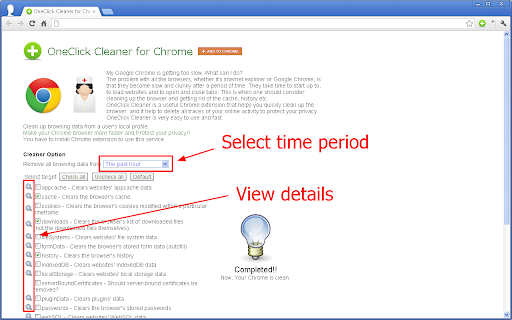
Is Chrome browser Slow? Clean up browsing data. Make your Chrome browser more faster and Protect your privacy!! My Google Chrome is getting too slow. What can I do? The problem with all the browsers, whether it’s internet explorer or Google Chrome, is that they become slow and clunky after a period of time. They take time to start up to, to load websites and to open and close tabs. This is when one should consider cleaning up the browser and getting rid of the cache, history etc. OneClick Cleaner is a useful Chrome extension that helps you quickly clean up the browser. and It help to delete all traces of your online activity to protect your privacy. OneClick Cleaner is very easy to use and fast. Clean up browsing data from a user's local profile. Make your Chrome browser more faster and Protect your privacy!! This extension works with minimal permissions since 2012. Updated to the manifest v3 in December 2023. *Features, Clean the following items. cache - the browser's cache downloads - the list of downloaded files (not the downloaded files themselves) formData - the stored form data (autofill) history - the browser's history passwords - the stored passwords appcache, cookies, fileSystems, indexedDB, localStorage, serverBoundCertificates, pluginData, webSQL

Fast Image Research
Heavy reverse image search user? This extension adds a simple "Research Image" option to the right-click context menu of Web images. Researching an image will automatically retrieve reverse image search results from your choice of Google, TinEye, Yandex, Bing, or a combination. Results are loaded into new tabs. You can use the data to find out who is using your own images, or help narrow down the subject matter of an image you found. NOTE: Google does email me user feedback. Any questions, feature requests or bugs? Contact support using the website link.

Privacy Manager
Manage privacy settings, browsing data deletion, quickly access page in incognito mode, manage cookies and monitor network traffic Privacy Manager is completely free and open source chrome extension for data transparency and control. Privacy Manager can help you with: * Privacy Management * Cookie Management * Browsing data deletion on browser start * Network monitoring Privacy Management - Extension provides ability to manage current privacy settings (Enable/Disable): * Blocks third-party sites from setting cookies. * Hyperlink auditing management. * Manage whether chrome must allow sending referrer headers with requests. * Show alternate error pages or not. * Automatically fill in forms settings management. * Enable or disable 'OK, Google' to start a voice search * Enable or disable password saving * Enable safe browsing in case if the option is disabled by another extension (if safe - --- - browsing is enabled Chrome does its best to protect you from phishing and malware). * Enable or disable safe browsing reporting * Search suggestion management. * Enable or disable correct spelling service. * Translate service switch. * Network prediction management. * Web RTC IP handling Cookie Management - is a tool for managing cookies (to use the tool you need to allow optional host permissions inside of the extension): * View cookies attached to domains * Filter cookies by domain * Add/create cookie * Modify cookie * Delete single cookie * Delete cookies from specific domain * Delete All cookies Network monitoring - User also can manage network traffic in popup window - collect http headers and also block user agent data to be sent via request, to use that feature you need to allow optional host permissions. Github: https://github.com/Privacy-Managers/Privacy-Manager Releases: https://github.com/Privacy-Managers/Privacy-Manager/releases Issues and feature requests: https://github.com/Privacy-Managers/Privacy-Manager#reporting-bugs-suggestions-and-questions Help me translate: https://github.com/Privacy-Managers/Privacy-Manager#translations

History & Cache Cleaner
Clear your browser history, cache and cookies for Google Chrome in just one click! Speed Up Chrome With Super History & Cache Cleaner Extension Super History & Cache Cleaner is a simple utility to clean browser data, cache, cookies, downloads and increase overall browser speed. Click the Add to Chrome button to launch Chrome Super History & Cache Cleaner and clear your browsing history without any effort. My Google Chrome is too slow. What can I do? The problem with all browsers, whether it's an Internet browser or Google Chrome, is that after a while they become slow and clumsy. They take time to launch, load websites, and open and close tabs. That's when you need to think about clearing your browser and getting rid of cache, history, etc. Chrome Super History & Cache Cleaner is a useful browser extension that helps you quickly clean your browser. and it helps to remove all traces of your on-line activities to protect your privacy. Clear browsing data from a local user profile. Make your Chrome browser faster and protect your personal data !! This extension supports Chrome 19 and later. ✔ Instant removal with one click ✔ Clear Chrome History ✔ Clear download history ✔ Clear cache ✔ Delete cookies and other site and plugin data ✔ Clear saved passwords ✔ Clear saved form data ✔ Ability to select a time period This software is 100% free and does not require you to pay.

TooManyTabs for Chrome
Manage your tabs, improve your browsing, and maintain your sanity when you have many tabs open. Ever tried having 20 tabs or more open in Chrome? You can’t even see the favicon of the tabs, not to mention the tab titles! If that happens to you, TooManyTabs is a must-have extension that manages your tabs, reduces your tab overflow, and saves your sanity! From the makers of TooManyTabs for Firefox, TMT has come to Chrome to help all your tab needs! Features - NEW in 2.4! Migrate to Manifest v3 - NEW in 2.4! Export/import with file directly - Bird's eye view of all opened tabs - Preview of tab's content [Require Optional Permission] - Instant tab search - Sort tabs by creation time, domain or title - Remember recently closed tabs (within TMT) - Suspend idle tabs and save memory, organize with custom columns - Custom themes Disclaimer - Due to Chrome limitations, extensions cannot restore history from closed tabs. If you need the history from a recently closed tab, you can press Ctrl+Shift+T to reopen them one by one. If you like TooManyTabs, check out our other extensions too! - Incredible StartPage http://goo.gl/he9o - FreshStart Session Manager: http://goo.gl/249h - TabJump: http://goo.gl/r5EY
