
omppnnipohkhkflpjebgbihgnhmkijlp
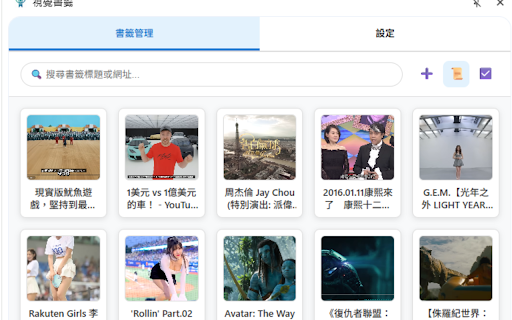


2025 Upgrade! Features screenshots, AES-encrypted private folders, and multi-tag management. Transform your Chrome bookmarks into a… Visual Bookmarks: The Ultimate Chrome Bookmark Manager Tired of endless text lists? Visual Bookmarks transforms your browser bookmarks into a stunning thumbnail wall. Find websites visually in seconds and say goodbye to the text labyrinth! Whether you are a designer, developer, or a privacy-conscious user, this is the essential tool to boost your productivity. 🧠 Smart Meta Search (AI-Like Search) Can't find a bookmark because the title lacks keywords? Search is no longer limited to titles! Enhanced Full-Text Search: When adding bookmarks, the system automatically scrapes Descriptions, Keywords, Authors, and JSON-LD structured data. No Dead Ends: Even if the title is just "Google," searching for "AI" will find it instantly. Hit Highlights: Search results display a helpful "🔍 Matched content:..." snippet, highlighting the keywords so you know exactly why a bookmark was found. Smaller Size, Same Quality: Adopting the next-gen WebP format reduces file size by over 30%, allowing you to save more stunning captures without hitting storage limits. Smarter Context Menu: Simplified logic with a new one-stop "Capture & Bookmark" feature, fully supporting multiple languages. Smart Validation: Optimized URL matching logic during capture to ensure the image is always linked to the correct bookmark, preventing mismatches. 🔒 Private Space & Secure Lock Don't want specific sites appearing in your browser's bookmark bar? We've built a secure vault for you. Isolated Privacy Space: Create "Internal Folders" visible only within the extension, completely isolated from native Chrome bookmarks. AES/SHA Encryption: Secured with SHA-256 encryption hashing. Your password is stored locally; no one can unlock it but you. One-Click Lock: Toggle privacy mode instantly via the lock icon to protect sensitive content. Multi-Tag Management: Break free from folder limits. Add multiple custom tags to bookmarks for flexible searching. Visual Colors: Tags are automatically color-coded for at-a-glance categorization. DOM Element Selection: Designed for power users. Use "Capture Element" in the context menu to precisely grab specific DOM elements (like video thumbnails or specific images) using CSS Selectors. Auto Capture: Instantly snap the visible area of the current page. Custom Area Capture: Drag to crop the exact part of the page you want. Manual Upload: Support for custom images (Logos, Posters). Dual View Modes: Switch between efficient "List View" and beautiful "Grid View". Drag & Drop: Intuitively organize folders and bookmark order. Full Folder Support: Create, edit, and delete folders with native bookmark syncing. Instant Search: Real-time search by title, URL, and tags. Side Panel: Always accessible on the side without interrupting your browsing. Keyboard Shortcuts: Custom hotkeys to double your efficiency.

Block Site - Site Blocker & Focus Mode
Block sites, protect your time with site blocker! Website blocker and password protection help you stay focused. Block Site is one of the best productivity tools available to help people procrastinate less, become more productive and reach their life goals. You’ll never have to worry again about how to stay focused at work. Block disturbing websites easily and Stay focused. This Block Site & Stay Focused extension allows you to block any website. Please note that, the extension blocks the whole domain. When you want to take a break you may deactivate the blocking easily for all blocked sites. Want to know how to block a website? We’ve got you covered! Just add websites to your block list and we’ll do the rest, we’ll even throw in some really funny images if you try and go on the sites while they’re blocked Stay Focused Extension You can now remove all distracting and harmful websites from your life by blocking them while you need to stay in the zone and be productive. You can even set yourself a focus timer and make sure you keep on track throughout the day while at work or school. Focus Mode The focus mode timer feature enables you to control your schedule via the Pomodoro technique timer. Break down your tasks into intervals, traditionally 25 minutes followed by a short break. With ‘Focus Mode’ you can set times when to disable websites and when to browse freely - no willpower necessary. Block by words Keyword Blocker that allows you to define a list of forbidden words that, when used, will block the content (discussion, comment, poll, etc.) This extension will soon be able to be used for blocking triggers or avoiding spoilers. Password Protection If you’ve blocked an app or a website you can unlock it with a passcode of your choosing, making it that bit harder to procrastinate. You can also password protect the options page to keep you from easily removing sites from your list. Adult Content Ever wondered how to block adult content on your device? Well now you can...easily! With the built in adult blocker that blocks all known adult sites by default making sure that you don’t see any inappropriate content. Site blocker may also come in handy if you don`t want to be annoyed by a certain website. In that case you just block site and forget about it. The extension is a real productivity tool that denies access to websites you don`t want to see. Surf the internet safely! Safer browsing and digital protection just got stronger with our brand new dashboard. Track all things internet safety in one place. Sites Blocker extension is going to help you increasing your productivity at workplace. BlockSite easy to install, easy to use and absolutely free extension specially for you! Don't hesitate, install Free Site Blocker & Focus Mode and feel the improvement.

Bookmarks Plus 2025 - Save to Multiple Folders, Tags, Emoji 😀 ...
Your bookmark data is still managed and synced by Chrome/Edge browser, while additional metadata (tags/notes) is stored locally. Works fully offline with zero data import required, ready to use right after installation, and extremely lightweight - the entire extension is only 400KB in size. ⚡ Bookmark Faster & Easier: • Context menu to save current page/open manager • Quickly jump to bookmarked folders from current page • Customized saving interface • Fast folder search and location • Recently used folders 🚀 Save Bookmarks to Multiple Folders: • Use tabs to quickly save bookmarks to multiple folders • Set different Tags, Notes, and Emoji labels (⭐) for bookmarks in different locations 📖 Powerful Bookmark Manager - Quick Preview, Custom Sorting, Custom List View...: • Quick bookmark detail preview with complete titles, links, tags, and browser IDs • Custom sorting: sort by date added, last used time, ID, etc. • Custom list view • Support for multi-select and drag-and-drop 🔎 Enhanced Search: • Local search: search only within specified folders, with option to include/exclude subfolders • Search enhancement: search titles, URLs, notes, tags, and even emoji labels 🏷️ Tag Filtering: • Filter by tags to show only bookmarks with specific tags • Support for filtering by multiple tags simultaneously • Local tags: show only tags in current folder, with option to include/exclude subfolders 📦 Batch Operations: • Select multiple bookmarks to batch set Tags, Notes, and Emojis • Also supports batch deletion and moving, including subfolders Privacy & Security: • Your bookmarks stay in browser storage - we never access your actual bookmark data • We only request bookmark IDs to associate with your annotations • All additional data (tags/notes/emojis) are locally stored • Full offline functionality

Chrome Profile Lock (Secure)
Secure Chrome profile with PIN protection, session timeout, and advanced security features. Created by Global Webify. Chrome Profile Lock – Secure PIN & Session Lock Protect your Chrome browser profile with powerful security features. Perfect for personal, family, business, or shared devices. PIN Protection: Lock/unlock your Chrome profile with a secure 4–8 digit PIN (encrypted with SHA-256). Startup Lock: Always starts in locked mode for maximum privacy. PIN Recovery: Reset with a security question. Extension Protection: Prevents unauthorized removal or disabling. Custom theme creator for personalized design. Perfect for family computers, office use, or shared systems. Easy, fast, and reliable interface. 100% local: no data ever leaves your device. Optimized PIN recovery flow for reliability.

Chrome Lock | Browser Password Lock Extension - ChromeLock.net
Lock your browser with one click. Protect your privacy and data with password protection, auto-lock, and keyboard shortcuts. Protect Your Browser Privacy with One Click Do you share a computer with family members or colleagues? Worried about others accessing your browsing history, saved passwords, or personal tabs? Chrome Lock is the simple, secure solution you've been looking for. Chrome Lock adds password protection to your Chrome browser. With just one click, you can lock your browser and keep your private information safe. When you return, simply enter your password to continue where you left off. THE PROBLEM: YOUR BROWSER IS AN OPEN BOOK Every day, millions of people leave their browsers unprotected: • Family members can see your browsing history • Colleagues might access your open tabs when you step away • Children can browse unrestricted content through your browser • Anyone can view your saved passwords and personal information THE SOLUTION: CHROME LOCK 🔒 One-Click Password Protection Set a password once, then lock your browser anytime with a single click. The extension displays a clean lock screen that blocks all access until the correct password is entered. ⏰ Auto-Lock on Startup Enable auto-lock to protect your browser automatically every time Chrome starts. Your privacy is protected from the moment you open your browser - no action required. 💤 Idle Auto-Lock Set a timer (5, 10, 15, or 30 minutes) to automatically lock your browser when you step away. Perfect for office environments or shared computers. ⌨️ Keyboard Shortcut Lock your browser instantly with Alt+Shift+L (Windows) or Cmd+Shift+L (Mac). Quick and convenient when you need to step away fast. ❓ Security Questions (Unique Feature) Forgot your password? No problem. Set up a security question and recover your password instantly. This is a feature most browser locks don't offer - you'll never be permanently locked out. 🔄 Auto-Reset Timer (Unique Feature) For extra peace of mind, enable auto-reset. If you forget your password, the lock will automatically reset after your specified number of days. This ensures you're never permanently locked out of your own browser. PERFECT FOR 📱 Shared Computers Protect your browsing data when sharing a computer with family members or roommates. Each person's browser activity stays private. 🏢 Office Privacy Keep your personal browsing private when you step away from your desk at work. Lock your browser before meetings, lunch breaks, or coffee runs. 👨👩👧👦 Family Protection Prevent children from accessing your browser, browsing history, or saved information. Create a safe boundary between adult and child browsing. ⚡ Quick Privacy Need to step away suddenly? Lock your browser instantly with a keyboard shortcut. Your tabs, history, and data remain protected until you return. ✅ Simple to Use - Set up in seconds, no technical knowledge required ✅ Lightweight - Zero impact on browser performance ✅ Secure - Password encrypted using industry-standard methods ✅ Private - All data stored locally on your device, never transmitted ✅ Recovery Options - Security questions and auto-reset prevent permanent lockout ✅ Free - All features available at no cost 1. Install - Add Chrome Lock from the Chrome Web Store 2. Set Password - Create your unlock password and optional security question 3. Lock - Click the extension icon or use the keyboard shortcut 4. Unlock - Enter your password to continue browsing Chrome Lock is designed with your privacy as the top priority: • All data is stored locally on your device • Your password is encrypted before storage • Uninstalling the extension removes all stored data ━━━━━━━━ Disclaimer: Chrome Lock is an independent product and is not affiliated with, endorsed by, or associated with Google or Google Chrome.
