
omnpknjnfgngpdoanodjfnhfdbokjckl


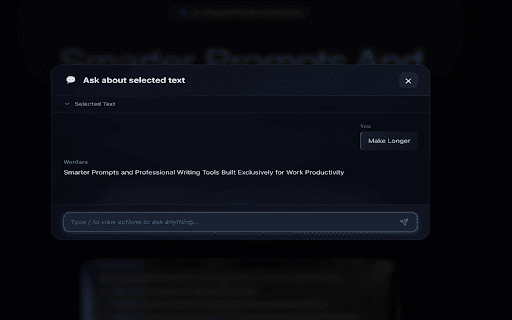
Simplify your AI prompts with one click using advanced AI optimization 🚀 Wordara: Supercharge Your Writing & AI Conversations with One-Click AI Magic Tired of bloated prompts, complicated sentences, or unclear text anywhere? Wordara instantly rewrites and optimizes whatever you select — whether you're chatting with AI or writing in Google Docs, Notion, Word, emails, forums, or any text field on the web. ✨ Now works everywhere text exists: - All major AI platforms - Google Docs & Google Sheets - Microsoft Word Online (Office 365) - Notion, Gmail, Outlook, Slack, Discord - Literally any text box or editor on the web ✨ Key Features - Instant Rewrite on Selection: Just highlight any text anywhere and tap the floating ✨ button (or right-click → Wordara) for instant results. - Smart One-Click Actions: Choose from built-in actions like: → Simplify → Rephrase Professionally → Make Friendly / Casual → Expand Ideas → Fix Grammar & Clarity → Make Shorter / Make Longer → Translate …or create unlimited custom actions for your exact needs! - Floating Magic Button: Appears automatically whenever you select text — no need to copy/paste. - Works Inside Google Docs Too: Select a paragraph in Docs → ✨ button appears → get a cleaner, sharper version instantly (replaces selection or inserts with one click). - Quota Tracking & Unlimited Pro: Free tier included, real-time usage indicators, unlimited on Pro plans. - Full Dashboard Control: Pin your favorite actions, set defaults, sync across devices at wordara.cc. 🎯 How It Works (Takes 10 Seconds) 1. Install the free Chrome/Edge extension. 2. Log in once (free account available). 3. Highlight any text anywhere online → ✨ floating button appears. 4. Click or choose your action → beautifully rewritten text appears. 5. One-click replace selection or copy → done! Perfect for: - Writers who want clearer drafts in Google Docs instantly - Students simplifying complex notes or articles - Professionals polishing emails and reports - Anyone frustrated with bad AI outputs from messy prompts Join tens of thousands who’ve already ditched prompt engineering headaches and bad writing forever. Install Wordara now and turn any selected text into gold with a single click! ✨

MetaPrompt - AI Prompt Engineer & Optimizer for ChatGPT & Claude
Transform unclear questions into expert prompts. Get better AI responses from ChatGPT and Claude with one click. Metaprompt: Your AI Whisperer Transform how you interact with AI MetaPrompt transforms your ChatGPT and Claude experience by intelligently enhancing your prompts. Powered by advanced GPT 4.1 models, our Chrome extension analyzes your questions and refines them to generate clearer, more precise AI responses - saving you time and frustration. Simple, Powerful Workflow 1. Type your question as you normally would 2. Click the MetaPrompt button to apply expert prompt engineering 3. Watch as your request transform into an optimized prompt that gets real results What Sets MetaPrompt Apart - Instant Optimization: Turn unclear questions into structured prompts that deliver exactly what you need - Seamless Integration: Works naturally within ChatGPT's and Claude's interface with zero learning curve - Universal Compatibility: Use our popup anywhere you interact with AI tools Choose Your Perfect Plan MetaPrompt Pro ($5.99/month) - 5000 monthly prompt enhancements - Access to larger, more powerful models for even better results Who Needs MetaPrompt? - Students seeking deeper explanations and research assistance - Professionals requiring accurate information for critical tasks - Writers looking for better creative input - Developers needing precise code solutions - Researchers formulating complex queries - Anyone tired of wasting time on unhelpful AI responses Stop struggling with AI miscommunications. Download MetaPrompt today and start getting the quality responses you deserve.

Compose AI: AI-powered Writing Tool
Accelerate your writing with AI Generate any text using AI. Autocomplete your sentences where you type. With Compose AI, you can write emails, create documents, and chat faster. We use artificial intelligence to automate the writing process. Prompt AI to generate any text, where you already write. Get suggestions for new ways to say something. Draft entire emails from a few words. You can do all that with just one tool. Compose AI is a holistic, AI-first writing solution: ⚡ Type // to generate text using AI 🏄 Autocomplete sentences across different websites ✍️ Rephrase sentences to make them friendlier, more professional, shorter, or longer 🎯 Reply to emails with a click 📄 Generate full-length emails from short phrases ➤ Compose Anything Type // to generate any text. Prompt our AI to write blog posts, marketing copy, paragraphs, sentences, headlines, topical information, research and more. ➤ Autocomplete Our extension’s core feature is Autocomplete. Just hit Tab to take a completion and save time typing. ➤ Compose Email Compose Now is an AI assistant for writing messages. It's great for drafting quick replies or generating ideas you can edit to make your own. To open, press Option+G (or Alt+G). ➤ Easy Email Reply Professionally reply to emails with a single click! Like magic, generated responses will reference the context from the original email. ➤ Rephrase With Rephrase, you can change how you word your sentences without having to rewrite anything. Highlight a text to shorten, expand, reword, or make something sound more friendly or formal. We’re always working to improve your experience with Compose AI. If you have any questions or feedback, we’d love to hear about them at support@compose.ai

AI Grammar Checker & Paraphraser – LanguageTool
Instantly Enhance Your Texts with LanguageTool’s Grammar Checker and Paraphrasing Tool This extension ensures that your writing is error-free. LanguageTool detects many errors that a simple spell checker cannot, such as grammar issues, commonly confused words, and punctuation oversights. Additionally, LanguageTool offers style suggestions to elevate your writing: synonym replacements for overused words, concise rephrasing of wordy sentences, and formal alternatives to commonly used expressions. LanguageTool is designed with simplicity in mind, instantly analyzing your text as you type. It is compatible with most platforms, including social networks such as Twitter and LinkedIn, and e-mail services such as Gmail. With LanguageTool, our aim is to give users a full-feature grammar checker and proofreader that will enable them to have control and confidence over their content. While LanguageTool is a vital extension for non-native speakers, it also recognizes many mistakes that are frequently made by native speakers. This grammar and spelling correction works across several varieties of commonly spoken languages, and is capable of distinguishing between American and British English. LanguageTool also features a personal dictionary for exceptions or words that you might commonly use, but are not found in a conventional dictionary; it will learn to recognize these words for future grammar checking and proofreading. Unlike other services like Grammarly (a.k.a. Grammerly :-), QuillBot, and Ginger, LanguageTool supports more than 25 languages including English, Spanish, French, German, Polish, and Russian (see below for the complete list). Your privacy is important to us: By default, this extension will check your text by sending it to https://languagetool.org over a securely encrypted connection. No account is needed to use this extension. We don't store your IP address. See https://languagetool.org/privacy/ for our privacy policy.

Prompt Copilot
Enhance your prompts and texts with AI-powered suggestions Advanced User Context and Memory Handling Across Major AI Tools
