
omnoiebebeaobclghngbkokilmafignh


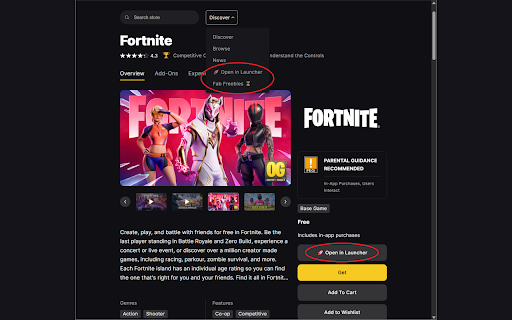
Adds buttons to the Epic Games Store to open pages in the launcher and see Fab freebies. Tired of having to login on the Epic Games website all the time? This is where OIEGL can help you! I feel the ability to open Epic Games pages in the Epic Games Launcher should be something already on the Epic Games website. But it isn't, so I wanted to change that to make all our lives a little bit easier. Unfortunately, I cannot get everything to open in the Epic Games Launcher, for example; Epic Games forums or app discussion pages (at least I haven't found a way, but if you do know a method, please let me know!). I'm just an AI Language model which loves to copy paste code. I'm only synthetic, so there will likely be comparison-bugs somewhere. If you find any bugs, please report them to me (preferably on Discord directly) with details of it and the page you were on at the time if relevant. *now with https://www.fab.com/limited-time-free button! (this chrome extension was made to have a shortcut to the launcher in case to get epic's free games without needing to login on their webpage)

Show GeForce Now on Steam
Shows if you can play games in GeForce Now while you are in steam website This extension shows the availability of games on the GeForce Now cloud gaming service directly on the Steam website. You can easily identify which games are available to play on GeForce Now while browsing or searching for games on Steam. You no longer need to switch back and forth between the Steam and GeForce Now websites to find and play the games you like. This extension only works on the Steam website. Support GitHub: https://github.com/mefaba/show-geforce-on-steam/ What's New 1.9? ✓ New feature to allow users to retrieve the most up-to-date game data from GeForce Now. ✓ Updated game data. ✓ Fixed wishlist page. Previous Updates: ✓ Added Geforce Now Filter function in search page. ✓ Added support for individual game pages. ✓ Minor fixes and updates based on user reviews. ✓ Performance Optimizations

Game Launcher
The extension: - Makes it simpler to open browser games without any further installation - Has 21 games (in the current update) - Has a fresh and dark UI that everyone will enjoy - Several different categories of games WARNING: If your school has blocked some of the websites that the games are hosted on you may not be able to play some of the games. I would suggest using a VPN (if you can) or a hotspot in that case. Update 1.0.3: - Theme refresh (New icons, new background, new font) - Footer at bottom of page with credits and a link to the Webstore page - Removed the "Offbrand Fortnites" category (Games from that category have been moved to Gun) - Renamed Vehicle to Driving/Racing - Added 3 new categories (Educational, Clicker, and Misc.) - Added 11 new games Update 1.0.4: - The extension's icon now appears at the top of the game list - Slightly altered the footer text - Added 6 new games - Added 2 new categories (Obstacle/Puzzle and Runner) Update 1.0.5: - Added 10 new games - Replaced 1V1.LOL 3.900 with 1V1.LOL 4.705 - Renamed "Gun" category to "Shooter" - Some links have been changed to another website Update 1.0.6: - Fixed HTML issue at the bottom of the extension - Added 1 new game - Renamed "Scratch" category to "Coding" Enjoy the extension? Have a problem? Why don't you leave a review?

Epic Games Library Exporter
Export your Epic Games library and transaction history to a structured text file. Epic Games Library Exporter helps you take control of your gaming data by exporting your entire Epic Games purchase history to a structured text file. KEY FEATURES: ✓ Export your complete Epic Games library ✓ Filter by date range to export specific periods ✓ Choose which data fields to include ✓ Privacy-focused: All processing happens locally ✓ No account data is stored or transmitted ✓ Simple one-click export to text file ✓ Works seamlessly with Epic Games Library Viewer WHAT YOU CAN EXPORT: • Game names and purchase dates • Original prices and discounts • Total amounts paid • Order IDs and payment methods • Tax information PERFECT FOR: • Creating backups of your purchase history • Tracking gaming expenses • Managing your game collection • Sharing your library with friends • Personal finance tracking HOW TO USE: 1. Navigate to epicgames.com/account 2. Click the extension icon 3. Select your export preferences 4. Click "Export Library" 5. Your data is saved as a text file This extension is open-source and respects your privacy. No data is collected, stored, or transmitted to any servers. All processing happens locally in your browser. Not affiliated with Epic Games, Inc. Epic Games is a trademark of Epic Games, Inc.

Epic Games Library Extension
🎮 **Epic Games Library Extension** provides instant access to your Epic Games collection directly from the store website. No more navigating through multiple pages or account sections to view your owned games - simply press Alt+G to open your complete library in a clean, organized interface. The Epic Games Store currently lacks a dedicated library section, forcing users to dig through account pages and transaction history to find their games. This extension solves that problem by creating a streamlined library experience with powerful organization tools. **🚀 Key Features:** • **⚡ Quick Access** - Press Alt+G to instantly open your games library • **🔍 Smart Search** - Find specific games in your collection with real-time search • **📊 Sorting Options** - Organize games alphabetically or by purchase date • **🌙 Dark Mode Interface** - Clean, modern design that matches the Epic Games aesthetic • **⌨️ Customizable Shortcuts** - Change the keyboard shortcut to your preference • **🔗 Seamless Integration** - Works directly on store.epicgames.com without redirects • **💨 Fast Performance** - Lightweight extension that doesn't slow down your browsing Perfect for Epic Games users who want to quickly browse their game collection, check what they own before making purchases, or simply organize their digital library more efficiently. The extension integrates naturally with the Epic Games Store interface and requires no additional setup beyond installation. **📋 How to Use:** 1. Visit store.epicgames.com and sign in to your account 🔐 2. Press Alt+G anywhere on the site to open your library ⌨️ 3. Search, sort, and browse your games collection instantly 🎯 Transform your Epic Games Store experience with quick library access at your fingertips! 🚀✨
