
ommecmjombblimoalipfjpnjnjeceiie
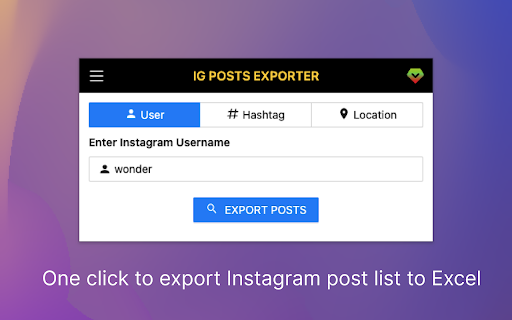
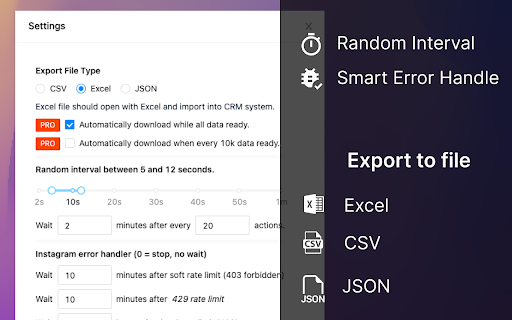
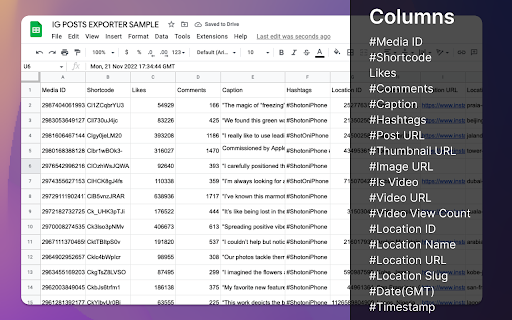
Automatically download Instagram posts to Excel/CSV/JSON tool. Support to export posts from Instagram username, hashtag, and location. #HOW TO GET STARTED? After installing this extension, choose the export type, including Instagram username, hashtag and location, enter the correct name or URL, and click this button to start the download. #v1.5.2 CHANGE LOG - Fix the Is Carousel issue, add Carousel urls. #v1.5.1 CHANGE LOG ✓ Fix the Date (GMT) issue #v1.4.3 CHANGE LOG ✓ Add only export user id and post URL. #v1.4.0 CHANGE LOG ✓ Fixed the fetch user posts empty data issue #UPGRADE ✓ Auto all task save history ✓ Resume task progress from history page ✓ Add export Post URL / All fields option #FEATURES ✓ Unlimited Posts Export ✓ One Click to Export Posts for Instagram ✓ Export data to XLSX(Excel)/CSV/JSON ✓ Automatically download when data is ready ✓ Random Interval range and wait for a period, useful for downloading large amounts of data ✓ Automatically Error Handling for 403, 429, and 400 error message #SUPPORTED FORMATS Export post list from Instagram into Excel, CSV, and JSON formats #FAQ https://igpostsexporter.extensionsfox.com/#faq If you have any questions, please keep in touch via help@extensionsfox.com. #DATA PRIVACY All data is processed in your local computer, never passing through our web server, and no one knows what you exported. #STATEMENT INSTAGRAM is a trademark of Instagram, LLC. IGPost is not affiliated with, endorsed, sponsored, or otherwise related to INSTAGRAM, Inc. or any of its affiliates or subsidiaries.

FastSave & Repost for Instagram
Download Instagram stories, save any IG video and photo. Make repost instagram reels to your feed. InSave is the ultimate tool designed to simplify and enhance your Instagram experience. With its comprehensive set of features, InSave empowers you to download and repost Instagram content seamlessly, all within a single platform. Download Feature: With powerful downloading functionality, you can effortlessly save videos, photos, and stories from Instagram. Repost Feature: Makes reposting Instagram content a breeze, allowing you to share your favorite posts with your audience while giving credit to the original creators. User-Friendly Interface: InSave features a user-friendly interface that prioritizes simplicity and ease of use. Seamlessly navigate between the download and repost functionalities, ensuring a smooth experience throughout. Organize your downloaded content, schedule reposts, and manage your Instagram library efficiently, all with InSave's intuitive interface. Created with love Kurluk

Instagram Email Scraper & Extractor
Instagram email scraper & extractor — export followers/following with emails, phone numbers to CSV/Excel/JSON in one click. SocialDeck is a professional Instagram email scraper and follower export tool for marketers, agencies, and growth teams. Instantly scrape public emails and contact data from any Instagram account's followers or following list — and export everything to Excel, CSV, or JSON with one click. 🔍 HOW TO USE · Install the extension and open it from your Chrome toolbar. · Enter any public Instagram username (e.g. @apple). · Select Followers or Following to scrape. · Click Start — the Instagram email scraper runs automatically. · Once complete, export your data to CSV, Excel (XLS), or JSON instantly. ✅ FEATURES ✓ Extract public email addresses from Instagram profiles at scale ✓ Pull emails from followers, following lists, or any public account ✓ Unlimited Followers / Following export ✓ One-click export to XLS (Excel) / CSV / JSON ✓ Auto-download when data collection is complete ✓ Smart randomized intervals — safe for large-scale scraping ✓ Full profile data extraction: follower count, following count, post count, biography, public email, phone number, external URL, and address ⚠️ DISCLAIMER INSTAGRAM is a trademark of Instagram, LLC. SoLeads.ai is not affiliated with, endorsed by, or in any way officially connected to Instagram, Inc. or its affiliates.

IGFollower - IG Follower Export Tool
IG Follower Export Tool: Scrape Instagram followers and following, and export to CSV/XLSX with one click. "IG Follower Export Tool"is a powerful tool that simplifies exporting Instagram followers and followings into a Excel/CSV file with just one click. This tool enhances your Instagram experience by providing a seamless way to export valuable follower data for analysis or management. 💡 Features ✓ Export followers from Instagram. ✓ Export followings list from Instagram. ✓ CSV and Excel formats support. ✓ Extract user profile, includings User ID, User Name, Avatar URL, Profile URL, Followed By You. ⚙️ Get Started 1. Enter Instagram Username. 2. Select Export type: FOLLOWERS or FOLLOWING. 3. Click the 'EXPORT' button. 🔒 Data Privacy Your data privacy is paramount. All data processing occurs on your local machine; it never transits through our servers, ensuring no one else has access to your collected data. ⚠️ Disclaimer INSTAGRAM and IG are trademarks of Instagram, LLC. IGFollower – IG Follower Export Tool is an independent tool and is not affiliated with, endorsed, sponsored, or otherwise connected to Instagram, LLC, Meta Platforms, Inc., or any of their affiliates or subsidiaries.

IG Exporter & Scraper: Export Instagram Comments data to list
Extract Instagram comments. Pick into CSV and Excel formats. IG Exporter & Scraper is a powerful Google Chrome extension and scraping tool for gathering Instagram comments. Export your data effortlessly into CSV and Excel formats. Perfect for analytics, content management, and social media strategies. Use this best-in-class online service to scrape data from Instagram for free, making it the ideal web scraping tool! ▬▬▬▬▬▬▬ How to Use ▬▬▬▬▬▬▬ 1. Click Ins Tools - Ins Comments Export Tool icon, which is on browser toolbar, then open IGTools popup page via IGTools Net 2. Click "Export Instagram Data" button, an IGTools option page will be opened. 3. Input a valid IG post URL 4. Click "Start export" button, and our IG Tools will run automatically. After this processing is finished, you can download IG comments to CSV or Excel. ▬▬▬▬▬▬▬ Features ▬▬▬▬▬▬▬ ● Export IG comments with one click by extension ● Export up to 50K IG comments ● CSV and Excel formats support ● Handles IG rate limit errors ● Processing in one click via IGTools net ▬▬▬▬▬▬▬▬ Security ▬▬▬▬▬▬ ● The extension neither ask for your IG password, nor any of your data including IG user information, story, visit history, posts, and social relationships. ● IG enforces IG rate limit, i.e. limit on the number of requests. The rate limit is not public information and varies depending on your IP address. ▬▬▬▬▬▬▬▬ How it works in IG Follower Export tool ▬▬▬▬▬▬ ● After every time you get 50 comments the extension goes to Cool down minimum 10 seconds (you can change it in settings tab).
