
omgdecchjpeflplknhhgmlhlobgiibge

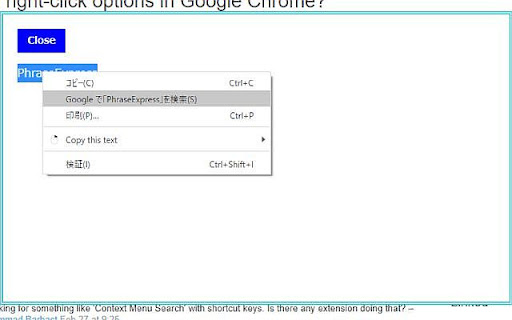
Open a context menu by right-clicking on any text. This extension uses DOMPurify (Mozilla Public License v2.0). This extension allows you to right-click on any text to open a context menu with various commands. Its primary function is to copy selected "TEXT" or "IMAGES" and display them in a simple dialog box. We hope it enhances your workflow. This extension uses DOMPurify.js and Tesseract.js This is under the Mozilla Public License v2.0. Change Log ================ 0.10.5 - 0.10.6 - Added OCR function in the dialog (English only) Try clicking the "dialog" menu on an image containing text - Fix: Ensured popup message displays globally across all frames. 0.10.2 - Expanded the scope of image copying 0.9.8 - Updated the extension to allow copying of images from frames with X-Frame-Options, including cases where window.opener is null. 0.9.7 - Update for image copying. To ensure your safety, this extension does not support copying SVG images. 0.9.6 - Bug fix for image copying. 0.9.5 - Security update for image copying. 0.9.4 - Workaround for a null reference to a new window. 0.9.3 - Updated it to enable copying images even from sites with X-Frame-Options. 0.9.2 - Removed the feature to delete links. - A popup appears when you successfully copy an image. 0.9.1 - Enabled image copying without needing browser clipboard permissions. - Removed the inject_script.js file. 0.8.2 - Apologies for the frequent updates. Focused on ensuring security. 0.8.1 - Cleaned up the code quite a bit. 0.7.0 - Lightened the extension 0.5.1 - Sudden change Workaround for some errors 0.4.87 - Widened the range of IMG HTML tags to copy 0.4.85 - 0.4.86 - Upgrade little by little - Fixed bugs and mistakes 0.4.84 - minor update - This image copying function is so simple that a needless image can be copied instead of the displayed one. 0.4.75 - 0.4.80 - Fixed stupid bugs and mistakes 0.4.4 - Added a dialog closing function with Enter key. 0.4.3 - Fixed some mistakes such as the "search link text" button not working. - Workaround for the issue where this extension couldn't get HTML elements including text in web pages where have shadow root. 0.4.0 - Removed the unnecessary close dialog menu - Fixed the function to get link text code short. 0.3.7 - Removed prompt command and the window pop up - Added search link text command 0.3.6 - Fixed copying function for all cases 0.3.2 - Added "close dialog" menu - Modified some bugs and mistakes on specific pages 0.3.1 - Changed the way of copying function to enable it on as many pages as possible 0.2.9 - Workaround for Chrome disallowing execution of notification

Copy link text
Adds a context menu to copy the clicked link's text Without this extension, copying a link's text is sometimes a bit of an art form. You have to highlight the link to copy the text, which usually involves copying the text around it. This extension allows you to simply right-click on the link and copy the link text. It even supports links in Jira.

Copy As Hyperlink
Copy page title or selected text as a pasteable hyperlink The purpose of this extension is to facilitate copying and pasting of text from a webpage such that the copied data includes a hyperlink to the page on which the text appears. To use this extension: 1. On the web page for which you're creating a link, select the text that you want to appear in the destination document. For a news article, this might be the article headline. If no text is selected, the page title will be used. 2. Click on the icon for this extension. A small window that says "Link copied" will pop up temporarily next to the icon. 3. Paste the text into the destination document. It should appear as a hyperlink to the webpage from which the text was copied. 4. You can also use a hot key to invoke the extension. The default is Alt-Shift-L.

Markdown Linker
Make it easy to copy links with markdown-format - ContextMenu > Copy link with markdown-format It works on the page, text link, or image. - "cmd + ctrl + c" to copy page title and url v0.3.1 fix for github issues page v0.3.0 rewrite for manifest v3 v0.2.4 tweak for relative link v0.2.2 tweak no-text link v0.2.1 fix copy page v0.2.0 add selection copy v0.1.6 add shortcut key - "cmd + ctrl + c" to copy page title and url v0.1.5 bug fix - cannot get link text on link with inner tag v0.1.4 bug fix - cannot get link text on Windows

Copy URL To Clipboard
* When copying the URL of the page, right-click anywhere on the page and open the context menu, then select the format to copy. * When you right-click on a link (an anchor element), you can copy the URL of that link. * If you select some text before right-click, that selected text will be used for the content of the link. * You can edit content text when copying. * Copy to clipboard can be executed from the context menu, the tool button, or keyboard shortcut.
