
omeojakmfellcgbojpohlmgoelmiolfg
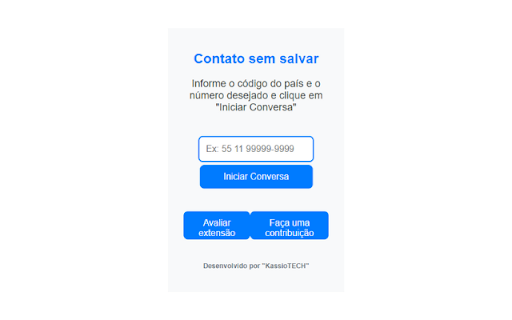
Start WhatsApp conversations without saving numbers to contacts Correções da versão anterior (v1.4.3) -> (v1.4.4) Botões inferiores estavam sem a devida formatação. -- Histórico de Atualizações (v1.4.3) Simplificamos as permissões para tornar a extensão mais leve e segura. Melhoria na tela de uso: mensagens de erro aparecem de forma discreta, sem janelas de alerta. Ajustes gerais para dar mais agilidade ao iniciar conversas. Agora temos essa extensão considerada confiável pelo recurso Navegação Segura com Proteção Reforçada do Google. -- Novidades na Versão 1.4.2: Botão de Colar: Agora você pode colar rapidamente números diretamente no campo de entrada utilizando o novo botão "Colar", facilitando ainda mais o uso. Remoção Automática de Caracteres Especiais: Ao inserir números de telefone, espaços e caracteres especiais são automaticamente removidos, garantindo a formatação correta para iniciar conversas no WhatsApp. Ação ao Pressionar Enter: Inicie a conversa no WhatsApp de forma mais rápida ao simplesmente pressionar a tecla "Enter" após inserir o número. Melhorias na Interface: Ajustes visuais foram aplicados para uma experiência de uso mais intuitiva e agradável. -- Esta extensão facilita o contato rápido com destinatários no WhatsApp sem a necessidade de salvar o contato na agenda. Útil em uma variedade de contextos e interesses além da comunicação pessoal. A extensão aceita apenas números de telefone, sem pontos ou caracteres adicionais. Para números brasileiros, inclua o código internacional do país (55). Compatível com números de telefone de qualquer país

Group Contact Extractor for WA
Easily export WhatsApp group contacts and chats contacts to CSV, Excel files. 🏷 What is Group Contact Extractor for WA? Group Contact Extractor for WA is a Chrome extension that allow people export and save all WhatsApp contacts, includes unknown phone numbers of group contacts. 🏷 Who is the WhatsApp group contact extractor designed for? We developed this extension to make it easier for marketers, salespeople or e-com sellers to better use WhatsApp for marketing and sales. 🏷 What can it do for you? Whether you're looking to boost your brand's visibility or drive product sales, whether you operate offline or sell on platforms like Amazon, Shopify, Shopee, or MercadoLibre, as long as your potential audience utilizes WhatsApp, this Chrome extension is your key to initiating communication with them. Group Contact Extractor for WA enables you to export contact details of members from the groups you've joined, as well as the phone numbers of individuals you chat with. Additionally, the extension can save your extracted WA numbers locally as a file, allowing you to review them at your convenience. You can download phone numbers of group member in various formats such as csv, xlsx, json, and more. 🏷 Feature: Export contacts Export the phone numbers you have chatted with. Export the phone numbers of WA group members (optional whether to include administrator) Save contact information to csv, xlsx, json and other file formats Easy to use Constantly updated. Respecting your privacy and security, the chrome extension will not record any of your information. 🏷 Disclaimer: This Chrome extension is an unofficial enhancement tool, not endorsed or certified by WhatsApp Inc., and must not be used in violation of its policies.

Iniciar conversa pelo Whatsapp WEB
ATUALIZADO PARA NOVA VERSÃO DO WHATSAPP EM: 04-10-2024 Está é uma extensão feita para tornar as conversas de Whatsapp ainda mais… ATUALIZADO PARA NOVA VERSÃO DO WHATSAPP EM: 04-10-2024 Está é uma extensão feita para tornar as conversas de Whatsapp ainda mais práticas. Em alguns casos, pode ser necessário iniciar uma conversa pelo WhatsApp, mas sem a necessidade adicionar mais um contato ao seu celular, ou pelo menos, sem a necessidade de adicioná-lo de imediato, podendo ser em uma urgência ou semelhante. Para estas ocasiões, adicionando esta extensão, basta clicar no botão que surge no canto superior esquerdo da página, ao lado dos 3 pontinhos já existentes do Whatsapp, adicionar o número do contato e iniciar o bate-papo.

Cooby: Best WhatsApp Extension for Work
Cooby is the world's most powerful WhatsApp experience. Are your business conversations happening on WhatsApp? Cooby can take your customer-facing teams to the next level, especially if you use HubSpot. It integrates WhatsApp with HubSpot seamlessly. Best suited for teams that use individual WhatsApp numbers and HubSpot. That includes, but is not limited to, sales, consulting, real estate, education, automotive, financial services, etc. Teams from SMBs to well-known companies such as Bytedance, WeWork, Aspire, and Spenmo rave about Cooby, the world’s most powerful WhatsApp experience. Hear what they say: 👉cooby.co/testimonial 👈 For managers: Record important WhatsApp conversations to gain visibility into what is being said between your representatives and customers. Use WhatsApp activities to measure members' performance. For members in Sales, Marketing and Customer Support: Save hours per day on administrative CRM work. No more going back and forth between WhatsApp and HubSpot. Make your work simpler, save time and be more productive. Here’s how you will achieve this ⭐: - View and edit your CRM contact right in your WhatsApp - Automatically log WhatsApp messages into HubSpot CRM - Generate Sales activity reports and HubSpot workflows based on WhatsApp activity - Create and update important CRM records -- like notes, tasks, tickets and deals -- right in your WhatsApp. Communicate at scale 📣 Cooby instills a high degree of organization and automation into your team’s WhatsApp. For example, ⭐Communication at Scale: Broadcast to multiple chats at once, send message templates, and import and export a large number of contacts. Start a chat with an unsaved number. You’ll communicate with more customers through automation. ⭐Inbox Productivity: Achieve Inbox Zero with Close/Snooze/Archive chats and Sort chats to Tabs. You can customize your inbox just like Legos and build workflows and message sequences. You’ll never miss a customer message, or feel lost in your messy inbox. Read more about features in the section below. Unlike WA Web Plus for WhatsApp™, WhatsWeb, WAToolkit, Promote Route, Eazybe, and other WhatsApp Chrome extensions, we focus on bringing you 3 pillars of product values: CRM Syncing, Inbox Productivity, and Communication at Scale that include, but are not limited to: ⭐ CRM Syncing 1. WhatsApp CRM syncing: sync conversational data from WhatsApp to HubSpot and more. 2. CRM contact cards: display CRM contact info and edit contact properties right within your WhatsApp. ⭐Inbox Productivity 1. System tabs: pre-built tabs that auto-update according to message’s status, such as: - Unread: messages that have not yet been opened. - Needs Reply: messages that have yet to be responded to. - Groups: chats with more than 2 contacts. - Awaiting Reply: messages that you have yet to receive a response from. 2. Custom tabs: create special tabs that suits your needs. 3. Share live chat: share live WhatsApp conversations with a link. New messages are shared in near real-time. 4. WhatsApp notes: create notes for specific chats. 5. WhatsApp reminders: set a reminder for a particular chat so you’ll never miss following up on a chat. 6. Schedule events: connect to your Google Calendar to schedule events right within WhatsApp. ⭐ Communication at Scale 1. Start a chat with unsaved numbers: send WhatsApp messages to unsaved numbers from the desktop. 2. Contact management: export and import contacts from your WhatsApp with just a few clicks. 3. Broadcasting: send messages to multiple chats at once. No pre-approved templates are needed. No additional surcharges. 4. Message templates: one-click to send pre-written templates. No pre-approval is required. WE DO NOT COLLECT YOUR CHAT DATA. YOUR CHAT DATA WILL NEVER LEAVE YOUR COMPUTER. WE DO NOT COLLECT PERSONAL IDENTIFIABLE INFORMATION EITHER. WE WILL ONLY CONTACT YOU WITH YOUR DIRECT CONSENT This extension is 100% privacy-safe 💯. We DO NOT collect your chat data or personal information. We will NEVER sell your data to any third-party companies in any shape or form. Cooby Inc. is a U.S.-based company that complies with U.S. laws. The permission requested on Google Chrome while installing Cooby might sound scary, but it's far from the real needs of the extension. The permissions are technically required for the following reasons: - Read and change your data on cooby.co and web.whatsapp.com: Required to add tabs to the top of WhatsApp Web. We don't collect any chat or contact data from your WhatsApp. - Read your browsing history: As scary as it sounds, we only need this permission strictly for the One-Click to WhatsApp Web (WAW) feature. We do not collect your browsing history at all. In fact, this is the "tab" permission from the Chrome Developer Guide, which DOES NOT allow us to read your browsing history. It only allows us to know what tabs are open right now. For any concerns or feedback, please feel free to email support@cooby.co. ———————————————————————————————————————— WhatsApp is a trademark of WhatsApp Inc., registered in the U.S. and other countries. Cooby is an independent product developed by Cooby Inc., and has no relationship to WhatsApp, WhatsApp Inc, or Facebook Inc. It is not an official WhatsApp or Facebook product.

WA Bulk Message Sender Extension
The Ultimate WhatsApp Bulk Sender Tool What is WA Bulk Message Sender Extension? WA Bulk Message Sender Extension, is a useful Chrome extension designed to facilitate large-scale messaging directly from your web browser. Like other bulk sender, this Chrome extension enhances your capability to send WhatsApp messages without adding contacts to your contact. Who is WA Bulk Message Sender Extension designed for? This tool is crafted for anyone needing an efficient sender solution. It's ideal for marketers, entrepreneurs, and professionals who use WhatsApp as a primary communication tool. What can it do for you? As a comprehensive WA bulk message sender, WA Bulk Message Sender Extension offers several key functionalities: 1. Send Messages: Empower your communication by sending direct messages to multiple recipients simultaneously, even without saving their phone numbers. 2. Import number list from Excel: Import phone number list into the extension through the Excel template we provide, so that you can improve the efficiency of bulk sending. 3. Real-time Reporting: Track the delivery and receipt of bulk WhatsApp messages with detailed real-time reporting. 4. Save Reports: As a Chrome plugin, it allows you to save and export detailed reports of your WA messaging activities in CSV format. 5. Historical Logs: Access and manage historical sending activities, enhancing your strategies as a WA Bulk Message Sender. How to send WhatsApp messages without saving a number? With WA Bulk Message Sender Extension, sending messages without adding contacts is straightforward. Activate the extension, enter the phone numbers, compose your message, and send it instantly. Features: 1. Robust WA Bulk Sender functionality. 2. Import phone number lists from Excel. 3. Supports message content templates. 4. Supports customized messages. 5. Supports send photos, videos and other attachments. 6. Real-time progress tracking of message delivery. 7. Historical record-keeping of all your sending activities. 8. Safe sending strategy. 9. Supports random sending time interval and random text. Disclaimer: This Chrome extension is an unofficial enhancement tool, not endorsed or certified by WhatsApp Inc., and must not be used in violation of its policies.
