
omapdeaklaaabcegmdikkciplbgignak
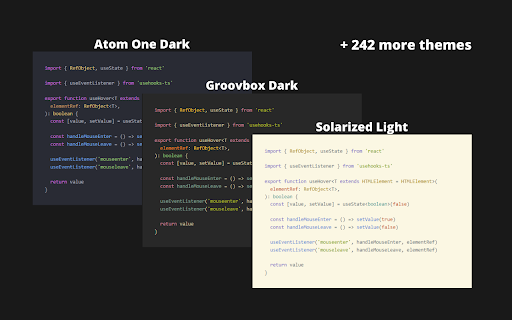
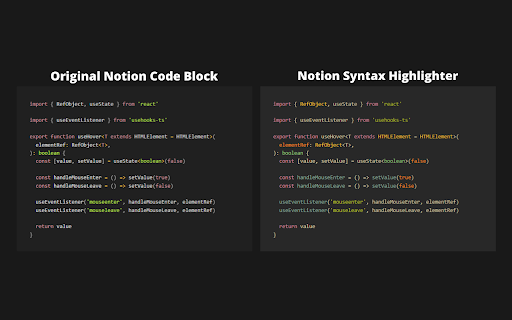


🖼️ 245 available themes 🔧 Improved syntax highlighting 🩹 Minor fixes for code blocks 🔓 Open source & free - you can find github repo here: https://github.com/JSerwatka/notion-syntax-highlighter _________________________________________________________ 🛠️ HOW DOES IT WORK _________________________________________________________ 1. Upon installing the extension, the default theme (Gruvbox dark) will be automatically selected. 2. To change the theme, simply click on the extension's icon and select a different theme. 3. For convenience, only a few themes are visible in the main theme dropdown. To add more, click below the dropdown or right-click on the extension's icon and choose the "Options" menu. On the options page, select the themes you want to appear in your default list. 🦁 FOR BRAVE USERS _________________________________________________________ To make this extension work on Brave browser, please follow this instruction: https://github.com/JSerwatka/notion-syntax-highlighter#for-brave-users Notion Syntax Highlighter extension does not analyze or send any user data. All the essential data needed for the extension to function, such as your selected themes and color scheme preferences, are stored locally within your browser. This extension requires thorough testing, so if you encounter any issues, please report them as bugs here: https://github.com/JSerwatka/notion-syntax-highlighter/issues You can support this project by: ❤️ Rating it 🤗 Proposing changes and contributing to its development 🐛 Reporting any bugs you encounter - Resolve performance issues related to editing large code blocks - Add shadow and rounded borders (configurable in settings) - Add line numbers (configurable in settings) - Allow line height customization (configurable in settings) - Support prettier and other code formatters - Simplify the process of adding new themes

Notion Capture
Quickly save links to your Notion databases ≡ Features - Direct save link by right click - Config default properties when save https://discord.gg/pAztBJEnrJ twitter: https://twitter.com/xuke11 help:https://ziyouma.vercel.app/notion buy a coffee:https://ko-fi.com/xukek

Notion Card
Notion Card is a Chrome extension that converts Notion content into card images, perfect for publishing online. One-click generation: Easily and quickly convert Notion content into card images. Visual optimization: Automatically adjust content layout for better social media presentation. High-quality output: Produce high-definition, vibrant card images for optimal visual impact. User-friendly: Simple and intuitive interface design, no design experience required. Use Cases: Self-media publishing: Enhance the visual appeal of your articles and posts to attract more attention. Content marketing: Create professional visual displays for your brand content to strengthen brand image. Knowledge sharing: Organize knowledge points and information into beautiful card images for easier dissemination and retention.

Notion Social Preview
Preview social media posts inside Notion. Powered by Notionsocial, A social media scheduling tool for Notion. Preview how your post will look like on social platforms, While creating it inside Notion. 🔌Plug & Play; Works for any database. 🤩 Preview posts on Instagram & X/Twitter. 🚀 Automatically schedule posts from your Notion database (Using Notionsocial). Read the guide: https://notionsocial.app/blog/chrome-extension This extension is powered by Notionsocial, a tool that allows you to schedule posts from Notion to multiple social platforms, Visit https://notionsocial.app to learn more. NOTE:- This extension is primarily for preview purposes and is not mandatory to use with Notionsocial.

Notion Tools
Make your Notion experience a little bit better with some QOL including colored headings, folded sidebar buttons and more. This extension provides a group of options that aim to improve your experience with the Notion website. These include: + ⭐ Automatically highlighting every heading across all your Notions. + 🔥 Having more vertical space in the sidebar by folding the "Search", "Inbox", and "Settings" buttons into horizontally lined icons (the notification counter also works). + Additional headings indication by adding # symbol at the end of it. + More horizontal space for your database board view. + Slightly more vertical space on page by reduced margin above it icon/name. + Ability to hide "invite members" button from sidebar. Every option can be disabled, if you want. I will continue adding more features over time. Hope you like it! ♥ UPDATE 1.2.2 - Added support for dark theme.
