
olnillffniogfhfohpimapmmpfdjnkhp
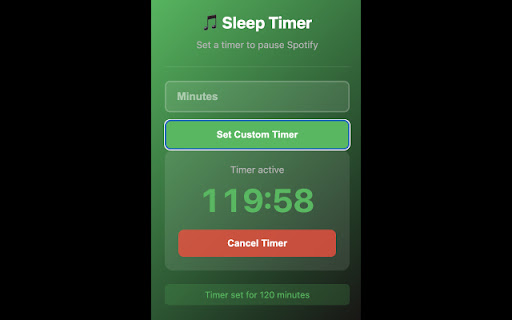


The missing sleep timer for Spotify Web Player. Automatically stop music, podcasts, and audiobooks to save battery. Sleep Timer for Spotify™ & Web Player Finally, a way to set a sleep timer on the Spotify Web Player! 🌙 The Problem: Spotify’s mobile app has a great sleep timer, but the desktop and web player versions are missing this essential feature. If you fall asleep listening to music on your laptop, it plays all night—draining your battery and waking you up later. The Solution: This extension adds a simple, lightweight sleep timer directly to your browser. Whether you are listening to rain sounds, a podcast, or your favorite playlist, you can now set a timer and drift off without worry. Key Features: ✅ Auto-Stop Audio: Automatically pauses music, podcasts, or white noise after your chosen time. ✅ Battery Saver: Prevents your laptop from running all night, saving battery life and data bandwidth. ✅ No Account Needed: Works instantly. No login, no tracking, no bloat. ✅ Lightweight: Runs quietly in the background with zero lag. Perfect For: 🎧 Using Spotify for white noise or relaxation during naps. ⏱️ Managing study sessions (use it as a Pomodoro timer for your music). Open the Spotify Web Player (open.spotify.com). Click the extension icon in your toolbar. Set your desired duration (e.g., 30 minutes). Relax—the music will fade out or stop automatically when the time is up. Privacy Policy: We believe in privacy. This extension does not collect any personal data, does not track your browsing history, and does not require a Spotify login to function. It simply sends a "pause" command to the active tab. Disclaimer: This is an independent project and is not affiliated with, associated with, or endorsed by Spotify AB. "Spotify" is a registered trademark of Spotify AB.

BBR Helper
This provides some advanced stats (game score, simple player rating and game box plus-minus) on multiple pages for NBA, WNBA, G-League, international leagues and college basketball. Including: - average stats by season on the player page - average stats by playoff series on the player page - average stats by player on the team_season page - average stats by player on the team_player page - average stats by player on the season_player page - single game/half/quarter stats by player on the game_boxscore page - single game and average stats on the gamelog and split pages - top 5 and top 20 average stats players on the season page - top 20 average stats players on the team_season page - top 20 average stats seasons rankings on the player page - top 50 career stats rankings on the player page - multiple stats rankings on the leader page - player awards column on team season page gBPM = (-0.55 * fga + 1.04 * fg3 + 1.39 * fg - 0.25 * fta + 0.79 *ft + 0.17 * orb + 0.27 * drb + 0.24 * (trb - orb - drb) + 1.34 * stl + 0.43 * ast + 0.64 * blk - 0.34 * pf - 0.95 * tov) / g """ , where orb is treated as 0.3 * trb and drb is treated as 0.7 * trb approximately when stats are not complete in early years.

ChatterBox
ChatterBox adds the ability to view, and add comments to sites that don't usually have comments. ChatterBox allows you to view and add comments on numerous sites, starting with daft.ie, myhome.ie, and donedeal.ie.

Bread Prompter - Multi-AI Prompt Sender Sidebar for ChatGPT, Gemini, Claude
Bread Prompter lets you send one prompt to multiple AI platforms at the same time and organises all their responses into a dedicated browser tab group so you can compare them easily. Instead of switching between ChatGPT, Gemini, Claude, Grok, and DeepSeek one by one, Bread Prompter pastes your prompt into all open AI tabs in parallel. Your results land in a single organised "Bread Chat" tab group, ready to compare side-by-side. When you are done for the day, save your entire AI session with one click and pick up exactly where you left off across all platforms, all at once. Perfect for AI researchers, prompt engineers, developers, writers, students, and analysts who want to get the most out of multiple AI models at once. 🎯 Parallel Prompt Broadcasting - Send one prompt to ChatGPT, Gemini, Claude, Grok, and DeepSeek simultaneously - All AI tabs automatically organised into a dedicated "Bread Chat" tab group - Enable or disable specific platforms based on your preference - Real-time login status detection for each platform 💬 Session Save and Resume - Save your entire multi-AI session in one click across all open platforms - Resume all saved conversations at once directly from the extension, right where you left off - Privacy-first: only conversation IDs and URLs are stored locally, no responses, no content, nothing leaves your device 🤖 AI-Powered Prompt Enhancement - Refine with AI: Transform rough ideas into clear, effective - prompts - Build Context: Intelligent questionnaire system to help you craft detailed prompts - Smart Summarisation: Extract and summarise key points from any web page 💾 Smart Storage - Prompts saved locally for quick reuse - Undo and redo support for prompt editing - All data stays on your device 🔒 Privacy-First - No tracking, no ads, no data collection - Conversation save stores only URLs and conversation IDs locally, never your responses - Optional AI features require your own Groq API key Works with: ChatGPT, Gemini, Claude, Grok, DeepSeek

Pause Timer
You can use the pause timer to automatically pause videos or music that can be stopped with the spacebar at a specified time. You can use the pause timer to automatically pause videos or music that can be stopped with the spacebar at a specified time. You can automatically stop background music on platforms like YouTube or Audible using a timer or scheduled time. Since it stops playback by simulating a spacebar press, it cannot be used on video or music streaming sites where the spacebar does not pause playback.
