
olimdjdkimlkghojdfglpjcookpbdfee
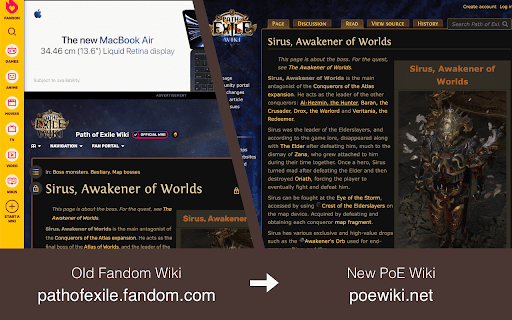
Redirects PoE Fandom (pathofexile.fandom.com) requests to PoE Wiki (poewiki.net) and adds an option to remove PoE Fandom search results from Google search results.

GemCheck – PoE Transfigured Gem Calculator
Transfigured gem EV for the Labyrinth Divine Font + Harvest swap EV for Catalysts, Essences, and Delirium Orbs. poe.ninja pricing. GemCheck overlays a floating panel on poe.ninja's skill gem price page and instantly tells you which transfigured gems are worth hunting at the Labyrinth Divine Font. ─── HOW THE DIVINE FONT WORKS ─────────────────────────────────────────── The Divine Font offers two ways to transfigure a gem: Color Roll — insert any gem of a colour and receive a random transfigured gem from that colour's entire pool (equal chance for each gem in the pool). Specific Roll — insert a specific base gem and receive one of that gem's transfigured variants at random (equal chance per variant). GemCheck calculates the expected value (EV) and hit probabilities for both modes so you can make informed decisions before you run the lab. • Color Roll Bingo — for each colour (Red / Green / Blue) shows the top target gems with their hit probability and current sell price. • Best Specific Gems — a combined cross-colour ranking of all base gems sorted by EV, with every variant's probability and sell price listed. • Gem level / quality filter — choose between lvl 1 q0%, lvl 1 q20%, lvl 20 q0%, or lvl 20 q20% to match what you actually sell. • Gemcutter's Prism price — shown in the status bar alongside ×20 cost so you can quickly judge whether quality is worth it. • Catalysts — expected value for swapping Catalysts via the Harvest crafting bench, ranked by EV with individual hit probabilities. • Essences — same EV analysis for Essence swaps. • Delirium Orbs — EV for Delirium Orb swaps using experimental drop-weight data (credit: lifewithoutpants_ on YouTube). • Live pricing — pulls directly from poe.ninja's API for the current league. Data is cached for 5 minutes; a Refresh button busts the cache. • League auto-detection — reads the league from the poe.ninja URL, so it always shows data for the league you are browsing. • Responsive panel — widens into a two-column grid layout at larger sizes; draggable and resizable, minimise or close when not needed. Navigate to poe.ninja › Economy › [your league] › Skill Gems (or Currency, Essences, Delirium Orbs). The GemCheck panel appears automatically. • Prices shown are raw sell prices (cheapest non-corrupted listing on poe.ninja). Base gem cost, lab fees, and orb costs are not deducted. • Harvest swap EVs use baked-in experimental drop weights; individual results will vary. • This extension only runs on poe.ninja. No data is collected, stored, or sent anywhere. • Gem pool data sourced from the Path of Exile wiki.

POE TradeNinja
Adds a Trade button to items in Path of Exile build pages and handles trading process. **Unfortunately not compatable with version 3.26 of POE, no planned update as of yet due to real life commitments ** Elevate your Path of Exile trading experience with PoE Trade Ninja — an essential Chrome extension for players who rely on PoE Ninja for build exploration and item pricing. Seamlessly search for items from any PoE Ninja build with just a click, saving you time and maximizing your trading efficiency. Install PoE Trade Ninja now and take full control of your Path of Exile trading strategy. Easily search for build items and stay ahead of the competition with this powerful tool. ------------------------------------------------------------------------------------------------------------------------------------------------- Key Features: Direct Item Search: Instantly search for any item featured in a PoE Ninja build with a single click, connecting you directly to the best trade options available. Automatic Build Parsing: Effortlessly analyze any build on PoE Ninja and find the exact items used in the build, including mods and variations. Seamless Integration: Fully integrated with PoE Ninja, ensuring you get the most accurate and up-to-date item information. User-Friendly Interface: Simple and intuitive design that fits naturally into your PoE Ninja browsing experience. ------------------------------------------------------------------------------------------------------------------------------------------------ How It Works: PoE TradeNinja enhances your experience on the poe.ninja website by adding an additional layer of functionality. As you explore builds on PoE Ninja, this extension allows you to instantly search for the exact items used in those builds. With just a single click, you can search the market for the items, mods, and variations that you need, ensuring you can replicate any build or optimize your trading decisions. If you frequently use PoE Ninja to browse builds or price-check items, this extension is a must-have. It cuts down the time spent manually searching for items by providing instant access to trade searches directly from the build pages. Whether you're trying to copy a top-tier build or simply looking for price trends, PoE TradeNinja makes it easier and faster. ------------------------------------------------------------------------------------------------------------------------------------------------ Compatibility: PoE TradeNinja is designed to work seamlessly with the PoE Ninja website and is compatible with the latest versions of Chrome and Chromium-based browsers. ------------------------------------------------------------------------------------------------------------------------------------------------ Updates and Improvements: We're constantly working to improve PoE TradeNinja with new features and enhancements. Stay tuned for updates that will further expand the extension's capabilities and make your Path of Exile experience even better. This product isn't affiliated with or endorsed by Grinding Gear Games in any way.

PoE Wiki Trade Link
Adds a link to every PoEWiki page to the trade site for that item. This Chrome extension adds a button to the Path of Exile (PoE) Wiki page to quickly open a PoE trade search page for a specific item. It allows you to seamlessly transition from researching an item on the PoE Wiki to finding it on the PoE trade platform. Usage Install the extension in your Chrome browser. Visit a PoE Wiki page that displays an item you want to find. Click the "Trade" button added by the extension. A new tab will open with the PoE trade search results for the item. FAQ Is there a Firefox version? A Firefox version has been submitted for review. License This project is licensed under the MIT License - see the LICENSE file for details.

Purple Ads Blocker
An adblocker for the Twitch.tv using server side signature and local m3u8 manipulation Purple AdBlock is a video ad-blocker for Twitch.tv. The extension uses an external proxy in an ad-free country, only video requests are sent through this proxy to retrieve an ad-free, full quality stream. The extension does not collect or store your personal information and is opensource. If you would like to contribute your own proxy or help us with the extension upkeep, please visit my Github https://github.com/arthurbolsoni it might not work in some countries ATTENTION: Does not work with Alternate Player for Twitch. ATTENTION: The author of this extension accepts no responsibility for the use of the extension. The use of the extension is the total responsibility of the user.
