
oligncolalihejdbajbbjlgboeamobjj
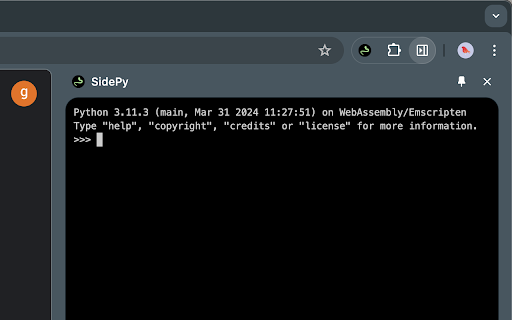


Run python within your browser SidePy is a Chrome extension that allows you to quickly open a side panel providing a Python console. With SidePy, you can execute Python code directly within your browser, making it a handy tool for developers, data analysts, and anyone who needs to run Python scripts on the go. Features: - Quick access to a Python console in a side panel. - Easy to use interface. - Lightweight and fast. Permissions: - sidePanel: Required to create and manage the side panel where the Python console runs. - storage: Needed to save user settings and preferences. - contextMenus: Used to add options to the context menu for quick access to the Python console. Notes: 1. This extension requires a minimum Chrome version of 116. 2. Any limitations found in https://pyodide.org/en/stable/console.html you should encounter here too, therefore make sure to check issues and discussions in upstream project.

CodeRun
Code execution made easy - run Python, C, C++, Java, and more, all in one place. Save time and streamline your coding workflow! Introducing a powerful and convenient tool for programmers of all levels, a chrome extension that allows you to execute code in Python, C, C++, Java, Go, and C# with just one click! This extension is designed to make your coding experience faster and more efficient than ever before. With this extension, you no longer need to switch between multiple programming environments to execute code in different languages. Instead, you can simply open the extension and select the language you want to use. From there, you can enter your code, and with one click, your code will be executed and the results will be displayed. Whether you're a beginner just starting to learn programming or an experienced developer looking to save time, this extension is the perfect tool for you. With support for multiple languages, you can quickly test code without the hassle of switching between different environments. Plus, the simple and user-friendly interface makes it easy to get started right away. So why wait? Download the chrome extension now and take your coding skills to the next level!

GitNav - GitHub Repository Navigator
Analyze any GitHub repository with interactive visualizations, dependency analysis, and smart insights. Navigate codebases faster. Visualize any GitHub repository as an interactive graph. Find files instantly, analyze dependencies, detect security issues, and understand codebases 10 times faster than browsing folders. GitNav transforms GitHub repositories into interactive force-directed graphs where you can drag, zoom, and click to explore. Each node represents a file, color-coded by type. Click any file to open it on GitHub, or click folders to zoom into specific sections. The smart search feature lets you find any file across the entire codebase with fuzzy matching, filtering by category, file type, or size. Results appear in real-time as you type. Comprehensive dependency analysis works across 7+ languages including JavaScript, Python, Rust, Go, Flutter, Java, and more. Instantly see which packages are outdated, detect heavy dependencies, and get suggestions for lighter alternatives. Security scanning identifies vulnerabilities, detects exposed secrets like API keys or passwords, and provides actionable recommendations to fix issues. All analysis happens locally in your browser with zero external servers. PERFECT FOR Learning from open source projects and understanding unfamiliar codebases Preparing for technical interviews by analyzing company repositories Conducting code reviews and security audits efficiently Onboarding to new projects and finding your way around large codebases Contributing to open source by quickly locating relevant files Evaluating project health and architecture before adoption Interactive Visualization Force-directed graph with drag, zoom, and pan controls. Color-coded nodes by file type. Hover for file details including name, size, and path. Supports repositories up to 60 files in the graph view with smooth animations. Smart File Search Fuzzy search across all files with filters for category, file type, and size. Shows up to 30 real-time results. Click any result to open the file directly on GitHub. Explicit activation prevents browser autofill interference. Repository Overview Guided onboarding with clickable file paths. Identifies entry points and key configuration files. Displays repository statistics including stars, forks, issues, and primary language. Install dependencies commands ready to copy. File Tree Explorer Complete directory structure with expandable folders. File icons, badges, and size display. Category labels for quick identification. Click any file to view on GitHub. Full nested folder support. Code Metrics and Analysis Estimated lines of code and complexity scoring from 0 to 100. Commit activity visualization by month, week, or day. Repository growth timeline with interactive charts. Average commits per month tracking. Repository Health Score Overall health score from 0 to 100 with detailed breakdown. Quick insight cards showing file count, types, commits, and contributors. File type distribution with visual bars. Large files detection over 100KB. Recent commit history. Advanced Quality Analysis Code quality metrics including maintainability, testability, documentation, and structure scores. Issue categorization by type. Documentation gap detection. Missing files identification. File hotspots showing most frequently edited files. Dependency Analysis Supports NPM, Python requirements, Flutter pubspec, Rust Cargo, Go modules, Maven, and Gradle. Detects outdated versions and counts dependencies per ecosystem. Identifies unused dependencies and suggests performance optimizations. Technology Stack Detection Automatically detects frontend frameworks like React, Vue, Angular, and Svelte. Backend technologies including Node.js, Python, Django, Flask, Rust, Go, Java, and Spring Boot. Database usage of MongoDB, PostgreSQL, MySQL, and Redis. DevOps tools like Docker, GitHub Actions, and CI/CD pipelines. Security Analysis Vulnerability scanning for known CVEs. Secret pattern detection for API keys, tokens, and passwords. Exposed credentials warnings. Security checklist verification including gitignore, license, and lock files. Best practices recommendations with severity levels. Contributors and Activity Top 10 contributors with avatars and contribution counts. Detailed commit history and author statistics. Activity timeline showing repository growth over time. Advanced Features File history and evolution tracking. Deleted files detection with commit messages. File relationship analysis. Related files detection including test file associations. Module index identification. Export and Tools Clone commands for HTTPS and SSH with one-click copy buttons. Export complete analysis as JSON. Generate Markdown reports for documentation. Create Mermaid diagrams in basic or detailed formats. Quick commands section with repository URL display. Private Repository Support Use GitHub personal access tokens for private repository access. Tokens stored securely in Chrome's encrypted storage with validation and rate limit monitoring. Easy setup with guided flow and token status display. Direct link to create tokens on GitHub. Works on all public GitHub repositories. Private repositories supported with optional GitHub token. Supports 7+ programming language ecosystems for dependency analysis. Processes all data locally in your browser. Displays GitHub API rate limits in real-time. Responsive dark mode interface matching GitHub's design. PRIVACY AND SECURITY All repository analysis happens locally in your browser. No external servers process your data. No tracking, analytics, or data collection of any kind. GitHub tokens stored securely using Chrome's encrypted storage API. No cookies or third-party services. Open source code available for transparency and security review. storage - Store your optional GitHub token locally and securely github.com - Inject the "Analyze Codebase" button on GitHub repository pages api.github.com - Fetch repository data from GitHub's public API Install the GitNav extension from the Chrome Web Store. Visit any GitHub repository page. Click the green "Analyze Codebase" button in the bottom right corner. Explore 12 organized tabs including Overview, Visualize, Search, Insights, Metrics, Tree, People, Dependencies, Tech Stack, Security, Tools, and About. For private repositories, click "Analyze Codebase" on any private repo to see setup instructions. Click the "Create token" link to open GitHub's token creation page. Copy the generated token and paste it into GitNav. The extension automatically reloads with full access to your private repositories. Chrome or any Chromium-based browser. Active internet connection for GitHub API access. Works on all public GitHub repositories. Optional GitHub account for private repository analysis. Enhanced search activation prevents browser autofill interference. Clickable file paths in Start Here onboarding guide. Functional About tab buttons linking to creator profiles. Expandable lists for deleted files, large files, and security issues. Improved event listener cleanup and memory management. Multi-layer autofill prevention with real user input detection. Better UI interactions across all tabs. SUPPORT AND FEEDBACK Report bugs or request features at github.com/SELESTER11/GitNav/issues Star the project on GitHub at github.com/SELESTER11/GitNav Read documentation at github.com/SELESTER11/GitNav#readme View changelog at github.com/SELESTER11/GitNav/blob/main/CHANGELOG.md Created by Varun Karamchandani, Computer Science student at SUNY Binghamton University. Open source under MIT License. Not affiliated with or endorsed by GitHub, Inc.

Python IDE
A Python IDE in the browser Perfect for learning Python and quickly testing code snippets! You will have access to: - Python 3.12 and the Python standard library - Blazing fast Python code execution - A clean and simple code editor and output terminal - Dark mode! Powered by WebAssembly and Pyodide

execute python
Detects Python code blocks on webpages, adds Run and Notebook buttons, and runs code entirely in-browser via Pyodide. Tired of copying and pasting Python code? Here’s an extension just for you. This extension automatically detects Python code and provides two buttons — RUN or OPEN IN NOTEBOOK — so you can execute it or open it in your notebook. All code is executed locally using WASM.
