
olielkdelkicpnlpebnheannlfjcnahp
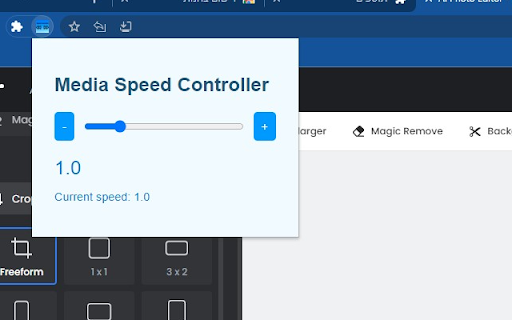
Control the speed of media playback Take control of your online viewing and listening experience with the Media Speed Controller extension. This tool lets you adjust the playback speed of audio and video** content directly from your browser. Whether you're trying to speed through a lengthy podcast, slow down a complex tutorial, or fine-tune the pace of a film, Media Speed Controller puts the power in your hands. **Note that not all Videos are supported, depand on the website streaming method

Speed Sail - Playback Speed Controls
Change the playback speed of videos and audio clips in your current tab. Speed Sail gives you the power to change the speed of videos and audio clips in your current tab! From slowing down videos or audio to help with learning a new language, to speeding up lectures to save time, Speed Sail has many uses to make your life easier! -Whats new: -Update 1.1.0 is here! -When opening the extension pop up the slider will now be set to the last speed you applied. This makes it easier to quickly re-apply a speed selection if it was lost by the page being refreshed or an ad being shown over the video. -Now values on the slider from 0.25 to 2 are incremented by 0.25, while values from 2 to 16 are incremented by 1. This makes the slider less cluttered with values and makes it easier to pick the value you want without skipping over it. -For update history vist: https://github.com/RyanHelgoth/speed-sail/wiki/Update-History -Features: -Applies speed change to every supported video and audio clip in the current tab. -Default speed button to quickly switch back to 1x speed. -Speed ranges from 0.25x to 16x. -Supports many websites including YouTube, Reddit, Twitter, and Facebook. -Note: -While Speed Sail works with most websites, some are not currently supported such as Spotify and SoundCloud. -Currently only supports English. -Credits: -Ryan Helgoth: Wrote all JavaScript, HTML, and CSS for Speed Sail. -References used can be found in code as comments at: https://github.com/RyanHelgoth/speed-sail -Jonah Farkasdi: Made logos and promotional image.

SlowSpace.Studio
Apply slowed and reverb effects to audio on webpages Transform your audio listening experience. Add customizable audio effects like tempo adjustments and ambient sound to create unique variations of music and audio in your browser. Our lightweight extension lets you modify playback in real-time - no complex software required. Simple controls let you fine-tune the speed and ambiance to your preference, or choose from preset configurations. Works with audio on many popular streaming sites. Note that compatibility may vary by platform. Premium features include custom presets, advanced tuning controls, pitch preservation, and personalized default settings.

Speed Control
Extension to control video speed rate The Video Playback Rate Control Chrome Extension is a powerful tool designed to enhance your video viewing experience on various streaming platforms. With this extension, you can take full control of the playback speed of any online video, allowing you to watch content at your preferred pace. Whether you want to speed up a lecture or slow down a tutorial, this extension gives you the flexibility to adjust the playback rate to match your learning style. Increase the playback speed to save time and consume content more efficiently, or decrease it to carefully follow complex instructions. Key Features: 1. Adjustable Playback Speed: Easily increase or decrease the playback speed of any online video to match your preferences. 2. Seamless Integration: This Chrome extension seamlessly integrates with popular video streaming platforms, including YouTube, Netflix, Vimeo, and more. 3. Precise Control: Fine-tune the playback speed with precision, allowing you to find the perfect tempo for your video consumption. 4. Adjustable audio rate and increased gain limits, allowing you to listen to silent audio volume Whether you're a student, professional, or simply a video enthusiast, the Video Playback Rate Control Chrome Extension empowers you to optimize your video watching experience. Say goodbye to limited playback speed options and unlock a new level of control over your online video content. Install the extension today and start enjoying videos at your own pace.

BPM Changer
Effortlessly adjust song tempo or speed up video with BPM Changer. Perfect as a tempo, music speed and audio speed changer. Are you looking for a way to instantly change the speed of audio and video playback in your Google Chrome tab 🧐? Look no further than BPM Changer, the ultimate solution for music enthusiasts, video watchers, and content creators. This powerful Chrome extension offers a seamless and intuitive experience for anyone who needs to adjust playback speed on the fly. Let's dive into the features and benefits that make this extension a must-have tool for your browser. 🤯 Key Features • Instantly change bpm of any song or video in your Chrome tab. • User-friendly interface for effortless speed adjustments. • Supports a wide range of audio and video formats. • Real-time playback speed switches without affecting pitch. • Perfect for musicians, dancers, language learners, and more. 🔥 Why Choose BPM Changer? Whether you are a musician practicing a new piece, a dancer fine-tuning your routine, or a language learner trying to catch every word, BPM Changer has you covered. This versatile tool allows you to switch bpm online with just a few clicks, making it easier than ever to tailor your media to your needs. 💨 Effortless Speed Adjustments With BPM Changer, you can easily inrease or decrease the bpm of a song or adjust video speed to match your preferences. The extension provides a smooth and responsive interface that lets you make precise bpm changes in real-time. 1️⃣ Select your audio or video. 2️⃣ Open BPM Changer in your Chrome toolbar. 3️⃣ Adjust the slider to change audio or video speed as desired. 🎧 Ideal for Musicians and Dancers For musicians, BPM Changer is an invaluable audio bpm switcher that helps you practice at different tempos without altering the pitch. Dancers can also benefit from this music tempo changer by slowing down or speeding up their tracks to perfect their moves. • Change bpm of song to match your practice pace. • Use the song bpm changer to prepare for performances. • Adjust the music speed for optimal dance routines. 🎓 Enhance Your Learning Experience Language learners and students can use BPM Changer to slow down audio or video content, making it easier to understand and follow along. This audio speed changer online is perfect for replaying lectures, interviews, and tutorials at a comfortable pace. ➤ Slow down video speed for better comprehension. ➤ Speed up playback to review content quickly. ➤ Use the online tempo changer to adjust educational videos. 👩🏻💻 Perfect for Content Creators Content creators can leverage BPM Changer to ensure their media is perfectly paced for their audience. Whether you're editing a podcast, creating a video tutorial, or producing music, this change bpm online tool gives you the flexibility to fine-tune your content. 1. Edit audio speed and bpm for podcasts and voiceovers. 2. Adjust video speed to highlight key moments. 3. Use the change tempo of song feature for custom tracks. 🌐Seamless Online Integration BPM Changer is designed to work seamlessly within your browser, providing an online music tempo changer that you can access anytime, anywhere. This convenience makes it easy to change audio speed online without the need for additional software. • Access the audio speed changer online directly from Chrome. • Enjoy a hassle-free online tempo changer experience. • Use the music speed changer online on various websites. 😲 Versatile Applications The BPM Changer extension is not limited to just music or educational purposes. It's a versatile tool that can be used in various scenarios, such as: 1. Enhancing workout routines by adjusting the tempo of exercise videos. 2. Slowing down tutorials to catch every detail. 3. Speeding up audiobooks to save time. 📝 How to Get Started Getting started with BPM Changer is simple and quick. Follow these steps to start enjoying the benefits of this powerful tool: • Install extension from the Chrome Web Store. • Open the BPM Changer from your Chrome toolbar. • Load your desired audio or video in the Chrome tab. • Use the intuitive slider to change the speed of audio or video. Q: Does BPM Changer affect the pitch of the audio? A: No, it adjusts the playback speed without altering the pitch, ensuring the audio remains clear and natural. Q: Is there a limit to how much I can change the speed? A: BPM Changer offers a wide range of speed adjustments to suit your needs, whether you want to slow down or speed up the playback. ✨Join the BPM Changer Community Become a part of the growing BPM Changer community and share your experiences with fellow users. Whether you're a musician, dancer, student, or content creator, this tool offers endless possibilities for enhancing your media experience. BPM Changer is the ultimate solution for anyone looking to change the speed of audio or video playback in Google Chrome. With its intuitive interface, versatile applications, and seamless online integration, this extension is a game-changer for musicians, dancers, learners, and content creators alike. Install BPM Changer today and experience the convenience and flexibility of this powerful audio and video speed switcher. 🌟 Unlock the full potential of your media with BPM Changer and enjoy a customized playback experience like never before!
