
olhcajgllkpacioibcjiniefblpmpech
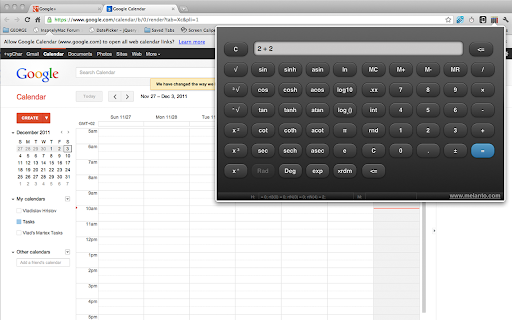

What makes it unusual is that you can see both sides of the current binary operation. For example -- if you type 2 + 2 you'll see exactly "2 + 2" until you press "=". The tool was made with touch-screen in mind and should be ready for touch-screen chromebooks. On devices with keyboard you can use the obvious keys: number keys, dot (floating point), +, -, *, /, Enter (=), ESC (C) and Backspace. The advanced ("scientific") functions are not yet accessible with keyboard shortcuts (but better keyboard support is planned for the next releases). The initial goal of this extension was to be a real-life example of jQuery Mobile (and it worked as such) but somehow, with the time, more options were added and it became full-featured scientific calculator. It is, however, still work in progress, so let me know if you find a bug, if something isn't working or if you want to see new feature added. There are 3 different “themes” for you too choose from. You can change the theme from the options page. Select between black, white or the original “3d buttons”. (Just click the “options” link at the bottom-right of the extension's popup and select the respective theme from the list) The same tool is available in 3 different versions: this one (extension added to the toolbar), as standalone chrome app (adding calculator icon to the apps page and opening the tool in its own browser tab) and as “desktop” app (pens the calculator in separate window, simulating desktop app). Here are the other two versions: All the 3 versions come with the same underlying code but I couldn’t create one single tool to address all the 3 ways of use because Chrome doesn’t allow apps to add icon to the toolbar (so we need the extension), while extension can’t add icon to the apps page (so we need an app) and then, at some moment Chrome offered the “packaged apps” option and I made the “desktop” version for those who want it in separate window, acting as separate app… DISCLAIMER OF WARRANTIES: MELANTO CALCULATOR IS PROVIDED “AS IS” AND WITHOUT WARRANTY OF ANY KIND

Melanto Calculator
What makes this calculator unusual is that you can see both sides of the current binary operation. For example -- if you type 2 + 2 you'll see exactly "2 + 2" until you press "=". The calculator was made with touch-screen in mind and should be ready for touch-screen chromebooks. The app is based on the so called “scientific calculators”, which means it comes with many “advanced” functions (trigonometric, logarithmic, exponential, etc.) But the way that calculator works (different than standard calculators and showing both left and right operand at the same time) means that if you have an operation entered (for example: 5 * 6) and tap some unary operation button (for example the square button) the operation will be performed on the second operand (in our example 6 will become 36). All in all this calculator app will give you little more info for the current/previous calculation but it is still a calculator and not a formula processor or equation machine. On devices with keyboard you can use the obvious keys: number keys, dot (floating point), +, -, *, /, Enter (=), ESC (C) and Backspace. The advanced ("scientific") functions are not yet accessible with keyboard shortcuts (but better keyboard support is planned for the next releases). The initial goal of this calculator was to be a real-life example of jQuery Mobile (and it worked as such) but somehow, with the time, more calculations were added and it became full-featured scientific calculator. It is, however, still work in progress, so let me know if you find a bug, if some calculation isn't working or if you want to see new feature added. As one would expect, the “usual suspects” are all here: - addition (+), subtraction (-), multiplication (*), division (/) - exponent (Power) operators (3 buttons for power calculation: ^2, ^3 and ^x) - square root, cube root and general root calculator - round, round$ and integer buttons - two ways to do percentage calculations Of course, here are the good old memory buttons (M+, M-, MR, MC) and you can use the copy/paste functionality too (that’s why the calculator requires copy/paste permissions) Finally, the scientific calculations supported are: - sin, sinh, asin - cos, cosh, acos - tan, tanh, atan - cot, coth, acot - sec, sech, asec - log10, logN - ln - exp - some constants… Radians and degrees calculations supported. Scientific or not, a calculator needs to be convenient and nice to look at. To make this one better, we added 3 different “themes” for you too choose from. You can change the design theme from the options page. Select between black or white calculator and the original “3d buttons” calculator. (Just click the “options” link at the bottom-right of the calculator popup and select the respective theme from the list) The same calculator is available in 3 different versions: this app (adding calculator icon to the apps page and opening the calculator in its own browser tab), as chrome extension (added to the main toolbar) and as “desktop” app (opens the calculator in separate window, simulating desktop app). Here are the other two versions: Calculator Extension: https://chrome.google.com/webstore/detail/melanto-calculator/olhcajgllkpacioibcjiniefblpmpech?utm_source=chrome-ntp-icon All the 3 versions come with the same calculationn engine but I couldn’t create one single to address all the 3 ways of use because Chrome doesn’t allow apps to add icon to the toolbar (so we need the extension), while extension can’t add icon to the apps page (so we need an app) and then, at some moment Chrome offered the “packaged apps” option and I made the “desktop” version for those who want it in separate window, acting as separate app… DISCLAIMER OF WARRANTIES: MELANTO CALCULATOR IS PROVIDED “AS IS” AND WITHOUT WARRANTY OF ANY KIND

Chrome Web Store
Add new features to your browser and personalize your browsing experience.

Simple Calculator
A simple and very lite calculator for your browser! Simple Calculator is a lite addon that renders a simple calculator in the browser toolbar popup. This calculator includes only simple math operations. Just click on the toolbar button to open the interface and start typing your desired math operations. Please note that all calculations are rounded to at most 7 decimal places. You can type either with your keyboard or the embedded virtual keyboard in the popup UI. To switch the popup interface theme to dark, please press the moon icon in the top-right toolbar. To report bugs, please fill out the bug report form on the addon's homepage (https://mybrowseraddon.com/calculator.html).

Discount Calculator
A basic caculator that also allows you to calculate common price discounts and tips with a single click. Calculate common discounts with a single click. This is a simple caculator that also allows you to calculate price reductions and see how much money you save! You can compare the reduced price and the amount of money you save. As a buyer, it works as a sale price calculator to see a final price after you factor in a discount - perhaps from that 20% price off coupon you have. Features: - A set of common discount percentage calculations. Takes your current calculation and rounds it to a price-friendly two decimal places. Displays the amount you would pay with the deduction and how much you save - invaluable! - Remembers your previous calculation when re-opened - History records last 10 calculations - Use the keyboard number pad for calculations - Copy results from the display - Re-sizable window - Enter key for "=" and "c" for clear - It's Free! Keyboard Shortcuts: - Number Pad or 0-9 for Number Entry - Equals (= or Enter) - Clear ("c") - Del or Backspace to delete - Divide (/) - Times (*) - Minus (-) - Plus (+) - Percent (% or F1) (Examples, 50%20 means 20 percent of 50; 40+50% means add 50% of 40) - Square Root (F2) - +/- (F3) - Decimal point (Period) - Copy results from the display (Ctrl-c) - Close Window (ESC or click in main Chrome tab)
