
oldkbmmdbndonbiogadbbbmgdkdpjoae


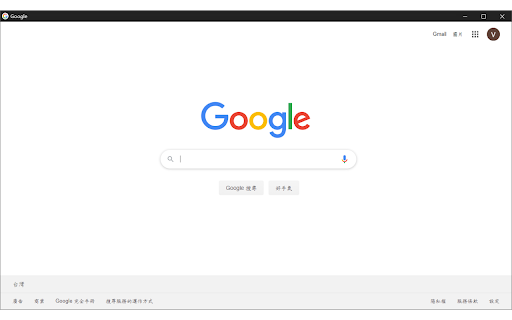
Quickly open the current tab as a borderless popup window — no toolbar, no clutter. 使用無邊框視窗開啟目前瀏覽的網頁 Browsing the current webpage with bordless window

Windowed Fullscreen for Videos
Works with most websites that include videos through the HTML5 tag, including videos that are embedded through iFrames and videos on websites that use shadow roots. Options: Enable / disable the extension for specific websites, and adjust button positioning so it doesn't interfere with other video overlays. You may report websites that are not compatible with this extension, but this usually happens due to websites being coded in exceptionally weird ways, so it might not always be possible for me to fix the problem. Please blame the website and not the extension :-)

網頁全螢幕看影片
【 Function Description 】 1. Allows videos on webpages to be viewed in full webpage screen. 2. Enables picture-in-picture viewing mode for videos on webpages. 3. This browser extension is activated automatically upon installation. Simply move the mouse cursor over a video, and blue buttons for "Maximize" and "PicInPic" will appear in the top right corner of the video. Click to watch the video in the selected mode. 【 Function Shortcuts 】 1. Webpage Fullscreen: Press F2 to toggle webpage fullscreen mode on or off. 2. Picture-in-Picture: Press F3 to toggle picture-in-picture mode on or off. 3. Auto-Detect: Click the extension icon to reset the current mode to its default. 【 Please Note 】 1. "Webpage Fullscreen" refers to filling the entire browser window, not the full screen of the monitor. 2. Currently, the function shortcuts are not customizable. 3. In response to the upcoming discontinuation of support for Manifest V2 extensions, this extension has been updated to V3. 【 Version Update 】 12.0.3.2 Fixed the issue where a black border appears when switching to full screen on the YouTube video platform. 【 Special Thanks 】 Thanks to the original author (冻猫) for designing the script. This tool was provided in Traditional Chinese by 4X, with related bugs fixed, CSS fine-tuned, and shortcut keys added.

Smallify
This extension enables you to open current tab in a small popup window. This extension opens current tab in a small popup window without toolbar, address bar, status bar, and tabs, improving your experience of glancing through the web-content.

Popout
A simple extension that allows tabs to be opened in a separate minimal window. Popout is a simple extension that allows tabs and web apps to be opened in a separate window with minimal controls. This is different from dragging tabs to a new window because Popup windows do not have to tab view, the address bar, or any buttons. This saves screen space and allows easier navigation to commonly used website and apps.
