
oknpjchmmppaaomcnfbchpflpcdmmhdk
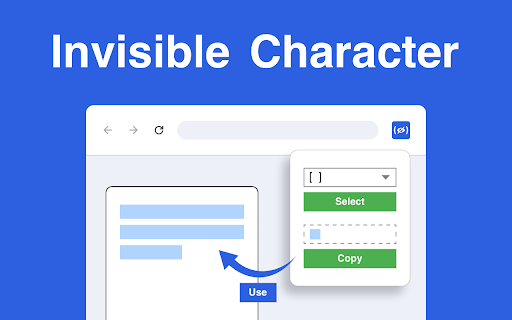
Use Invisible Character to create invisible space or invis char anywhere. The blank space copy paste tool in your Chrome sidebar! 🕶 Invisible Character is the ultimate tool for creating blank spaces to copy and paste in places that usually don't allow spaces, like usernames, social media profiles, or online forms. With this extension, you can easily copy and paste it anywhere, achieving a clean, subtle effect without any visible symbols. Perfect for customizing nicknames, creating unique blank username, or adding hidden characters in text. Simply click to copy, then paste your blank space symbol wherever you need it! 💎 Advantages of Using Invisible Character 💠 Quick Access: Conveniently accessible in your sidebar for easy use. 💠 Flexible Usage: Ideal for invisible name copy and paste on platforms where spaces aren’t allowed. 💠 Clean Formatting: Add invisible symbol characters for an organized look in text fields. 💠 Unique Personalization: Stand out with invisible characters that add mystery and elegance to your text 🔍 Where Can You Use the Extension? ✨ Blank copy paste options are perfect for creating unique symbols in usernames or bios. ✨ Copy paste blank space to text fields for a seamless look in apps and games. ✨ Use invisible text copy and paste to create hidden characters in messaging platforms. ✨ Try blank character copy paste for innovative formatting in social media posts or comments. ✨ With our extension, you can add empty spaces that personalize your online presence without any visible markers. 📋 How to Use It 1️⃣ Open the Invisible Character from your Chrome sidebar. 2️⃣ Select an invisibility symbol from the dropdown menu, such as (U+0020) Space, Hair Space, or Figure Space. 3️⃣ Click Copy to add the selected invisible characters to your clipboard. 4️⃣ Easily preview your blank text in the dedicated window within the menu bar. 5️⃣ To start over, click Clear. 📌 Features That Make Invisible Character Essential 🔹 Create invisible letter or messages to ensure your text has a unique layout. 🔹 Use transparent text for subtle adjustments or hidden elements in social media profiles. 🔹 Need a hidden character? This tool offers blank text copy and paste options in various styles to fit any need. 🔹 Add blank space copy and paste characters to usernames, bios, and other fields that don’t support traditional spaces. 💡 Enhance Your Text with Our extension makes it easy to add blank copy and paste options to your favorite platforms, allowing unique formatting that goes beyond standard text. Whether you're looking to include invisible character copy paste options in your bio or need an empty space copy paste for usernames, this tool is designed for flexibility. Simply copy and insert blank text copy paste wherever you need that subtle, invisible touch! 📂 Creative Ways to Use Invisible Character ✨ Blank space copy paste features allow you to create usernames or game names with hidden symbols, making your profile stand out. ✨ Add empty space copy and paste elements to your messages or comments for a unique, organized look. ✨ Use invisible copy and paste characters to leave subtle hints or hidden messages in text fields without drawing attention. ✨ With blank txt options, the extension gives you control over formatting across different platforms for endless creativity. 🔧 Customization and Flexibility The extension offers extensive options to help you achieve perfect text alignment and spacing. You can experiment with blank symbol and copy and paste blank text choices to personalize your online interactions. From empty text copy and paste elements to copy and paste invisible character additions, every option is designed to provide seamless customization. Effortlessly insert these blank symbols into fields where they typically aren’t allowed, giving your usernames, posts, and messages an original twist. 💻 Frequently Asked Questions (FAQ) ❓Q1: Can I use invisible characters in different languages? 📌 A1: Yes! It can be used with various language settings, making texto invisible everywhere. ❓Q2: What is the best way to add blank symbols to messages? 📌 A2: Use the blank message or invis name feature for adding empty spaces in messaging platforms without any visible symbols. ❓Q3: Where can I use these blank spaces? 📌 A3: You can blank texting on social media, messaging apps, and online forms for personalized formatting without visible characters. ❓Q4: How to write empty space without causing errors? 📌 A4: Copy and paste invisible text from the dropdown and copy it directly into the text field. It’s as simple as selecting, copying, and pasting. ❓Q5: How do I use invis char to create unique usernames? 📌 A5: Select a character from the dropdown, copy it, and paste it into the username field. This allows for unique, spaced names in places where traditional spaces aren’t accepted. 🤩 Why Choose Invisible Character? ⭐ Empty char options give you flexibility in text formatting, perfect for online forms and usernames that don’t accept standard spaces. ⭐ The invis char function allows you to create clean, organized layouts in messages and bios. ⭐ Blank letter choices provide subtle ways to enhance the visual structure of your text. 🚀 Invisible Character empowers you to take full control of your online presence with hidden characters and formatting options, adding mystery and creativity without the need for visible symbols. With the extension, users can master the art of invisible text, easily applying blank space text to a wide variety of online platforms.

Hack Club Welcomer
Hack Club Welcomer – Make your Hack Club experience magical! ✨ Transform your time on Hack Club's website with customized cursors,… Hack Club Welcomer – Make your Hack Club experience magical! ✨ Transform your time on Hack Club's website with customized cursors, interactive media, and fun surprises! The Hack Club Welcomer extension adds a personal touch to your browsing, from whimsical cursors to Santa themed welcome messages. Whether you're exploring the site or diving into HighSeas battle, the extension brings a dash of joy and creativity to every click! 🎨 Personalized cursors: Choose from a variety of fun, themed cursors to make your browsing more interactive. 🎶 Custom audio and visuals: Enjoy handpicked audio tracks and images that make Hack Club feel like home. 🚀 Seamless experience: All features are optimized to work perfectly on Hack Club’s site with zero hassle. Let the Hack Club Welcomer be your virtual sidekick in creating a vibrant, fun-filled Hack Club journey!

Invisible Character
Copy Invisible Character From This Extension By Just One Click And Paste Where Ever You Want To Paste It is a free copy and paste invisible text or blank character it’s look like empty text that shows empty character. You can say invisible text generator. Many users want to use space in username for their games or social apps like Pubg, Free fire, Discord, Instagram so this invisible character chrome extension is perfect for them.

Copy without Formatting
Simply install this software, drag the text you want to copy and then choose "Copy without formatting" option to copy and paste the text as plain text. Modern browsers make copying effortless—but they preserve every hidden tag when you paste. Fonts, colors, tracking links, zero-width characters, and odd Unicode control codes creep from web pages into documents, CMS fields, chat apps, and code editors. A “copy without formatting” extension intercepts the operation and strips everything down to plain, UTF-8 text. At first glance it seems like a small convenience. In practice it upgrades productivity, accuracy, and digital hygiene in ways that quickly feel indispensable. Here’s why. Instant cleanliness—no more “Paste → Paste Special” Office suites and online editors offer a Paste as Plain Text button, but reaching for it each time creates tiny but relentless context switches. A single shortcut or context-menu item supplied by the extension removes that cognitive drag. Over a workweek of hundreds of copy-paste operations, the seconds reclaimed add up to real minutes of flow preserved. Stops formatting-spread that bloats file size Hidden markup inflates size. Copying a one-line quote from a news site into a project brief can smuggle in spans, divs, inline CSS, and analytics attributes—sometimes multiplying the character count ten-fold. When those fragments end up in a shared Google Doc, every collaborator loads that cruft on each page view. A plain-text clipboard keeps source files lean and network-efficient. Prevents style collisions in content-management systems CMS fields often merge pasted HTML with their own templates. A rogue tag or inline color style can override global CSS and break visual consistency, producing support tickets like “Why is this paragraph suddenly teal?” A plain-text paste guarantees that only the system’s sanctioned styles apply, preserving brand guidelines and sparing editors late-night debugging. Eliminates invisible Unicode gremlins in code and data Websites frequently embed smart quotes, non-breaking spaces, and emoji via entity codes. When pasted into JSON, YAML, or source files these characters may compile fine on a Mac yet choke a CI pipeline running on Linux. The extension converts typography marks to straight ASCII quotes and replaces non-printing characters with regular spaces, heading off mysterious syntax errors.

Plain text converter
Use this tool to paste without formatting — convert copied content and paste as plain text anywhere with one click. Tired of messy formatting when copying and pasting content? The Plain Text Converter extension solves that problem instantly. Whether you're a student, writer, coder, or just someone who values clean, readable text, this tool lets you paste as plain text with ease — anytime, anywhere 💡 ✅ Why Use Plain Text Converter? When you copy content from websites, emails, or documents, it often includes unwanted styles like bold text, colors, fonts, and hyperlinks. The plain text converter strips all that away and gives you clean, unformatted content that you can paste wherever you need it — whether you're using Google Docs, Gmail, Notion, or WordPress. 🚀 Main Features 1️⃣ Paste as plain text automatically or manually 2️⃣ Easily assign a paste as plain text shortcut 3️⃣ Right-click to copy in context menu with formatting removed 4️⃣ Quickly remove extra spaces in copied content 5️⃣ Preserve line break for better readability 🎯 Who Needs This? 🔸 Writers and bloggers 🔸 Developers and tech editors 🔸 Office workers and email power users 🔸 Students working on academic texts 🔸 Anyone frustrated by formatting garbage 🔥 Key Benefits ♦️Clean up copied content before pasting ♦️Prevent unexpected fonts and links in your documents ♦️Save time rewriting or cleaning formatting manually ♦️Use a clear text copy and paste workflow across all apps ♦️Works even on paste without formatting mac setups 🖱️ Simple to Use 1. Copy text from any source 2. Click the extension or use your keyboard shortcut 3. Paste plain text into your target app — clean and clutter-free You can even copy unformatted text directly from the right-click copy in context menu ➤ no extra steps needed. 💻 Keyboard Shortcuts Set up a custom shortcut to insert clean, unformatted content instantly. Whether you're on Windows or macOS, you’ll benefit from: 💠Faster, clutter-free input 💠No unexpected fonts or styles 💠Simple setup through Chrome’s shortcut settings On Mac, it’s a great solution when native formatting-free commands aren’t available — a lightweight alternative to default system options. 🎯 Customize Your Experience ▸ Enable or disable the context menu ▸ Set whether to preserve line break or remove them ▸ Activate automatic formatting cleanup on every paste ▸ Choose whether to remove extra spaces ▸ Use extension icon or shortcut — your choice! 📚 Use Cases • Insert copied quotes into Gmail without formatting • Insert code snippets into Google Docs using this tool • Submit content to CMS like WordPress using paste as plain text • Create clean notes in Notion or Evernote • Build scripts or posts without carrying over styles ⚙️ Works Everywhere No matter where you work — Google Docs, Word Online, Slack, Trello, Gmail, Jira — the plain text converter ensures you always get a clear text to copy experience. Just copy, clean, and paste. ✨ Key Features at a Glance 🔹 One-click in context menu — Quickly convert copied content without extra steps 🔹 Trim extra spaces — Clean up messy spacing from source material automatically 🔹 Keep line breaks — Maintain original structure for easier readability 🧠 Smart and Lightweight The extension is lightweight and doesn’t slow down your browser. With just one click, you can paste without formatting, and get exactly what you copied — just without the clutter. Set it up once and enjoy a seamless writing experience. 🌟 What Makes It Different? ➤ Unlike other tools, this extension doesn't just remove styles — it also: • Keeps your line breaks • Lets you assign your own paste plain text shortcut • Offers context menu support • Helps you format consistently across platforms 🆓 Free and Privacy-Friendly No tracking. No logins. No data collection. Just a free and simple plain text converter that works exactly as you’d expect. Copy → clean → paste. 👇 Get Started Now Install the extension today and say goodbye to messy formatting. Want help setting up your shortcut or tweaking the settings? Drop a message to the support page — we’re happy to help.
