
okngcalljddikhljpfhgmikklmmmdkkd


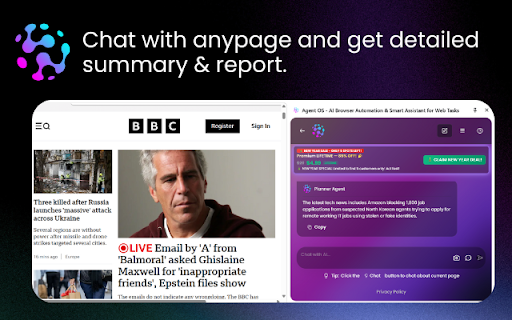

AI-powered browser automation agent. Auto-fill forms, scrape data, automate workflows with intelligent task planning & execution. Transform your browsing experience with AI-powered automation. Agent OS is an intelligent browser assistant that helps you complete web tasks faster and more efficiently through natural language commands and smart execution planning. Agent OS brings artificial intelligence directly into your browser, enabling you to automate complex web tasks with simple natural language instructions. Whether you're filling out forms, extracting data, or performing repetitive actions across multiple websites, Agent OS understands your intent and executes tasks with precision. Key Automation Features: • Natural language task interpretation • Multi-step workflow planning and execution • Intelligent form detection and auto-filling • Dynamic content handling • Cross-page navigation and task continuation • Error detection and recovery • Task history and repeatability Extract structured data from any website without writing code. Agent OS intelligently identifies and extracts information, organizing it in formats ready for your use. Data Extraction Capabilities: • Automatic table detection and extraction • Product information gathering • Contact details and email extraction • Price monitoring and comparison data • Article and content scraping • Image and media file collection • Export to multiple formats (JSON, CSV, etc.) • Batch processing across multiple pages Smart Form Filling Automatically detect and fill form fields with intelligent data matching. Save time on repetitive data entry tasks across job applications, registrations, surveys, and more. Workflow Automation Create complex multi-step workflows that span across different websites. Agent OS remembers context and maintains state throughout your automation tasks. Side Panel Interface Access Agent OS through a convenient side panel that doesn't interrupt your browsing. View task progress, review plans, and maintain control without switching tabs. Debugger Integration Advanced Chrome debugger API integration enables precise control over page elements and interactions, ensuring reliable execution even on complex web applications. Task Planning & Review Before executing any task, Agent OS presents a detailed plan for your review. You maintain full control and visibility over what actions will be performed. Business & Productivity • Automate data entry into CRM systems • Extract competitor pricing information • Monitor website changes and updates • Compile research data from multiple sources • Generate reports from web-based dashboards Step 1: Describe Your Task Open the Agent OS side panel and describe what you want to accomplish in plain English. No coding or technical knowledge required. Example tasks: - "Fill out this contact form with my information" - "Extract all product names and prices from this page" - "Navigate to the checkout and enter my shipping address" - "Scrape all email addresses from this directory" Step 2: Review the Plan Agent OS analyzes your request and generates a detailed execution plan. Review each step to ensure it matches your intentions. Step 3: Approve & Execute Once you approve the plan, Agent OS executes each step automatically. Watch in real-time as tasks are completed, or minimize the panel and continue working. Step 4: Get Results Receive extracted data, confirmation of completed actions, or exported files. Save successful workflows for future reuse. Your privacy and security are our top priorities. Agent OS is designed with the following principles: Architecture • Manifest V3 compliant extension • Modern JavaScript architecture • Modular component design • Efficient resource usage • Background service worker implementation Browser Integration • Chrome side panel API • Active tab scripting • Debugger protocol support • Storage API for settings • Comprehensive permission model Compatibility • Chrome browser (version 88+) • Chromium-based browsers • Works on all websites (where permitted) • Responsive design for all screen sizes Performance • Lightweight footprint • Minimal memory usage • Fast execution times • Optimized for efficiency • Non-blocking operations Installation 1. Install Agent OS from the Chrome Web Store 2. Click the extension icon to open the side panel 3. Follow the quick setup wizard 4. Start automating your first task Configuration • Configure your AI API settings (if required) • Set up default form fill values • Customize automation preferences • Choose data export formats Tips for Success • Start with simple tasks to learn the interface • Use clear, specific task descriptions • Review plans carefully before execution • Save frequently used workflows • Check permissions for target websites Documentation Visit our comprehensive documentation portal for guides, tutorials, and API references: https://portal.agent0s.dev Regular Updates We continuously improve Agent OS with new features, performance enhancements, and security updates. Keep your extension updated for the best experience. Feedback Welcome We value your feedback and feature requests. Help us make Agent OS even better by sharing your experiences and suggestions. For Power Users: • Custom workflow scripting • API integration options • Advanced selector targeting • Conditional logic execution • Loop and iteration support • Variable and data storage • Complex multi-page automations For Developers: • Testing automation • Development workflow integration • API testing and validation • Form validation testing • User flow simulation For Data Analysts: • Structured data extraction • Data transformation pipelines • Batch processing capabilities • Export to analysis tools • Scheduled data collection Save Time Automate repetitive tasks that consume hours of your week. Focus on creative and strategic work while Agent OS handles the routine. Increase Accuracy Eliminate human error in data entry and form filling. Agent OS executes tasks consistently and precisely every time. Boost Productivity Complete tasks faster with intelligent automation. What takes minutes manually can happen in seconds with Agent OS. Work Smarter Let AI handle the tedious work while you focus on decision-making and creative tasks that require human insight. • Chrome browser (version 88 or higher) • Internet connection for AI features • API key for AI functionality (may be required for some features) • Appropriate permissions for target websites We're constantly working on new features and improvements. Upcoming enhancements include: • Enhanced natural language understanding • More data export formats • Workflow templates library • Collaborative automation sharing • Advanced scheduling capabilities • Browser automation API • Mobile companion app Start automating your web tasks today with Agent OS. Install now and experience the power of AI-driven browser automation. For more information, visit: https://agent0s.dev

Jobright Autofill – Instant Job Applications, Job Match, AI Tailor Resume
1-click to autofill millions of job applications. The best way to manage job hunt and tailor resumes — Trusted by 500K+ job seekers Instantly completes every field on thousands of ATS sites, so you can submit an application in seconds. ✦ Mission: We’re on a mission to level the playing field in hiring—so that every professional has a fair shot at landing their dream job. ✦ Proven Trust: The only job-search tool featured in the ChatGPT Plugin Store and Named #1 Product of the Month on Product Hunt ✦ Built by Experts: Founded by Eric Cheng (early Box employee, serial founder) and Ethan Zheng, PhD (former AI lead at Twitter & NewsBreak), Jobright brings together AI and real-world hiring insight from top tech companies including Google, Amazon, Twitter, and Box. ✦ One-Click Autofill – Apply to jobs up to 10× faster, no manual entry needed. ✦ Resume Matching – Instantly highlight missing keywords and improve your ATS score. ✦ AI Resume Builder – Generate tailored, recruiter-optimized resumes in seconds. ✦ Smart Job Match & Tracker – Get AI-curated job suggestions and track every application in one place. 🔒 Privacy First We only collect what’s necessary to help you apply faster—and never sell your data. Everything is encrypted, secured, and fully under your control. Install for free to start applying smarter today. By installing this extension, you are agreeing to our Terms of Service here: https://jobright.ai/legal/service. Please also take a moment to review our Privacy Policy here: https://jobright.ai/legal/privacy. Need help? Email us at support@jobright.ai

Taskade - AI Agents, Chat Bots, & Task Automation
AI Agents, task lists, and workflow automation. Get work done faster and smarter with Taskade. ➜ TASKADE CHROME EXTENSION: ELEVATE YOUR PRODUCTIVITY WITH AI-POWERED AUTOMATION AND COLLABORATION Transform your browser into an all-in-one productivity powerhouse with the Taskade Chrome Extension. Capture ideas, automate workflows, and collaborate effortlessly using AI agents that think, learn, and act. Whether you’re brainstorming ideas, managing projects, or automating workflows, Taskade is the ultimate tool to supercharge your productivity. • Highlight text and right-click to "Add to Taskade" for instant organization. • Automate repetitive tasks with Taskade Automation's smart triggers and actions. • Train AI agents with knowledge from files, links, projects, and live data. • Manage tasks, projects, and workflows with powerful AI tools. • Collaborate in real-time with AI chat, mind maps, and team tools. • AI AGENTS: Build, train, and deploy custom AI agents to automate tasks, conduct research, and enhance workflows. • TASKADE AUTOMATION: Create workflows with "If this, then that" logic to handle repetitive tasks and boost efficiency. • TOOLS FOR AI AGENTS: Equip agents with advanced tools to execute commands, interact with external platforms, and streamline tasks. • KNOWLEDGE FOR AI AGENTS: Train agents with files, links, and live data for smarter, contextual, and adaptive responses. • TASKS AND PROJECTS: Organize tasks in lists, boards, calendars, and mind maps, enhanced with AI for creativity and structure. • AI COLLABORATION: Collaborate with teammates and AI agents using real-time chat, video conferencing, and automation tools. Taskade Automation enables you to streamline repetitive workflows and put your projects on autopilot. Using simple "If this, then that" logic, you can create automation flows tailored to your team’s needs. • Automate task creation and notifications. • Integrate with tools like Google Sheets, Slack, and WordPress. • Use AI agents in automation flows to execute commands and handle decisions. • Schedule automations to run at specific intervals, such as daily or weekly. • Share automation flows and templates with your team for consistent productivity. ➜ TOOLS FOR AI AGENTS Give your AI agents the ability to perform actions and interact with external platforms using powerful tools. Tools for AI Agents unlock new possibilities for dynamic workflows. • Create and manage tasks or projects within your workspace. • Send messages to team channels, email contacts, or publish blog posts directly from Taskade. • Integrate seamlessly with external platforms like Google Drive, Dropbox, or WordPress. • Enable specific tools for your agents to handle specialized tasks, like scheduling or generating reports. ➜ KNOWLEDGE FOR AI AGENTS Train your AI agents to provide smarter, more context-aware responses by equipping them with knowledge from a variety of sources. Combine static and dynamic knowledge to enhance agent performance. • Upload files like PDFs, DOCs, and spreadsheets to your agent's knowledge base. • Add live resources such as web links, YouTube videos, and blogs for real-time learning. • Integrate workspace projects as sources, including text, tasks, and embedded data. • Manage bulk knowledge uploads to keep agents updated with the latest information. • View knowledge backlinks in projects to track agent usage and sources. ➜ BUILD YOUR ULTIMATE AI-POWERED WORKSPACE • Capture ideas instantly by turning any webpage into actionable tasks with one click. • Automate workflows with Taskade Automation to save time and reduce effort. • Train AI agents with files, live data, and external resources for smarter assistance. • Collaborate smarter with AI-powered chat and real-time video conferencing. • Use tools for AI agents to interact with external platforms and handle complex tasks. ➜ HOW TASKADE BROWSER EXTENSION WORKS • Turn your new tab into a productivity dashboard where tasks, goals, and agents are one click away. • Use automation flows and tools to execute workflows, generate insights, and streamline decision-making. • Enable agents to handle dynamic knowledge for real-time, adaptable responses. ➜ PERFECT FOR INDIVIDUALS AND TEAMS Taskade adapts to your needs, whether managing personal projects or collaborating with a global team. • Unlimited workspaces to organize tasks and notes. • Customizable templates to create repeatable workflows. • Cross-device sync for seamless access on web, mobile, and desktop. ➜ GET STARTED FOR FREE Taskade is free to use, with optional upgrades to unlock additional features. Learn more at https://taskade.com/pricing. Join millions of users from companies like 3M, Netflix, Tesla, Adobe, and Airbnb who rely on Taskade to stay organized and productive. Read testimonials at https://taskade.com/reviews Reimagine how you work with Taskade and 10x your productivity. Download the Taskade Extension today and take your productivity to the next level.

Browster: AI Assistant & Performance/RAM Optimizer
Your intelligent browser assistant. Optimizes memory, freezes inactive tabs, and automates tasks with AI. Speed up your Chromium-based browser and stay focused with intelligent tab and resource management. Browster optimizes your browser by freezing inactive tabs, reducing memory usage, and managing heavy extensions. Ideal for students, professionals, developers, or anyone who works with many tabs and needs smoother performance. Key Features • Smart Tab Freezing Engine: Automatically suspends inactive tabs to reduce RAM usage • Focus Mode: Keeps only your current tab active to minimize distractions • Extension Manager: Temporarily disables resource-heavy extensions • Resource Monitoring: Real-time CPU and RAM usage indicators • Customizable Settings: Choose which tabs and extensions stay active • Timer Presets: Quick freeze options with one click • macOS Support: Fully compatible with macOS systems • Interactive Onboarding: Guided setup for new users Performance Benefits • Reduce Chrome memory usage by up to 70% • Faster browser response and reduced lag • Lower CPU load, extending laptop battery life • Prevent slowdowns across your system Productivity Advantages • Stay focused on the task at hand • Reduce tab-switching distractions • Streamline workflow with prioritized active content • Gain insight into browsing habits with usage statistics Perfect For • Remote workers managing multiple tasks • Students with many research tabs • Developers running heavy web tools • Anyone wanting smoother browsing on limited hardware

Oppy AI - Job Search Virtual Assistant, Resume & CV Scoring
Oppy helps job seekers apply with confidence by analyzing resume-to-job fit before you submit applications. Get personalized feedback, improve your resume, and stand out to recruiters with our job-specific certification. Know Where You Stand Before You Apply: Oppy is the job application assistant that gives you transparency in your job search. Upload your resume, select a job posting, and instantly see how well you match the requirements with our transparent scoring system. Key Features: - Resume Scoring: Get an objective analysis of how your resume matches specific job requirements - Personalized Feedback: Receive actionable recommendations to improve your resume for better job fit - OppyApply Certification: Submit applications with our job-specific "stamp" that signals to recruiters you're a high-quality match - Application Tracking: Get notified when recruiters view your application, eliminating uncertainty Perfect For: - Recent graduates building their first professional resume - Career changers highlighting transferable skills - Professionals returning to the workforce after a break - Job seekers optimizing applications in competitive fields - Remote work candidates showcasing relevant capabilities How It Works: 1. Upload your resume to Oppy 2. Select the job you want to apply for 3. View your fit score and receive personalized recommendations 4. Revise your resume based on feedback (optional) Apply with confidence using OppyApply certification: - Track when recruiters view your application - Stop sending applications into the void. With Oppy, know exactly where you stand and how to improve your chances of getting noticed by recruiters. Privacy Oppy respects your privacy. Your resume data is securely stored and only used to provide scoring and recommendations. We do not sell your personal information to third parties.
