
okneoehcfcpejmnkokolcpfkghelhced

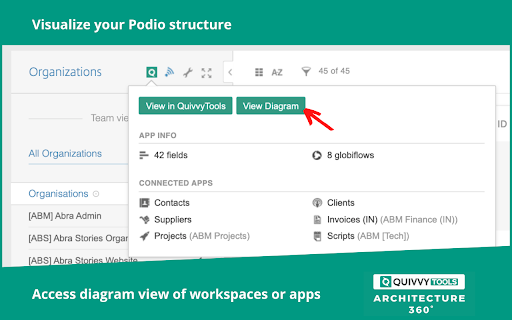
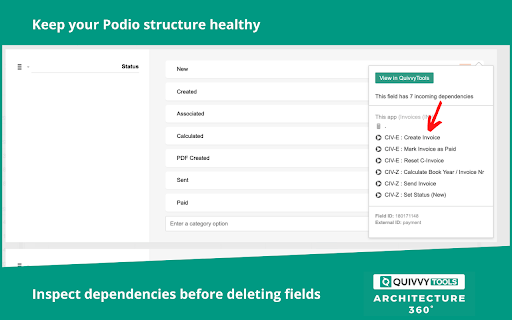


Integrate QuivvyTools into Podio and PWA With this free Chrome Extension for Podio & Podio Workflow Automation (Globiflow), you will be able to: - have a 360° overview of your Podio/PWA setup - check field, app, workspace, organisation AND flow dependencies - monitor the health of your Podio/PWA setup and fix errors instantly - know the impact of deleting a field before deletion - search for specific flow content (eg body of an email brick) - see who changed what, when & where in your Podio structure Visually, this blends completely within the Podio/PWA look & feel. The Quivvy Tools icon displays your dependencies and highlights errors. From there, you can navigate directly to the QuivvyTools Architecture website for a comprehensive overview that shows you the complete context.

Lucen Track widget
Track your time directly from Google Chrome in all your favorite tools Lucen Track for Google Chrome™ is the simplest extension to track time from your favourite productivity tools. The extension automatically integrates with the Lucen Track web app and allows to start timers, log time manually and manage your time entries without opening a new tab. Start tracking your time from your browser and within leading project management tools. = Get started in 3 simple steps = 1) Click “Add to Google Chrome™”. 2) Click on the Extension Icon. 3) Log in with your Lucen Track credentials. 4) You will now find a little Lucen Track icon inside the supported tools. 5) Click on the Lucen Track icon next to the task or project you want to track time - the extension will automatically match the task description with the equivalent project in the web app. 6) Choose whether to start a timer or log time manually, and start boosting your productivity! If you are working on a project or multitasking between emails, meetings and social media, you can always monitor the time spent on each task or to-do by starting single or multiple timers. The extension already works in: - Basecamp - Asana - Microsoft To-do / Planner and many others. Find all of our supported sites at https://www.timeneye.com/integrations If you are experiencing problems or want to send us a feedback, please contact us at support@timeneye.com Please note that Lucen Track for Google Chrome™ requires a Lucen Track subscription: subscribe at https://www.timeneye.com

Octagon Find
Extension adding Octagon Find search engine to Chrome. This extension allows you to set the Octagon Find search engine as your primary search provider in the address bar. Octagon Find search engine is an alternative search engine with the ability to search for content in various sources with an emphasis on user privacy. By clicking "Add to Chrome", I accept and agree to installing the Octagon Find and setting Chrome search to that provided by the service and the Terms of Use and Privacy Policy. The extension will update your search settings provided by Octagon Find.

HighlightAI
Chat on highlighted cell number on Whatsapp. Search highlighted text on FB, LinkedIn, X, Quora and TikTok. Search using AI Unlock a smarter way to browse and connect with Highlight AI, the Chrome extension that transforms your online experience. Highlight text to instantly search across Quora, TikTok, X, and Facebook, or start a WhatsApp chat by selecting a phone number—no copying or pasting needed. With its intuitive design, Highlight AI seamlessly boosts your productivity and engagement. Perfect for social media fans, researchers, and professionals. Download now and elevate your digital life! This concise, engaging description highlights key benefits, targets a broad audience, and includes a strong call to action to attract more users.

Power Tools
Power Tools for Podio is a bundle of 4 tools that will make your Podio life much easier. Power Tools for Podio is a bundle of 4 tools that will make your Podio life much easier. These 4 tools are included in this extension: - Bulk Edit: Update multiple Podio items directly from your table overview. - Power Export: Combine your linked Podio apps in one export. Drag and drop the columns you want to export, save your report and click export. - Power Sync: Sync your Podio app to a Google Sheet. - Power filters: Filter on fields from related Podio apps.
