
okeooekaaniggaignhhfeddohlcjadkd

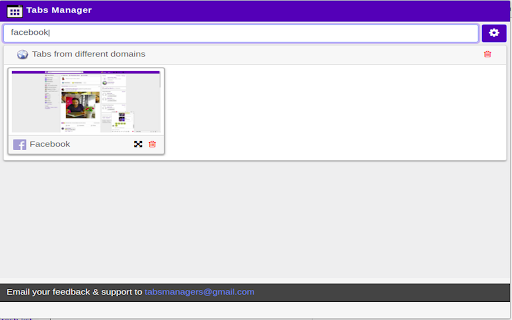
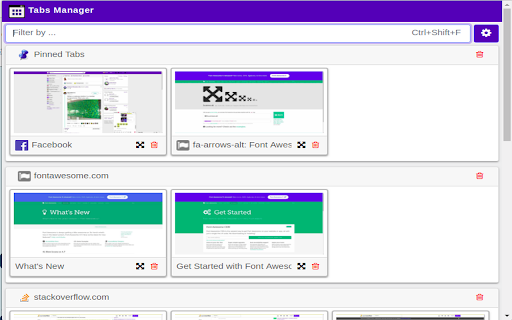
Quickly view, search, and manage all your open tabs with thumbnails and grouping across windows. Easily manage your open tabs with searchable thumbnails – all in one place. Get a visual overview of all your open tabs with automatically captured thumbnails. Zoom into previews, group tabs by domain, and manage them effortlessly. Key Features: - 📸 Auto-generated thumbnails with tab titles - 🔍 Search tabs by title or URL - 🧩 Group tabs by domain - 🖱️ One-click tab actions: switch, close tabs, or entire groups - 🔎 Zoom preview on hover What's New: 🆕 Jan 1, 2026 - Add guard to capture image one at a time and defer capture until document load. - Major code refactoring August 13, 2024 - Higher-quality snapshots - UI fixes: card padding, Options page September 13, 2020 - Fixed layout issues with 4-thumbnail display May 22, 2020 - Improved fail-handling for thumbnail capture - Library updates Earlier Updates - YouTube compatibility fix - Mac shortcut fix - Badge indicators for current and total open tabs - Multi-window support - New card layout and Options page - Shortcut (Ctrl+Shift+F) to open popup

Tab Master 5000
The swiss army knife of tab, history, bookmark, session, and extension management. Tab Master 5K replaces your New Tab page with a full-featured tabs, history, bookmarks, apps, extensions, and sessions manager. -- Tabs - Close, pin, and mute tabs from your New Tab page. - Re-order tab tiles by dragging and dropping them. - Close all tabs from a specific website. - Close duplicate tabs, and optionally make them pulsate. - Manage tabs through icons, the right click menu, or through a table view. - Search tabs in the top search bar. - Option to sort tabs by website or alphabetical order, and apply the order to your Chrome window. - Option to view tabs across all windows. - Automatically discard tabs from memory and customize how long they have to be inactive to trigger it. -- Customization - Full control of the New Tab's appearance with a flexible theme editor. - Import any wallpaper as a background. - Adjust the size of the grid tiles. - View a screenshot of each tab in the grid. - Enable screenshots to cover the background of a New Tab page when you hover over a tab tile. You can adjust the strength of the blur and opacity of backgrounds in Preferences. -- Session Management - Session manager built in for saving and restoring your current tab sessions. - Synchronize your saved sessions, and keep them persistently updated with the current Chrome window. - Tab sessions can be exported and imported. - View, sort, and filter your session tabs as tiles in the grid view. -- Chrome Management - View, sort, and filter your bookmarks, history, apps and extensions as tiles in the grid view. You can change how apps launch, create app shortcuts, enable/disable, or uninstall them. - Quickly navigate the extension with keyboard shortcuts. - Undo tab actions by pressing CTRL+Z, or through the context menu while a New Tab page is open. - Add websites you do not want to view to a comma separated blacklist in Settings -> Preferences. Websites added to the blacklist will have their tabs closed under any circumstance. Please report any issues on this store page's Support tab. If you like this extension, or think it could be better, please rate it and leave feedback. You can also fork and pull request this extension on its public Github repository: https://github.com/jaszhix/tab-master-5000-chrome-extension

Tab Sorter 2
Enhance your browsing experience, one click at a time Introducing TabSorter2 - the browser extension designed to revolutionize the way you manage your tabs! Say goodbye to tab clutter and hello to seamless organization with just one click. 🅴🅵🅵🅾🆁🆃🅻🅴🆂🆂 🆃🅰🅱 🅼🅰🅽🅰🅶🅴🅼🅴🅽🆃 [FREE]: • 💫 Quickly sort your tabs by domain and title for easy navigation. • 🔄 Merge all your windows into one streamlined interface. • 🎲 Spice things up by shuffling your tabs for a bit of fun! • 💥 Collapse: Create groups of domains with more than 2 tabs opened [NEW] 🅰🅳🆅🅰🅽🅲🅴🅳 🅵🅴🅰🆃🆄🆁🅴🆂 🅵🅾🆁 🅿🅾🆆🅴🆁 🆄🆂🅴🆁🆂: • ↔️ Split your window vertically or horizontally to tailor your browsing experience. • 🏷️ Take control with Domain Uniting, perfect for grouping or isolating tabs from the same domain. • 🧠 Optimize your memory usage with Memory Optimization, freezing and unloading tabs to save valuable resources. • 🧹 Say goodbye to clutter with Domain Cleanup, closing all tabs from a specific domain across all windows. • 🚫 Eliminate duplicates with Tab Deduplication for a cleaner browsing experience. 🅲🅾🅼🅱🅰🆃 🆃🅰🅱 🅰🅳🅳🅸🅲🆃🅸🅾🅽: • 🎯 Dive into Focus Mode to eliminate distractions and boost productivity with a clear canvas. • 📚 Easily return to your tabs with Unfocus when you're ready to dive back in. 🅾🆁🅶🅰🅽🅸🆉🅰🆃🅸🅾🅽🅰🅻 🅱🅻🅸🆂🆂 🆆🅸🆃🅷 🆂🆃🅰🅲🅺🅸🅽🅶 🅼🅾🅳🅴: • 🗂️ Keep your windows neat and clutter-free after a domain split with Stacking Mode. • ✨ Tidy up: Feeling overwhelmed? In one clean sweep, tidy up your messy tab life 🧹 [FREE - Experimental for 50+ tabs opened] Why wait any longer? Embrace the essentials for free indefinitely or subscribe to support continuous development and unlock all current and forthcoming features 🙌. Seize control of your browsing journey today with TabSorter2. Your tabs will thank you for it 😉!

Extentie - extension manager
A simple and elegant Chrome extension manager allows you manage your extensions in a popup window. Extentie is a simple and beautiful tool that allows you to toggle and manage Chrome extensions in a popup. Latest update: - Now you can create your own groups to manage your extensions - Revamped from ground up, added more features

TabPlus
The most feature-packed tab manager. Save & organize your tabs, sync across devices! Tab++ allows you to save your tabs for later. You can organize, categorize, and name them, then restore individual tabs or tab groups at any time. You can even sync them across devices! Tab++ is inspired by similar extensions like OneTab, only with WAY more features... Like folders, cloud-syncing, easy backup and restore, and more! # Note: Usage help can be found in the options page. # NEW IN v1.7.3 - Dark mode, woot! - Implemented more settings in the options page - Confirmation prompt before clearing all data - Don't save pinned tabs by default (configurable) - Bug fixes & improvements to automatic corruption recovery
