
okcddklchnidfaehbkgphjodojdkpkkn
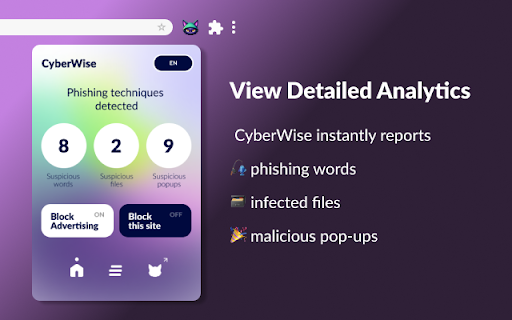

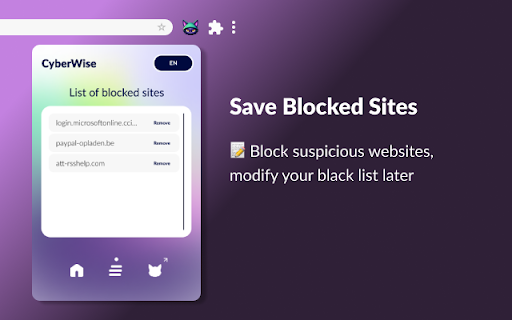

Multilingual detector of phishing, adware, and malware on websites CyberWise detects cyber threats for people speaking 10+ different languages 👾🌎 Once on your browser, the cyber security extension notifies you beforehand about all malicious websites, files, and ads through built-in notifications. Contact us: Any questions or suggestions? We are always happy to learn from your perspective! Feel free to contact us at victoriapanassevitch.cyberwise@gmail.com.

Web3 Vigilance - Browser security
The extension will help you be safe when interacting with web3 DApps. The extension crowdsources active scammers information and alerts you if you open one. Additionally, you can also report fraudulent domains to warn rewards in crypto. The team behind this extension is a blockchain based decentralised autonomous organisation (DAO). The community aims to maintain active information about legitimacy about domains and open source this information for the good of web users.

Digital Shield: Tracker Blocker, Privacy & Parental Control
Block trackers & malware, check email data breaches, parental controls, dark mode & password manager. Free Chrome privacy extension. Digital Shield is a free tracker blocker and privacy protection extension for Chrome. Stop third-party trackers, block malware and phishing sites, check email data breaches, and keep your family safe - all in one lightweight extension built on Manifest V3. You are being tracked on almost every website you visit. Digital Shield stops it. 🛡️ TRACKER BLOCKER & MALWARE PROTECTION • Block third-party trackers and invisible scripts that follow you across the web • Malware & phishing protection: identify and block dangerous domains before they load • Website Safety Score: real-time 0-100 security rating and Privacy Grade (A-F) per site • SpyGraph Visualizer: see exactly which ad networks and data brokers your data is shared with • Privacy Sandbox: feed trackers false data to break their profiling entirely 🔔 DATA BREACH CHECKER & IDENTITY PROTECTION • Check if your email or passwords were exposed in known data breaches - instantly • Zero-knowledge password manager: securely store, generate & autofill credentials on-device • Email alias generator (PRO): create masked emails to protect your real inbox identity • Anti-fingerprint protection (PRO): block advanced cookieless tracking across sessions 👨👩👧 PARENTAL CONTROL EXTENSION & FAMILY SAFETY • Kids safe browsing: enforce strict Safe Search with granular age filters (Under 10 to 14+) • Adult content blocker (PRO): dynamic filtering to protect children from harmful content • Pause browsing instantly with a parent PIN - ideal for screen time and focus sessions • Bedtime scheduling: automatically disable browsing at set times for healthy sleep habits • 72-hour search history log (PRO): rolling parental review of browsing activity ⚡ PERFORMANCE & BROWSER PRODUCTIVITY • Universal dark mode: enable an eye-friendly dark theme on any website instantly • One-click browser cleaner: clear cache and cookies without getting logged out • Tab resource monitor: track RAM and CPU usage per tab to fix browser slowdowns • Reader view: strip pop-ups and sidebars for clean, distraction-free reading 🔐 SECURE VAULT & PRIVACY TOOLS • Encrypted bookmark and notes vault protected behind a PIN • Network-level firewall (PRO): granular control over all browser network connections • AI privacy policy summarizer (PRO): understand any privacy policy in plain English • Session-safe cleaning: remove your digital footprint without losing active sessions 🚀 WHY DIGITAL SHIELD? ✔ Free tracker blocker - no account or sign-up required ✔ Built on Manifest V3: zero impact on browser speed or performance ✔ Privacy-first architecture: your data is encrypted and never leaves your device ✔ Covers what VPN extensions miss: tracker-level and script-level blocking ✔ The only Chrome extension combining breach alerts + parental controls + tracker blocking ✔ Fully localised in 14 languages — global privacy protection for everyone Digital Shield replaces: tracker blockers, malware scanners, data breach checkers, parental control extensions, password managers, dark mode extensions, and browser cleaners - in a single free privacy extension for Chrome. Stop trackers. Block malware. Protect your family. Own your privacy.

Script Control
• Allow or block JavaScript globally. • Allow or block JavaScript for multiple domains. • Allow or block JavaScript for individual domains. • Light and dark theme preferences. Chrome only allows 5000 simple rules (single domain) and 1000 complex rules (multiple domains). If you think you need more rules you may want to try an extension like NoScript or uBlock Origin that may not be using Chrome's new rule based technology. Script Control modifies security headers at low level to allow or block JavaScript. If you are using another security focused extension that is using the same technique, one or both extensions may interfere with each other. Script Control respects your privacy. https://nightmode.fm/software/script-control/privacy This software is provided under a no-contact and no-support model. Do not contact the author, for any reason, even if you think it would benefit the author.

FDev Security
You are protected absolutely with our awesome features: Realtime protection, block seen and typing indicator, blur messenger! # INTRODUCTION You are often afraid about "malicious" websites on the internet. It seems that you cannot know when your sensitive data was stolen by attackers. And when your information, data is hacked by someone (such as banks account, Facebook, ...), you just realized that your data is very importance and you begin to care about the security when you browsing in the Internet. Let's CoderDocs Security protect you with real-time protection feature. And we also has another awesome features like: Facebook (+Zalo) privacy, Privacy Web Experience, Blur Messenger, Malware URL scanning, .... # FEATURE 1: REAL-TIME PROTECTION When you install CoderDocs Security extension successfully, this feature will enable real-time immediately. This feature is the most important, so you cannot disable it. When you visit a malware site, the warning popup will be displayed to warning you about this malicious site. # FEATURE 2: FACEBOOK (+ZALO) PRIVACY You can easily enable / disable this feature by check or uncheck the checkbox of every small functions. This feature includes: - Block "Seen" indicator: When you receive a Facebook message, you click to view this message, the sender will see the status "seen" in their message space. But if you enable this function, the sender can not see the status "seen" any more. They never know whether you saw the message or not. - Block "Typing" indicator: Similar with block "seen", the sender can not see the "typing" indicator when you compose the message in Facebook message space (the three dots indicator "..."). - Block "Seen" status in Story: When you click to view the Story of someone, they will know that you have seen their Story. But with this function, nobody can know that you saw their Story. You can click and see your ex-girlfriend any time. - Block "Typing" indicator in Comments space: When you are typing the comment in any post. People can see the indicator "Someone are typing ...". But if you enable this function, this indicator will be disappear forever. - NOW, it support block seen and typing indicators in Zalo web version. Note: Block "Seen" status in Story and block "Typing" indicator in Comments are disable now because some technical problems. # FEATURE 3: PRIVACY WEB EXPERIENCE You can also easily enable / disable this feature by check or uncheck the checkbox of every small functions. This feature includes: - Block important sites when you absent: When you go out, you forgot to lock your computer, someone can open you browser, they can open some important site such as Facebook, Gmail and see your sensitive information. If you don't want that thing happen. Let enable this function. It allow you to block some importance sites that you don't want anyone access to if you have to lend your computer or you go out. - Block tracking Ads Scripts: This function allow you to block the tracking scripts like Facebook, Google. For example, you go to an e-commerce website, when you comeback to Facebook, the previous items in e-commerce website will be display. You can enable this function to block them. - Browser for kids: This function allow you to block almost porn sites in the world. If your kids uses your computer, let enable this function. # FEATURE 4: URL MALWARE SCANNING This is a feature that allow you to operate directly on the user interface. Let go to menu path: TOOLS / SECURITY / MALWARE SCAN and explore this feature. This feature allow you to analyze any URL and inform for you if the URL will be redirected to the website that contains any malware/virus. # FEATURE 5: BLUR MESSENGER This feature allow you to hidden all information when you chat with someone in the Messenger (messenger.com). Just don't care anyone who often peek at your messages. It only work with Messenger - Open Messenger (messenger.com) - Click Settings Icon in the left side bar. - Enjoy the new Messenger feature. More information about CoderDocs Extension: https://lenhatthanh.com/en/coderdocs-security/
