
ojnfapijbeobcdnmngijlngbiaknejjo
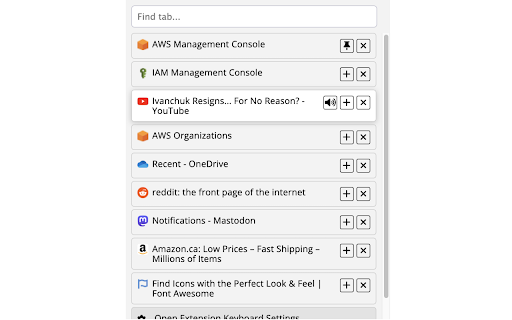

A basic tab manager that allows you to find or navigate to tabs quickly. A basic tab manager that allows you to find or navigate to tabs quickly, as well as pin or unpin tabs, and mute or unmute audible tabs. v0.1.2 includes case-insensitive tab searching by title. v0.3.3 includes the ability to close tabs, the ability to pin and unpin tabs, and an updated shortcut key (Ctrl+Shift+E) that should have fewer conflicts with other extensions. v0.3.4 includes the ability to show audible and muted tabs, and mute or unmute audible tabs.

Simple Tab Manager
Simple tab manager that allows you to easily manage and sort tabs. Windows: - Open, close, and minimize windows - Change window title - Color code windows Tabs: - Open, close, mute, pin, refresh, duplicate tabs - Move tabs within and between windows - Select multiple tabs at once - Sort tabs by title or url - Easily find tabs by searching Other: - Supports dark mode - An alternative, more compact view (grid view) - Use shortcuts to quickly perform actions - Export and import windows and tabs

Tab Manager
This extension allows you to manage and close your tabs. New dark mode with persistent settings - Switch between light and dark themes with a single click, and your preference is saved for your next session. Archived tabs management has been completely overhauled - Now you can restore individual tabs, view archive history, and bulk restore/delete tabs with improved visual organization. Notification system with toast messages - Get immediate visual feedback on all your actions with our sleek new notifications that automatically disappear after completion. Zippy search functionality with enhanced filtering - Find your tabs instantly with debounced search that updates as you type and new sorting options (by domain, title, or activity). Tab Manager is a Chrome extension designed to help you take control of your browsing experience. It offers a set of practical features to manage your tabs effectively, saving you time and reducing browser clutter. 🔍 Comprehensive Tab Overview: See all your open tabs in a clean, list format. 🔗 Smart Tab Grouping: Automatically organize tabs by domain. ⚡ Quick Search: Find any open tab with ease. 📊 Bulk Actions: Select and manage multiple tabs at once. 📈 Tab Statistics: View your total tab count and most visited domains. 🔄 Duplicate Tab Management: Identify and remove duplicate tabs quickly. 📁 Tab Archiving: Save tabs for later without keeping them open. 🔇 Mute Control: Mute or unmute tabs directly from the extension. 📤 Export Functionality: Save your current tab setup to a CSV file. 📑 Custom Tab Lists: Save and restore groups of tabs for different tasks. ⌨️ Keyboard Shortcuts: Manage tabs efficiently using your keyboard. 💪 Increased Productivity: Spend less time organizing and more time browsing. 🧹 Reduced Clutter: Keep your browser tidy and easier to navigate. 💻 Resource Management: Close unnecessary tabs to free up system memory. 🎨 Customizable: Adapt the extension to your personal browsing habits. Tab Manager is suitable for anyone who frequently works with multiple tabs, from casual users to power browsers. It's a simple tool that can significantly improve your daily browsing experience. Try Tab Manager today and see the difference it can make in your web browsing efficiency! 🚀

Tab Groups List
Lists all tab groups across all browser windows. On a click navigates to the selected group. A simple extension that shows a list of all open tab groups across all browser windows in a popup. Clicking the group activates the first tab in that group and focuses its browser window if needed. The purpose of the extension is to allow users to quickly find specific tab group and navigate to it - useful especially for tab hoarders with many groups across many windows. IMPORTANT NOTE: This extension can only display tab groups that are currently open in the browser windows. Tab groups saved or hidden via Chrome's native "Save group" feature are not accessible to extensions through Chrome's API and will not appear here. The extension tries to maximize the number of groups visible without scrolling (as extension popup window size is limited by the browser) by displaying them in 1 to 3 columns based on the number of groups to show. In a nutshell: ● Shows a list of all tab groups across all browser windows in a popup. ● On a click navigates to the selected group. ● Only groups are involved, no tabs get in the way. No group management either. ● Extension is for Chromium based browsers that support tab groups. Remember to pin the extension after installation so its icon is always visible and clickable. You can also set a keyboard shortcut to open the popup in the browser settings (usually Extensions -> Keyboard shortcuts). Browsers currently list all the groups (without their tabs) only in the "Add tab to group" context menu - not very useful when you just want to jump to the group without adding anything. And the search function often (depends on browser) only checks tabs and not group titles. There is no group management or messing with individual tabs in this extension, you can find nice ones for that already or have built-in support.

Tab Manager
An extension to manage your tabs seamlessly! This Extension lets you create and save your most used webpages for faster access!! A side project from Cidroy Dev Team, so show some ❤️!
