
ojjckobagcdggiifhibnhmjeoahoapdn
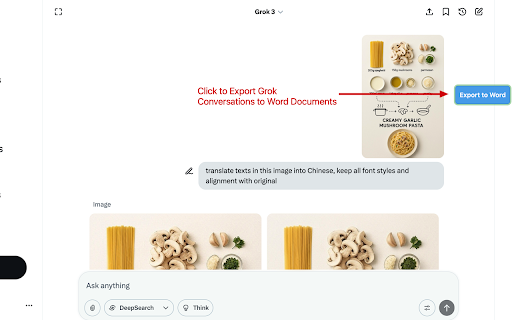


Overview Grok to Word allows you to effortlessly export your Grok conversations as well-formatted Word (.docx) files with just one click. Easily save, share, or archive your chats for future reference. The extension lets you filter which messages to export, so you always get exactly what you need. Features ✅ One-click export of entire Grok conversations to Word (.docx) files for easy downloading ✅ Filter and export user messages, assistant responses, or individual messages as needed ✅ Preserves images, tables, code blocks, and more from your Grok chats in a clean, readable Word format ✅ Ensures your exported Word documents are visually appealing and perfect for reading, sharing, or documentation Pricing The extension is completely free for all basic features, with optional upgrades for advanced functionalities. Feedback and Support For questions or support, contact us here: https://forms.gle/YcXyeSuKnUSufgdNA Privacy and Security Your privacy is our priority. All data is processed locally in your browser and is never transmitted to our servers. We do not store any of your data. Disclaimer This extension is an independent, third-party tool and is not affiliated with, endorsed by, or associated with Grok or its parent company in any way.

AI Chat to Word, PDF & Google Docs - for Gemini
Convert the Gemini content into a Microsoft Word, Google Docs or a PDF format in a single click. Save your Gemini conversations as Word, PDF, Google Docs or Markdown documents with the Gemini to Google Docs or PDF Chrome extension. With a single click, you can convert Gemini responses into a well-formatted Google Docs, Word, or PDF file, Markdown file, ensuring easy access, sharing, and reference. This extension lets you copy math equations from Gemini to Word while preserving symbols, fractions, and integrals. This extension preserves formatting, ensuring your content appears just as it does on Gemini, including: Supports exporting the complete conversation as a Google Docs, Word, or PDF file. Supports exporting only Gemini responses as a Google Docs, Word, or PDF file from the entire conversation, excluding user prompts. Ideal for research, content creation, brainstorming, and archiving purposes. Whether you need a Gemini to Google Docs converter, a Gemini table to Google Docs converter, or to copy Gemini equations into Google Docs without losing formatting, this extension makes it effortless.

Grok to PDF
This Grok to PDF extension makes it simple to export your Grok conversations as beautifully formatted PDF files with just one click. Whether you need to save, share, or archive your chats, this extension provides a fast and convenient solution. Easily filter which messages to export, so you always get exactly the content you want. Features ✅ One-click export of entire Grok conversations to PDF files for easy downloading ✅ Filter and export user messages, assistant responses, or individual messages as needed ✅ Preserves and beautifully formats images, tables, code blocks, and more from your Grok chats into a clean, readable PDF ✅ Ensures your exported PDFs are visually appealing and perfect for reading, sharing, or documentation Pricing The extension is completely free for all basic features, with optional upgrades for advanced functionalities. Feedback and Support For questions or support, contact us here: https://forms.gle/UvTfFmmASkxS4MgX7 Privacy and Security Your privacy is our priority. All data is processed locally in your browser and is never transmitted to our servers. We do not store any of your data.

Grok Chat Exporter
Export Grok chats with Grok Chat Exporter in PDF, HTML, Markdown, TXT or Word formats Easily export your Grok conversations with this plugin, supporting multiple formats like PDF, HTML, Markdown, JSON, TXT, and more. Save, share, and manage your chat data in the most convenient way possible. 🚀 Support for Multiple Export Formats Whether you need a document for archiving, a web-friendly file, or a developer-ready format, this plugin has you covered: PDF: High-quality, printable files for formal records. HTML: Web format for easy online viewing and sharing. Markdown: Lightweight text format for integration with tools and platforms. JSON: Developer-friendly format for analysis or processing. TXT: Simple, clean plain text. Word: Export chats as Microsoft Word docs for easy editing. Format Selection: Pick your preferred format from a clear dropdown menu. Real-Time Preview: See your conversation and choose how to export it. Customization: Fine-tune details to suit your needs. Select Content: Pick your Grok conversation to view or edit. Choose Format: Select PDF, Markdown, JSON, or more from the menu. Export with Ease: Click “Export” to generate and download your file. Save or Share: Store locally or share with others instantly. Export to PDF 🖨: Turn your Grok chats into polished PDFs for printing or archiving. Export to Word 📄: Create editable Word docs for further use or collaboration. Export to Markdown 💻: Perfect for tech users, integrating with blogs or GitHub. Export to JSON 💡: Ideal for developers, enabling data analysis or system integration. Work Archives: Save chats as Word or PDF for future reference. Collaboration: Share discussions via HTML or Markdown with your team. Data Insights: Export to JSON for programmatic analysis. This plugin makes managing and sharing your Grok conversations a breeze. From professional archiving to casual sharing or advanced data analysis, it’s designed to boost your productivity. All processing happens locally, ensuring your privacy is protected. Download the plugin today and unlock a smarter, more efficient way to handle your chats! ✨

Save Grok Chat as PDF
Capture any Grok conversation and download it cleanly—whole thread or selected messages—without broken math or mangled code. Unofficial helper tool (not affiliated with xAI or Grok). Key features • Full or selective export • Custom PDF styling (layout, font size, margins) • Theme‑adaptive interface • Remembers your settings locally • 100% local processing—no servers, no tracking Typical uses • Researchers & students: keep proofs and citations intact • Developers: preserve code blocks and formatting • Writers & bloggers: archive drafts or notes • Data / ops teams: retain decision trails Privacy: All processing happens in your browser; nothing is transmitted.
