
ojindngmcgdigpfnpkimfdjecnafiioe

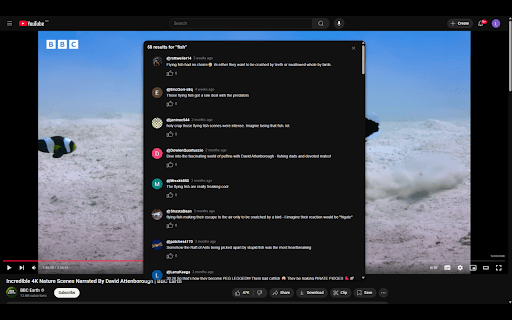


YouTube Comment Finder is a Chrome extension that lets you instantly search comments on the currently open YouTube video for any… YouTube Comment Finder is a Chrome extension that lets you instantly search comments on the currently open YouTube video for any keyword without leaving the page. Features: • Search comments directly from a popup inside the YouTube page. • View commenter profile, username, channel link, likes, replies, and posted date. • Fetch all top-level comments. • Load more results in batches of 1000 comments. • View all replies to a comment in YouTube-like format. • Clean, modern UI styled to match YouTube. • Smooth animations and loading states for better UX. How it works: 1. Open any YouTube video. 2. Click the extension icon to open the popup. 3. Enter a keyword and click "Search" to instantly find matching comments. Optionally, click "Load more comments" to load another batch of 1,000 comments (if the video has more). You can repeat this process until all the comments have been fetched

YouTube Comment Kit — Comment Search
📖 How to use: Open any YouTube video 👉 find the panel in the right sidebar. 🔍 Comment Search — Text search with advanced Filters, Sorting & RegEx support. ⏱️ Timed Comments — Synced playback with clickable timestamps. 🔥 Comment Heatmap — Markers on video seekbar for timestamps with previews. 👍 Comment Actions — Like, unlike, and translate comments instantly. 🎨 UI & Themes — Sleek layout with light, dark and more themes. 🚀 Coming Soon: Export (JSON/CSV), caching, AI sentiment analysis, and advanced comment processing tools for creators.

YouTube Comment Search & Filter
Search and filter YouTube comments with ease. Find specific comments, authors, or topics instantly. ✨ **Key Features:** • 🔎 **Instant Search** - Find comments containing specific words or phrases • 👤 **User Filter** - Search comments by specific YouTube usernames • ⚡ **Real-time Results** - See matches highlighted as you type • 🎯 **Smart Filtering** - Case-insensitive search with partial matching • 📱 **Clean Interface** - Non-intrusive search box that fits YouTube's design • 🚀 **Fast Performance** - No page slowdown or interference with YouTube 🎯 **Perfect For:** • Finding discussions about specific topics • Locating comments from particular users • Researching opinions on controversial videos • Finding timestamped comments with specific moments • Moderators managing large comment sections • Content creators engaging with their audience 🔧 **How It Works:** 1. Open any YouTube video 2. Click the extension icon or use the search box 3. Type your search term 4. See matching comments highlighted instantly 5. Click results to jump directly to comments ⚠️ **Current Limitations:** • Searches currently loaded comments (scroll to load more) • Reply comments need manual expansion to be searchable • Works best on videos with moderate comment counts 🛡️ **Privacy & Security:** • No data collection or tracking • All searching happens locally in your browser • No information sent to external servers • Open source code available for review 💡 **Pro Tips:** • Scroll down to load more comments before searching • Use partial words for broader matches • Try different keywords if first search doesn't find what you need Perfect for researchers, content creators, moderators, and anyone who wants to make sense of YouTube's comment chaos! ⭐ Rate and review if this extension helps you find what you're looking for!

YouTube Comment Search & AI Analyzer - Comets AI
Search and analyze YouTube comments instantly with AI-powered insights. Find specific comments, detect emotions, analyze sentiment, and understand what thousands of viewers think—without endless scrolling. 🔍 Smart Comment Search & Filters • Search comments by keyword, timestamp, or topic • Filter by sentiment (positive, negative, neutral and 12+ emotions) • Find specific praise, complaints, or questions instantly • Search works on videos with thousands of comments 📊 Visual Insights & Summaries • Word clouds showing trending topics and keywords • Pattern recognition across comment threads • Smart summaries of long discussions • Spot consensus and controversial opinions at a glance ⚡ Lightning Fast • Analyzes thousands of comments in seconds • Lightweight extension—won't slow down YouTube • Only activates when you click it • Works instantly on any public video 👥 WHO IS THIS FOR? • Content Creators & YouTubers: Understand your audience feedback faster. See which video moments engage viewers. Identify what content resonates most. • Students & Educators: Study public opinion, analyze social media trends, research online communities for academic projects. • Curious Viewers: Skip the scroll. See if a video is worth watching based on what others actually think. Install Comets AI extension (takes 5 seconds) Open any YouTube video Click the Comets AI icon in your toolbar See instant analysis + use smart search filters 🔒 YOUR PRIVACY IS PROTECTED ✅ Only analyzes comments when you click ✅ No browsing tracking ✅ No watch history stored ✅ Never sells your data ✅ Works entirely in your browser ❓ FREQUENTLY ASKED QUESTIONS Q: Is this free? A: Yes! Comets AI is completely free. We may add optional premium features later, but core functionality stays free forever. Q: Does it work on all YouTube videos? A: Yes—any public video with comments enabled. Music videos, reviews, vlogs, tutorials, podcasts, everything. Q: Will it slow down YouTube? A: No. Comets AI is lightweight and only activates when you click the icon. Videos play normally. Q: How accurate is the emotion detection? A: Our AI is trained on millions of YouTube comments and understands context, sarcasm, and nuance. It catches what people mean, not just what they type. Q: Can I use this for research or school projects? A: Absolutely! Perfect for analyzing public opinion, studying social media trends, and understanding community reactions. Q: Do I need technical skills? A: If you can click "Add to Chrome," you're set. Designed for everyone, not just tech experts. • Search functionality (find any comment instantly) • AI analysis (understand sentiment and emotions) • Visual insights (see patterns and trends) • Privacy-first (your data stays yours) Install Comets AI now and discover what people really think.

YouTube Comment Reader
Search, Sort, Filter, Translate, Read, Export YouTube Comments in spreadsheet format. Navigate Comments & Rplies with arrow keys +++ New Export functionality in version 1.0.28 +++ All loaded comments now exportable optionally in XML for Excel, JSON, or CSV (comma, tab or semicolon separated) format. The export complies with the current filter and order settings (i.e. you can easily export a filtered part of the comments in a desired order). If you are in dark mode, then the Excel sheet is created in dark mode as well. +++ New in version 1.0.20 +++ New translate buttons in the comment popups (listening to Alt+Y) ..translating every foreign language comment into your language (back and forth). +++ New in version 1.0.17 +++ + Shortcut key now is Ctrl+Shift+Y (for extension popup) ..which can be changed in extension settings + Any short video can quickly be opened in a regular video player (where timeline, speed, volume etc. can be adjusted) by clicking the video title in the extension's popup. +++ New in version 1.0.16 +++ Comments now also visible and sortable ascending by timestamps appearing in comments Features: ➤ Youtube comment presented in multi-functional spreadsheet format ➤ Sort comments (by table header click) ascending or descending by author, comment time, upvotes count, replies count, last reply time, timestamps appearing in comments, comment length, or channel owner's upvotes (heart symbol) ➤ Search main comments and/or replies by author and/or text content ...e.g. filter for an author's main comments and/or responses ...e.g. filter for comments and/or responses containing a specific text phrase ➤ Works in every language ➤ Works with YouTube Shorts as well ➤ Quickly navigate through comments and responses by (left, right, up, down) arrow keys ➤ Easily switch between light and dark mode Instructions: 1. Open a YouTube video. 2. Click on the extension icon (in the chrome extensions toolbar, to the right of the address bar). 3. Wait for the extension popup to load a brief overview containing the YouTube channel, video title, total comments count etc. 4. In the info popup click on the Comment Reader icon. The Comment Reader opens in a new tab and starts loading comments (from newest to oldest). 5. Watch the progress while comments are loading. 6. Click OK to interrupt the loading process at any time to start reading the comments that has been loaded till then. When all comments are loaded, the progress view and interrupt button will disappear. 7. An interrupted loading process can be continued at any time if loading more comments is desired. Tips: Use (left, right, up, down) arrow keys to quickly navigate through comments and replies (although, of course, mouse clicks work as well). ➤ use up & down keys to go from one row to another ➤ use the right arrow key to dive into details (of a currently selected row) ➤ use the left arrow key to leave the details and return to parent list ➤ Quickly open any short video in a regular player (..so you can adjust the timeline, speed, volume etc.) by clicking the video description in the extension's popup 8. To reply to or upvote a comment you may click on the comment time (e.g. "6 hours ago") above the comment text. This will open a new regular YouTube window with the targeted comment (as the "highlighted comment") appearing immediately under the video player. That way you can interact via the regular YouTube user interface.
