
oikmmggdnfnnnbpnpbljdgocppkiehni

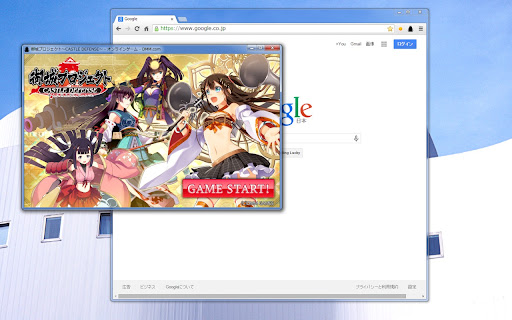

御城プロジェクトをぴったりサイズの別窓で起動します お城のアイコンをクリックすると別窓で開きます もう一回クリックするとポップアップメニューが出ます 攻略サイト等を見ながらプレイしたい時に便利かもしれません 主な機能は ・スクリーンショット機能 ・拡大縮小機能 ・通知付きのタイマー機能(手動) です ・ソース https://github.com/chabon/ShiroproLauncher ■ ver1.9.0 (2025/05/24) ストアからの削除を回避するため、manifest version 3 に対応しました。 これまでの設定値が全て初期化されてしまいます。ご不便をおかけしますが、ご了承のほどよろしくお願いします。 ● 不具合修正 ・ウインドウ右端に5pxほどの余白ができてしまう問題を修正 ● 機能追加 ・ウインドウ位置を記憶する設定 ・ウインドウサイズを記憶する設定 ● 機能削除 ・デスクトップショートカット機能 ■ver1.8.9 ・以下のタイマーの不具合を修正しました - マウスホイールが効かなくなっていた不具合 - モニターがスリープ状態になると、カウントが止まる不具合 ■ver1.8.7 ・png形式でスクリーンショットを撮った時、保存に失敗することがある不具合を修正しました ■ver1.8.6 ・ポップアップメニューのズレを修正しました ■ver1.8.5 ・タイマーのラベル変更時のバグを修正しました ■ver1.8.4 ・デスクトップショートカットを作成出来るようになりました(設定画面下部から) ・ポップアップメニューとタイマーに、ミュートボタンを追加しました ・以下の項目のショートカットキーの設定が可能になりました - フルスクリーン切り替え - 音声をミュート ■ver1.8.3 ・霊力タイマーを追加しました ・ウインドウリサイズ時の拡大縮小処理を、軽くなるように修正しました ・終了時に確認ダイアログを表示する設定項目を追加しました [オプション] - [ウインドウ・その他の設定] にあります ■ver1.8.2 RE版のURLと画面サイズに対応しました ■ver1.7.2 城プロを起動していなくても、アイコン右クリックからタイマーを出せるようにしました ■ver1.7.0 以下の設定項目を追加しました ・ウインドウリサイズ時、縦方向へのゲーム画面中央化を行わない ・起動時のウインドウサイズを指定する ・起動時のウインドウ位置を指定する アイコン右クリック→オプション→ウインドウ・その他の設定 の項目のところにあります ■ver1.6.8 タイマー下部にコントロールボタンを設置しました ■ver1.6.5 ポップアップメニューを少し変更しました ■ver1.6.4 ウインドウサイズ変更時にゲーム画面を拡大縮小出来るようになりました ■ver1.6.2 通知音声や通知アイコン画像の設定等ができるようになりました ■ver1.6.0 手動のタイマー機能を追加しました 城プロ起動後に、再度アイコンをクリックするとポップアップメニューが出ます。その中の「手動タイマー」ボタンを押せば起動します 使い方や設定は、アイコン右クリック→オプションを参照してください ■ver1.5.0 Ctrl+Shift+Sキーでスクリーンショットが撮れるようになりました

twitter画像原寸ボタン
This extension adds "Original" button on the image-embedded tweet in Twitter. Click the "Original" button to open image(s) in original size. [注 / Note] この拡張機能は、譲渡・売却の予定はありません。そのような連絡はお断りします。 I WILL NOT transfer/sell this extension under any condition. I REFUSE such requests.

YouTube LiveChat Flusher (Danmaku Chat)
Under development, it may not works well. If it doesn't work, please refresh page or switch to mini player. If you prefer to older version, please refer to the [GitHub wiki](https://github.com/ys-j/YoutubeLiveChatFlusher/wiki/Installation). - Works without displaying the chat frame (on independent mode) - You can pause each message's animation by right click. - Message translation; chat messages can be translated using Chrome's built-in translator or Google Translate. - Picture-in-picture with chat (beta features) - Time-shift; allows you to shift the timing of chat replay messages. - Animation Duration - Font Size / Number of Lines / Line Height - Font Family/ Weight - CSS-syntax (Comma-separated; Font name containing spaces must be enclosed in quotation marks.) (e.g. Roboto, "Noto Sans JP") - Stroke Style - Color, Offset, Blur. - Chat Layer Opacity - Background Opacity - Superchat, Milestone etc. - Max Width / Wrap Mode - Display Limit (Max Number of Messages) - Simultaneous Messages - Behavior when loaded many messages at same time. - Emoji Expression - Flow Density / Direction - Hotkeys (Keyboard Shortcuts) - Visibility and color with each following types: chat message by member, moderator, channel owner and verified user; super-chat, super-sticker, new-membership and milestones. - Words Filter (Banned Words List) - User-defined CSS - Message Translation - Time-shift Duration - Auto-start (on dependent mode) Configuration control panel is available from "Gear" icon as with video quality or annotation. The developer is not responsible for any damage caused by the add-on. It is noted that the add-on is not developed and published as a business, therefore it does not infringe upon any patent rights of DWANGO Co., Ltd. in Japan.

Illust Downloader EX for pixiv.net
You can easily download images, comics, and novels from pixiv.net! *This extension is unofficial and is not affiliated with Pixiv Inc. "pixiv" is a registered trademark of Pixiv Inc. *As of May 17, 2025, this extension has been renamed to "Illust Downloader." With Illust Downloader EX, you can download 'ugoira' as video files (such as AVI, WebM, etc.), APNG, GIF animations, SVG, and more. It also offers features such as sorting illustrations into folders based on various criteria like author or time, compiling manga into ZIP files, a function to see if an illustration on the list page has already been downloaded, bulk download functionality, and many other convenient features. The basic functions are free forever. You can try premium features free for one month, so please take advantage of this opportunity. To use all premium features of Illust Downloader EX, there is a monthly fee of 195 yen. Basic functions are available for free, but some functions, such as downloading 'ugoira,' are limited. For first-time users, there is a special offer to try all features free for one month, so please take this opportunity to experience it. - Automatically sort illustrations into folders, which you can name. Depending on how you use it, you can sort by author, by date, and more. - Save ugoira as ZIP files and play them with a dedicated player. You can also save each frame separately, or as video files (AVI, WebM, etc.), APNG, GIF animations, SVG, etc. - Compress and save manga in ZIP format. Manga can be saved in a format that adds a zero in front of the page numbers for easier viewing in manga viewers. - Easily identify whether an illustration or novel has already been downloaded from the list page. - Add a one-click save button to thumbnails. - Save comments, captions, etc., in text format. - Save novels with illustrations included, and use many other features. - Share download history with other PCs. - Access batch download functionality. - Various other features are available for use.

TabToPopup
this extention enable to export current tab page to new popup window. If you click on the icon to open the popup window. Page will be reloaded. Please be careful not to use the page being edited. ■ ver1.2.0 (June 7, 2025) ・Added feature to remember window position and size ・Minor bug fixes ■ver1.0.4 Add the setting can specify the popup window size ■ver1.0.2 In option, added the following settings ・when open a popup window, close the original window ・hide the scroll bar ・add 「open in popup window」to right-click menu on the link ・insert css in the popup window
