
oihpodnimjebpjcdfhipjfmpmcbmedoe
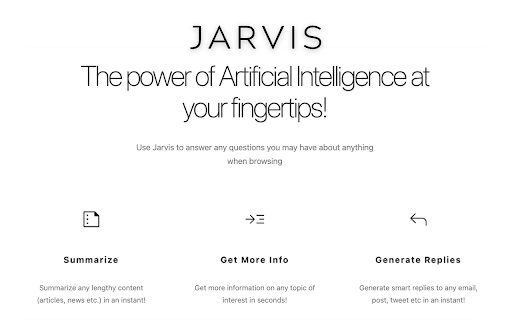

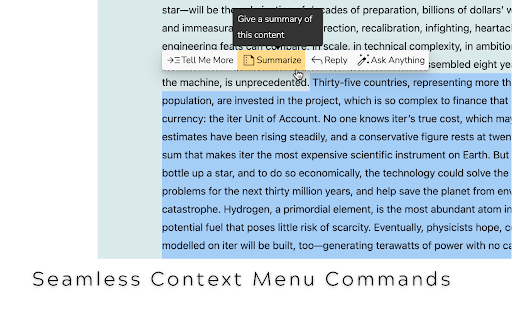


Browse Smarter with Jarvis ChatGPT AI Extension! Select content & Get Relevant Information, Summarize, Write Replies & Much more! Introducing Jarvis - Your Smart AI Assistant powered by ChatGPT that is going to revolutionize the way you interact with online content! 🚀 GETTING STARTED Launch Jarvis by using any of the following option: 1️⃣ Simply Select Any Online Text Content, which brings up the Jarvis custom menu to choose from. 2️⃣ Or, Press Ctrl+J to start chatting with Jarvis. KEY BENEFITS ⭐ FREE access to the power of ChatGPT! ⭐ Summarize selected articles and other long-form content. ⭐ Get More Information about any topic of interest. ⭐ Create replies to emails, social media posts, and anything else, saving you time and enhancing productivity. ⭐ Ask any question and get instant answers, making it really easy to find the information you need. HOW JARVIS WORKS ➡️ Simply Select Any Online Content, which brings up the Jarvis custom menu. ➡️ Choose any Command from Menu (Summarize, Get More Info, Generate Reply, etc) ➡️ Jarvis pops up with relevant answer. Continue to chat with Jarvis if needed. FAQs ➡️ Is Jarvis Free? Yes! There is a free version of Jarvis. ➡️ Can I turn off Jarvis for selected websites? Absolutely! Just click the Jarvis extension from the Chrome extensions list and select the 'Disable Jarvis for this Website' checkbox setting. 🙏 THANK YOU! Jarvis is designed to be user-friendly and intuitive. Its seamless integration as a Chrome extension means you can effortlessly access its capabilities while you browse. Say goodbye to switching between tabs or opening additional apps. Jarvis becomes your trusted co-pilot, always ready to assist and enhance your online journey. We believe that Jarvis has the potential to revolutionize the way people interact with the web, and we're eager for your help and feedback. Thank you so much for your support!

Jarvis
Explore commands that close, open and regroup your tabs without any hassle, making your browsing experience SEAMLESS. First, there are no commands to Jarvis. Converse with it, but try to make sure that the context you want it to act on is CLEAR. Given a query/request/command, you can perform 7 types of tasks with Jarvis : 1) Reopen tabs given their specific context try to be as concise and accurate as possible. For e.g., "Reopen entertainment" , " reopen funny videos ". This feature accesses the last tabs you visited under 6 hours of time and finds the most similar tabs to your query. ( Unfortunately, this command won't always work. I am a student developer and the free Hugging Face inference endpoints have very low rate limits. The OpenAI key is enough to empty my pockets :). ) 3) Close multiple tabs when you name their websites, e.g. " Close google and youtube " 4) Group tabs together by naming their websites "club youtube tabs please", "put together LinkedIn and Udemy", "group google with medium " etc. 5) Navigate on your current tab, in both directions and if you want specify the number of times you want to go back too. E.g. - "Can you go back twice", " Can you go forward 3 times?" 6) If Jarvis feels you are little sad and need cheering up, it will open random websites on its own. 7) Open tabs given the website name ( Only use it when you want to open multiple types of websites, this is quite useless otherwise.)

Jarvis AI Assistant — AI Copilot for Your Browser
All-in-one AI copilot. Write, translate, summarize, check grammar, and automate tasks with 30+ AI models. 🚀 Jarvis AI Assistant — Your All-in-One AI Copilot for the Browser! Tired of jumping between AI tools? Jarvis brings 30+ powerful AI models right into your browser — helping you write better, translate instantly, get answers faster, and breeze through your daily tasks. No extra tabs. No extra accounts. Just smarter browsing. 🤖 Multiple AI Models, One Extension Access a wide range of leading AI models through a single, unified interface. Switch between models in one click to find the best fit for your task — whether it's creative writing, coding, analysis, or conversation. No need to sign up for multiple AI services separately. ✨ Highlight Text → Get Instant Magic Just select any text on a webpage and Jarvis pops up with 20+ smart actions: • 🌐 Translate to any language • ✅ Check grammar & explain errors • ✏️ Rewrite, paraphrase, or simplify • 📝 Summarize or expand content • 🎯 Make it more persuasive or professional • 📌 Extract the key points • 💡 Explain text or code • ❓ Answer questions about the selection No copy-pasting needed — everything happens right where you're reading. 💬 AI Chat Sidebar — Your Smart Assistant on Every Page Press Ctrl+J to open the Jarvis sidebar anytime, anywhere. Chat with your favorite AI model and unlock powerful built-in tools: • 🔍 Web Search — get up-to-date answers from the internet • 🎨 Image Generation — create images from text descriptions • 📊 Data Analysis — analyze charts, files, and datasets • 🧩 Artifacts — create and edit code blocks and documents • 🧠 Extended Thinking — deeper reasoning for complex questions • ⚡ Web Automation — let AI click, scroll, and fill forms for you 📧 Email Made Easy Jarvis works right inside your email: • Generate smart email replies in one click • Draft new emails with AI assistance • Get multiple reply suggestions so you can pick the best one 🔍 Smarter Search Results Search on Google or Bing? Jarvis shows an AI-generated answer right next to your results. Get the information you need instantly — no more clicking through dozens of links. 👨💻 Built for Developers Too Jarvis adds AI tools directly into popular developer platforms: • Auto-generate pull request titles and descriptions • Summarize code changes across all files • Line-by-line diff review and explanation • Ask AI questions about specific code changes • Generate issue summaries, descriptions, and templates 📱 Social Media Helper Creating content for social media? Jarvis has you covered: • Generate engaging posts and comments • Summarize long threads so you don't miss anything 🖼️ Understand Any Image See an image on a webpage? Jarvis can: • Describe what's in the image • Answer your questions about it Great for research, accessibility, or just curiosity! 📚 Build Your Personal Knowledge Base Turn Jarvis into YOUR personal expert. Connect your own data sources and get AI answers based on your content: • 📄 Upload PDFs and documents • ☁️ Connect Google Drive, Notion, Confluence • 💬 Import from Slack and Discord • 🌐 Index any website • Plus more: SharePoint, HubSpot, Zendesk, and others Ask Jarvis anything — and it answers using YOUR knowledge, not just the internet. 🤖 Create Your Own Custom AI Assistants Build specialized AI bots tailored to your needs: • Pick any AI model + your knowledge bases • Set custom instructions and behavior • Share your assistants with teammates Perfect for customer support, internal Q&A, research, and more. 👥 Team Collaboration Bring your whole team along: • Create shared groups and invite members • Share conversations, assistants, and knowledge bases • Control access and permissions Work smarter together with shared AI resources. 📋 Prompt Library — Never Start from Scratch Browse 13+ categories of ready-to-use prompt templates: • Marketing, SEO, Writing, Coding • Business, Education, Career, Productivity • And more! Save your own favorite prompts and reuse them anytime. 🌍 Works on Every Website Jarvis follows you everywhere online: • ✨ AI assist button appears in text fields across the web • 🖱️ Right-click any page for quick AI access • ⌨️ Ctrl+J opens the sidebar instantly • 🌐 No website restrictions — it just works 💰 Free to Start • Free plan available — try Jarvis with no commitment • Upgrade to Starter for premium models and advanced tools like Web Search, Image Generation, Data Analysis, Extended Thinking, and Web Automation 🔒 Your Privacy Matters • Your data is handled securely • Strict privacy policy — we respect your information • Only essential permissions requested — nothing extra ⚡ Get Started in Seconds 1. Install the extension 2. Sign in 3. Press Ctrl+J on any webpage 4. Start chatting with AI! Join thousands of users who are already working smarter with Jarvis AI Assistant. Your browser just got a whole lot more powerful. 🚀

Voice Extension
Chrome extension that speaks to you The user is able to wake up jarvis when clicking the popup icon. Jarvis will change with background of available websites and tell the user what current site they are at!

ChatBot AI - ChatGPT & Claude & Bard & Bing
ChatBot is a copilot that uses ChatGPT, Bing, Claude, Bard, and more to answer questions like translations, emails, Q&As, and more. ChatBot AI assistant as your copilot, able to answer any complex question. 💻 Feature Highlights: 1️⃣ Supports multiple models, e.g. ChatGPT, Claude, Bard, Bing 2️⃣Powerful sidebar ✅ ChatGPT Translator ✅ ChatGPT Dictionary ✅ Grammar check ✅ Customize any prompt 3️⃣ Easy to access ✅ Support ChatGPT API key, support GPT-3.5, GPT-4 ✅Supports Claude API key ✅ Support iFlytek 4️⃣Theme ✅Support dark/light mode ✅Supports multiple color adjustments 5️⃣ ChatGPT/Claude/Bard response page: ✅ Markdown rendering ✅ Code highlighting ✅ Stop generating responses ✅ Copy response to clipboard 6️⃣ Many features to enhance your reading 7️⃣ Copywriting : Many features to optimize your writing 8️⃣ Prompt Library: This is a promptbase that provides a large number of prompts based on ChatGPT, GPT-3.5, and GPT-4. 9️⃣ Quick Action: Translate, paraphrase and paraphrase text on any web page. 🔟 Most importantly, your voice matters! 🗣 And we will continue to improve ❇️ How it works: 1️⃣ Click the extension icon 2️⃣ Choose the big oracle model you want to use ChatBot AI Assistant uses the powerful features of ChatGPT, Claude, Bard, etc. to understand and respond to your chat messages and generate copy based on the provided templates. You can also translate, paraphrase and explain the text on any web page. ❓ FAQ: 📌 Are you considering adding more models? 1. As written above, we will keep updating with Chatgpt synchronously in the future. If there is GPT-5 in the future, we will support it as soon as possible. And we will keep paying attention to the capabilities provided by Excel-Chatgpt, sql-Chatgpt, Mini-Chatgpt, claude, brad, etc. Maybe you can see these functions in the future.
