
oiekdmlabennjdpgimlcpmphdjphlcha


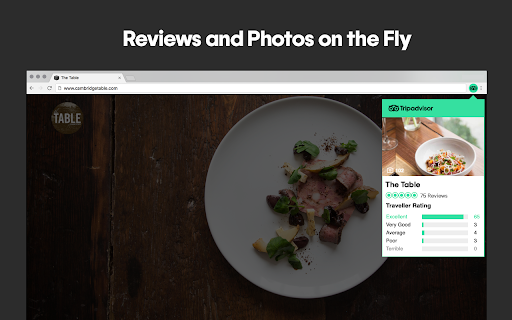
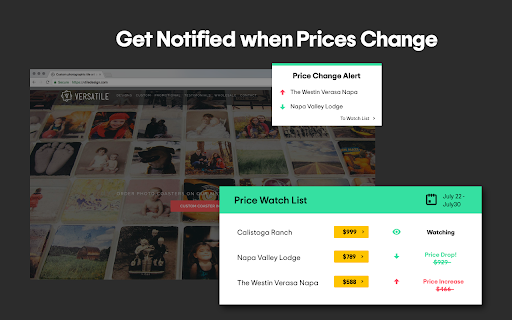

Find the best hotels, restaurants, and attractions worldwide with trusted Tripadvisor reviews. Tripadvisor's official Chrome Browser Button. * FEATURED in Chrome Webstore and always FREE * Faster access to Tripadvisor reviews and ratings * Track hotel prices - and get notified of price drops * Search Tripadvisor from anywhere * Plan and book with confidence * Hotel Price Tracker * NEW - Now you're Tripadvisor Browser button can act like a Hotel Price Watcher making sure you get the best price on a hotel your interested in staying at. Watch multiple hotels in the same area for your next trip to be sure you get the best price! * Faster Access to Tripadvisor Ratings * Millions of up-to-date reviews and photos by real travellers on hotels, restaurants and attractions from around the world and also in your home town. * Search through Reviews * Quickly search Tripadvisor reviews for the details that matter to you. * Save Time - Stop Clicking Around * From any website you're just one-click away from the #1 travel website in the world - Tripadvisor. * Easy to Use * No need to do anything; the Tripadvisor Browser Button will conveniently show-up as you browse around the web. By installing, you are agree with the Terms of Use located at tripadvisor.com/ChromePrivacy. Tripadvisor is proud to support the Tourism Cares, a nonprofit that promotes sustainable tourism. We invite you to help our mission when you are shopping at partner stores, at no cost to you. Support is always optional, and can be permanently disabled at any time via the donation popup. Affiliate commissions may be earned from purchases at these partner stores, which become the donations that go to your selected charity.

Travel Mapper: Save travel plans to Google Sheets
1) Visit your favorite websites for travel recommendations to your destination. 2) Find something you want to add to the trip you're planning in Google Sheets. 3) Highlight the text, right-click, and select 'Save to Itinerary' to add it to your Sheet with all details formatted. For a quick save, use Cmd + Shift + S (Mac) or Ctrl + Shift + S (PC). —————————— ✈️ CORE FEATURES ✈️ 📌 Add to your itinerary from any website Right click on any text you're viewing on Chrome and add it right into your Travel Mapper itinerary. For a quick save, highlight and use Cmd + Shift + S on Mac or Ctrl + Shift +S on PC. 📌 Automatically get the address Whenever possible, Travel Mapper will automatically find and add the location's address to your itinerary when you save ideas from websites. 📌 No More Copy-Pasting in the Spreadsheet Easily edit and rearrange your itinerary by dragging and dropping your activities. 📌 Split Costs With Friends Use the expense tracker to easily divide up costs after the trip. 📌 Beautiful Template With a click, generate a comprehensive itinerary, to-do list, packing checklist and split-costs sheet. —————————— 🚀 WHY TRAVEL MAPPER? 🚀 🤔 Tired of switching between your spreadsheet and dozens of tabs with when researching your trip? 🤔 Tired of copy-pasting activities from website to itinerary? 🤔 Tired of manually creating an itinerary template for each new trip? Use Travel Mapper to: ✔️ Save time and work more efficiently ✔️ Automatically save location addresses with every saved idea ✔️ Easily create an organized itinerary template every time —————————— 📘Change log: 3/21/2025: Minor UIUX improvements and improved analytics 3/13/2025: Fix sign in bug 3/10/2025: Improve style consistency, implement geocode for locations and hot key commands 2/27/2025: Improve load speed 9/24/2024: Handle un-synced Chrome profiles, improve login flow 7/31/2024: Fix saving places when there are empty rows between activities 3/23/2024: Fix Chrome sync issues 3/15/2024: Initial publish.

Briskine: Email templates for Gmail™
Write emails faster! Increase your productivity with templates and keyboard shortcuts on Gmail™, Outlook, or LinkedIn. Write emails faster with templates. Create templates from repetitive pieces of text. Insert them into your emails or messages in seconds using shortcuts, and respond faster to your customers! ➤ Use for: Customer Support, Sales, Personal productivity. ➤ Works great on Gmail™, Outlook.com, LinkedIn, Facebook, and many more sites. ★ Keyboard shortcuts (or snippets) Do you always end your emails with “Kind regards, Ken”? With keyboard shortcuts, you can type kr, press the TAB key, and get the same result — only faster! ★ Create your own templates Do you often find yourself typing the same text in your emails? Turn it into a template! Then, use a shortcut to insert it and reply within seconds. Templates are similar to Gmail™ Canned Responses but are faster, easier to customize, and work on any site. ★ Variables Do most of your emails start with “Hello firstname”? Press h and then TAB, and Briskine will write “Hello Jennifer” (if you’re writing to Jennifer, of course). ★ Search Don’t remember your shortcuts? Search and insert templates directly from the compose box. ★ Share templates with your team (Premium) Make sure everyone has access to your company templates and set a consistent tone for your external emails. ★ Permissions and privacy Briskine needs broad permissions to work on any site. But you’re always in control: you can block it from running on specific sites (from the blocklist in the Briskine dashboard) or allow it to run only on some sites through Chrome’s extension settings. Find out more at https://www.briskine.com/ Your feedback is welcome at support@briskine.com

UV Weather
Real time weather forecasts with live radar, minute by minute rain, multi-location support, air quality, and AI reports Meet UV Weather, a new era of personalized, AI-powered global weather forecasting with hyperlocal accuracy, that helps you plan your day. All you have to do is enter your city’s name or let the extension use your current location. You’ll have instant access to real-time weather data and forecasts for anywhere in the world. It’s incredibly easy to install with just a single click, and you don’t have to fiddle with any settings. ------------------------------------------------------------------------ UV WEATHER – HIGHLIGHTS ------------------------------------------------------------------------ ⦁ Supports multiple locations ⦁ Displays temperature in your browser toolbar ⦁ Provides full weather details including wind, POP, humidity, and more ⦁ Offers minute-by-minute precipitation forecasts ⦁ Offers a worldwide Live Radar map ⦁ Displays weather alerts and warnings ⦁ Sends severe weather alert notifications ⦁ Provides weather reports in news-style by AI technology (Pro feature) ⦁ Forecasts wind direction, speed, and gusts ⦁ Provides real-time air quality Index ⦁ Offers information on weather-related health and safety ⦁ Provides hourly air quality forecast with pollutant concentrations (Pro feature) ⦁ Displays world weather map ⦁ Displays UV Index on hourly and daily basis ⦁ Offers 10-day and 48-hour daily/hourly weather forecasts ⦁ Offers a 45-day extended weather forecast (Pro feature) ⦁ Displays daily weather comparison ⦁ Provides 240 hourly weather forecast (Pro feature) ⦁ Provides an outlook weather forecast ⦁ Offers 10-day Solar & Lunar Timings (Pro feature) ⦁ Displays Today's Solar & Lunar Timings ⦁ Offers moon phase calendar ⦁ Displays AccuFeel, an accurate Feels Like temperature ⦁ Offers a one-click install with no settings needed ⦁ Automatically detects your location ⦁ Allows you to manually add location by address or zip code ⦁ Offers a language location search ⦁ Provides real-time weather updates ⦁ Offers a dark and light theme with customizable background colors ⦁ Automatically switches to dark mode at night (Pro feature) ⦁ Displays a white badge icon for dark browser theme ⦁ Displays a large number (Temperature/UV) in the toolbar badge ⦁ Offers a fast location change button ⦁ Allows you to choose between 12H/24H Time format ⦁ Customize homepage background with color or image ⦁ Displays animated icons ⦁ Features a clean, simple, and sleek design ⦁ Supports multiple popular languages, including English, Spanish, Chinese, French, Hindi, Arabic, Russian, Portuguese, Japanese, Italian, and German ⦁ Powered by Apple weather and Microsoft Azure ⦁ Supported by Comfable Inc. UV Weather is developed with love in Toronto, Canada.

Price.com: Cash Back, Coupons & Price Comparison
Automatically apply coupons and earn cash back at 100,000+ stores. Compare prices across stores and find the best deal instantly. No extra steps. No extra effort. 💰 Automatic savings at checkout We test coupon codes and apply the best one instantly, so you don’t have to. 🔍 Find better prices before you buy Price comparison across stores for new, used refurbished, and rental. ⚡ Works while you shop Price.com pops up at checkout and automatically applies coupons and cash back. Most tools only do one thing. Price.com does all three: ✔ Coupons automatically applied ✔ Cash back rewards activated ✔ Price comparison across stores 👉 So you don’t just save money. You know you got the best deal. How it works 1. Shop like you normally do 2. Price.com finds and applies the best savings 3. You pay less instantly That’s it. Find deals on the stores you already shop every day. Used by shoppers every day to save money at brands you already love. Works at 100,000+ stores including Best Buy, Home Depot, Sephora, and more. Save on: • Fashion • Electronics • Travel • Home • Everyday essentials Used daily by shoppers to save money online. Only shows up when it can save you money. Install Price.com and never overpay again ------ By using this Chrome extension, you agree to the Price.com Terms & Conditions available at https://price.com/terms When you follow our links to visit a store, we get paid a commission on what you buy during your visit. We then share that commission with you, our members, through our Cash Back Rewards program. The commission amount, and in turn, the Cash Back Rewards you earn, are based on commission rates that the participating store offers at the time of purchase. Retailers pay us to drive sales and help grow their brands. We relay shoppers to their websites or brick-and-mortar stores and may also feature them on our website, in emails, or in other marketing opportunities. You, the Price.com user, benefit by earning Cash Back Rewards based on our traffic to the retailers.
