
oibokknlhjginjokcocnilfibocideol
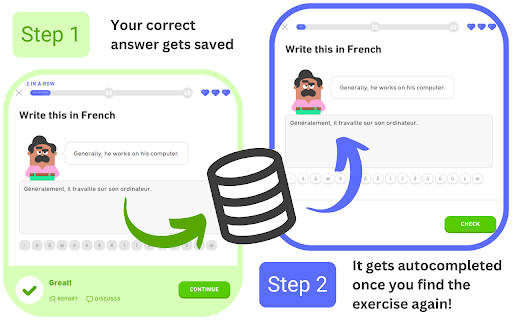
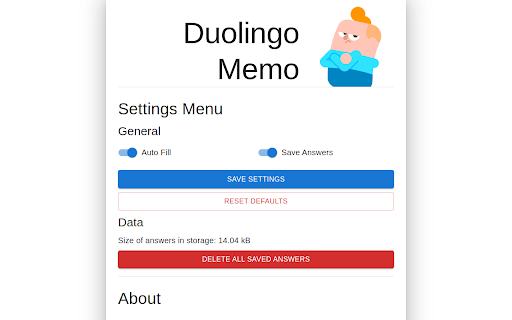

Remembers and auto-fills your answers on Duolingo. This extension was originally conceived with the intention of addressing the tediousness of some Legendary Challenges. For each Legendary Challenge (and inside a same unit), the exercise pool is quite reduced, and you're only allowed two mistakes. This makes retrying a Legendary Challenge specially annoying, since you'll most likely have to retype the same answers over and over again. This extension aims to solve that problem by remembering your correct answers and automatically filling the input with the remembered answer. Legendary challenges contain almost exclusively exercises of type "Translate", that is, those where you must translate the proposed sentence by typing the answer in the input. Nevertheless, the extension has been expanded to support other types of exercises and it will continue to be expanded in the future.

Duolingo Streak
Display duolingo streak next to the address bar Completely free duolingo extension to boost your learning journey even when you're not using your phone. Duolingo streaks are something that you're definitely proud of. You keep track of it on your phone but why not have it also on your browser so you're reminded of taking a duolingo lesson everytime you're browsing the internet. ⦿ Pin the extension icon to view the streak at all times ⦿ Click on the extension icon to start the next lesson ⦿ Right click on the extension icon to view your stats ⦿ From the right click context menu jump to various pages on the Duolingo website It doesn't change anything but provides an ease of access to your Duolingo stats as well as direct links to the lesson pages so that you can get back to learning on your laptop quicker. Note: Some information on the right click menu are only visible if you are logged into the duolingo website with the same username as the one you added to the Duolingo Streak extension.

Becky G Duolingo
Replace all the cartoony images on Duolingo with Becky G! Do you want to improve your language learning experience? When learning a language on Duolingo, cartoony images will be used in various places such as when selecting a level, for certain questions and during loading screens. Install this extension to replace these images with a random image of Becky G, a near fluent speaker of Spanish! Options are provided to configure which images get replaced. This extension does not collect any personal information and is not affiliated with Duolingo.

Duolingo PRO
Unofficial Chrome wrapper for the Duolingo PRO userscript — tools and automation on duolingo.com. Duolingo PRO for the web: run the PRO panel on Duolingo, toggle it from the popup, open Duolingo in one click. Enhance your Duolingo web sessions with extra tools and automation from one lightweight extension. Open the popup to jump to Duolingo, turn the script on or off, and reload the tab when you change the setting so it takes effect. What you get • Runs the Duolingo PRO experience directly on duolingo.com / duolingo.cn — no separate userscript manager required. • Simple popup: enable/disable, open Duolingo, version info. • Your choice is remembered locally. How to use 1. Install the extension and pin it if you like. 2. Visit Duolingo in the browser. If you disabled the script in the popup, reload the page after turning it back on. 3. Use the features provided by the in-page panel after the lesson page loads. Notes This extension wraps third-party script functionality. It is not affiliated with Duolingo Inc. Use in line with Duolingo’s terms of service and your local laws.

Duolingo Mistake Exporter
- In the process of using Duolingo, automatically add incorrect questions to Anki for review. - Export Duolingo incorrect answers to Excel.
