
oiammgngilobglebpkibhfbgjlgddiel
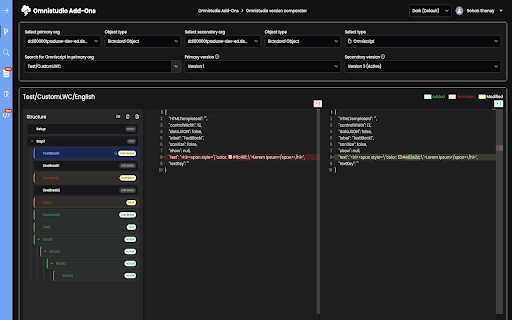


Cross-org search, comparison, and management of OmniScripts, FlexCards, Integration Procedures, DataRaptors, and LWC components. Compare any OmniStudio artifact — OmniScripts, FlexCards, Integration Procedures, Data Mappers, LWC, Apex, and Salesforce Flows — side-by-side across versions or orgs. Color-coded diffs instantly highlight what changed between deployments, including additions, removals, and nested modifications. Supports both Standard Salesforce and Vlocity namespaces. _________________________________________________________________________________________ OmniStudio Finder _________________________________________________________________________________________ Browse, search, and inspect every OmniStudio component in your connected org without ever leaving the browser. Filter by name, type, or property set, and view source code inline with full syntax highlighting. Works seamlessly with both Standard Salesforce and Vlocity namespaces. _________________________________________________________________________________________ Advanced Query Builder _________________________________________________________________________________________ A professional-grade query workspace supporting SOQL, SOSL, and GraphQL with Monaco editor syntax highlighting and org-aware autocomplete. Saved and history queries are maintained separately per query type, and results display in an inline table with filtering, sorting, and CSV export. Includes Tooling API support for metadata queries. _________________________________________________________________________________________ Reference Finder _________________________________________________________________________________________ Instantly trace every component that references a given OmniStudio artifact — across OmniScripts, Integration Procedures, FlexCards, LWC, Apex, and Flows in a single search. Filter results to activated versions only, with LWC and Flow caching for faster repeat lookups. Eliminates the guesswork of cross-type dependency mapping before making changes. _________________________________________________________________________________________ Code Editor _________________________________________________________________________________________ A Monaco-powered editor for Apex and LWC files with a file-tree sidebar, multi-tab editing, and one-click deployment directly to your Salesforce org via the Metadata API. Includes syntax highlighting for Apex, LWC HTML, JavaScript, CSS, and JSON, plus HTML autocomplete with 200+ SLDS classes and LWC directives. Execute anonymous Apex code functionality is also available with instant result in Results panel. An AI coding assistant panel is added, which will be available as part of 1.1.1 version. Note: Works across multiple namespaces (insurance, cmt, public sector, omnistudio etc), supports both standard and managed package.

Salesforce Omnistudio Inspector
Makes development easier for omniscripts and Integration procedures 1️⃣ Easily search for content within Omniscripts (OS) or Integration procedures (IP). 2️⃣ Seamlessly search and navigate to Omnistudio component designer pages, including Omniscript, Flex Card, Integration Procedure, and Data Raptor. 3️⃣ Access all custom functions created for OmniStudio Data Raptors and IP from one convenient location. 4️⃣ Swiftly navigate to Omnistudio component pages and Salesforce pages. 5️⃣ Effortlessly clone and move elements between Omniscripts (OS) or Integration procedures (IP). Check out the demo video: https://drive.google.com/file/d/1OnQB6EZXuTQ4mLBhPQi_eOGd0YuaW8Lb/view To make the most of feature 5️⃣ , follow these installation steps : 1️⃣ Download the package from https://github.com/madhav596/Vlocity-Developer-Extension and deploy it to Salesforce org using VS code . 2️⃣ Refresh Salesforce pages, and you'll spot the extension icon. Advantages : 1️⃣ Accelerates Omnistudio (Vlocity) component debugging and development. 2️⃣ Compatible with all Industry Clouds like Communication, Insurance, Health, and more. 3️⃣ Functions seamlessly within the Salesforce Lightning Experience.

Salesforce advanced Code searcher
By using the advanced quick find you can get your code few clicks shorter. Also, you can search any string your code Using this extension you can search your code components your salesforce instance: 1) apex Classes 2) Apex Triggers 3) visualforce Pages 4) Visualforce Components 5) Lighting Component In addition to the above you can use this extension to jump to classes / pages / triggers from the advanced quick find section on the left hand side. How to make it work in Lightning: 1) We embed the extension in the setup page. Please navigate to the setup home page where you can find the extension injected in the right. 2) You need to authorize (this is a one time activity) for the application to make the API calls. 3) On clicking the button, you will be navigated to the Salesforce to authorize. Once you have successfully completed the authorization, you will be redirected back to the home page. 4) Once this is done, all the functionalities will be enabled. Both the below section get added in the set-up pages, so this is only useful for developers and Admins, this tool will not make any sense for salesforce users. 1) Advanced Quick Find section:This part gets added in side navigation bar on all set-up pages. Select the code component that you want to go to, then start typing the name of the code,an autocomplete suggestion pops up, select the one that you want to go to. 2) Developer Utilities: 2.1) This component get added in force.com home page only. Let's say you want to know where you have hard-coded a profile name in your code, like if(profile.name =='sys Admin'){//you're doing something}. Right now to find this out you have to either go thru all the code individually or create a force.com project in eclipse and then search there. There's no way we can do this directly in salesforce. This string search will help you do that. You have to check the code components in which you want to search the code, enter a string in the input text field and hit enter. You will be presented with a list of code components where the string is used. 2.2 ) Code Coverage Extract: You can View and download the code coverage in your org. 2.3 ) This extension now allows you to lint the lightning code via the Lightning Linter tab. 2.4 ) You can now run PMD against your code 2.5 ) Added a new tab which will allow the users to view the record and its child information . update 1.22 Improved the static code analysis functionality update 1.15 Added the LWC Editor with Autocompleting for html & xml files. update 1.10 Added the ability to get the record Information by just giving the record Id. update 1.8, 1.9 Added support for the application to work on lightning update 1.4.2 Added support for Custom label Addes support for Apex PMD Update 1.1.1 Expanded the quick search scope to Email Templates, Validation Rule, Workflow Rule, Custom Object Added edition checks. Update 1.2 Update the UI to be more in sync with Lightning Update 1.3 Added Code coverage Extract section allowing user to view and download the code coverage. Update 1.3.3: UPdated the cookie issue. NOTE: 1) Salesforce's REST API is used to accomplish the above functionalities Update 1.3.5 1) Added support to delete all the Debug logs 2) Added a button on traceflag to renew the startDate / expiration date.

Salesforce OmniStudio Network Logger
Logs Network Requests from OmniStudio FlexCard, OmniScript for actions like Integration Procedure, Remote Actions, Data Raptors etc. 🚀 Simplify Debugging for OmniStudio 🚀 The Salesforce OmniStudio Network Logger is a powerful Chrome extension that captures and logs network requests made by OmniStudio components like FlexCards, OmniScripts, and actions such as Integration Procedures, Remote Actions, and Data Raptors. This extension streamlines the debugging process, helping you pinpoint issues without the usual hassle. Key Features 📡 Logs Network Requests: Automatically captures all requests from OmniStudio components : FlexCard, OmniScript. 🛠️ Easy Debugging: Debug OmniScripts and FlexCards effortlessly, saving time and improving productivity. 🔍 Search & Filter: Quickly find the requests you care about with robust search and filtering options. 🌑 Dark Mode: Work comfortably in low-light conditions with a sleek dark mode interface. Take your OmniStudio debugging experience to the next level!

Salesforce Inspector Reloaded
Productivity tools for Salesforce administrators and developers to inspect data and metadata directly from the Salesforce UI. This extension is based on the original Salesforce inspector extension made by Søren Krabbe. IMPORTANT: If you have any question or facing bugs, please use the GitHub repository : https://github.com/tprouvot/Salesforce-Inspector-reloaded/issues - Analyze Field Usage in Show All Data - Multi Query tabs in Data Export - Download & Deploy Metadata - Security improvements - Field Creator page to bulk create fields from the extension - Event Monitor page to subscribe to Platform Events from the browser - Import / Export configuration from Option page - Customise extension shortcuts - Support SOSL and GraphQL languages - REST Explore page to run any API from the extension without external tool - Load recent records from popup - Customize extension favicon and Sandbox banner - Check QueryPlan on data export - Enable Logs from User tab - Customize settings in Option page - New Org tab - Search for a particular flow, profile or permission set from Shortcut tab - Restrict Salesforce Inspector usage with a default connected app - New "Shortcut" tab to quickly access setup menu - Link to permission sets assignment from User tab And many more !
